
Spatial canvas for visual organization
Arrange notes, snippets, PDFs, and other material on a spatial canvas so you can see relationships before turning it into a draft.

Arky is a spatial workspace for organizing complex ideas with AI. It helps you arrange research, notes, and project material visually, then refine that work into documents and exports.
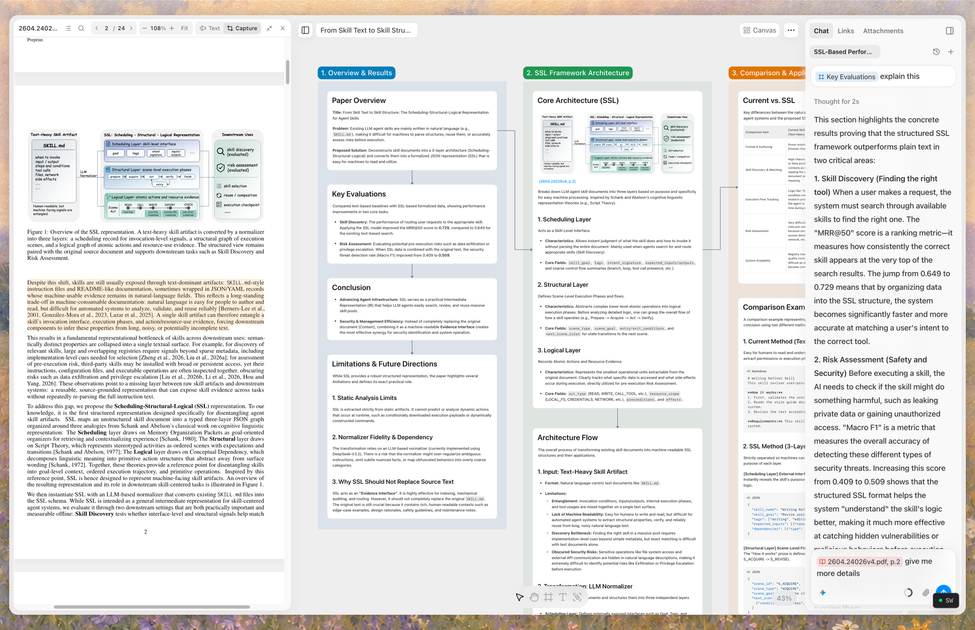
Arky is a spatial workspace for thinking, writing, and planning. It combines a freeform canvas with AI so you can collect fragments from notes, web content, and PDFs, arrange them visually, and then turn the result into a structured document.
The product is aimed at people working through complex material such as research, study notes, reports, project plans, and presentations. The site emphasizes moving from messy input to organized output, with a separate Docs view for drafting and export options for sharing the finished work.
Arrange notes, snippets, PDFs, and other material on a spatial canvas so you can see relationships before turning it into a draft.
Use Arky’s AI to organize what you laid out, generate new ideas, and work from the context already on the canvas.
Move between a visual canvas and Docs view when you want to expand an outline into a more linear document.
Highlight passages from PDFs and drag material into your draft while keeping the source open for reference.
Connect concepts with arrows, create diagrams, and view project structure as a mind map when the material is easier to understand visually.
Export work as Markdown or Docs, with Word (.docx) and PNG export mentioned in the changelog and PDF or PowerPoint support referenced on the site.
Lay out research notes, PDF excerpts, and web snippets on the canvas, then use AI and dragging to turn the material into a clear outline or draft.
Map a lecture or exam topic visually, connect related concepts, and switch into Docs view when you want to turn the study map into a study guide.
Collect raw ideas, project fragments, and priorities on the canvas, then group and connect them into a roadmap or plan you can share with others.
Start with references or source material, inspect how the pieces relate on the canvas, and write the final report or memo in a more linear flow.
Work with teammates on the same workspace, comment on specific blocks or sections, and keep discussion attached to the content being edited.
Arky is available as a desktop app for macOS and Windows, and the roadmap also lists tablet support. The download page specifically highlights the desktop app experience.
The source describes Arky as a spatial canvas for mapping, structuring, and organizing ideas with AI. It is positioned for research, study notes, project plans, and drafting documents from arranged content.
Arky can export work as Markdown or Docs, and the changelog adds Word (.docx) and PNG canvas export. The home page also says PDF, PowerPoint, HTML, and slides are planned or coming soon.
Yes. The home page lists real-time collaboration as an Alpha feature, and the 1.0 changelog says teams can be invited at the workspace level to share and organize content together.
The pricing page shows a free plan during beta, plus paid Plus and Max plans. It also states that the free plan does not require a credit card.

Goldfish is an AI memory app for macOS that helps you reply, write, summarize, and continue using the context already on your Mac. It stores memory locally and writes in your tone.

Lasso is an ecommerce product data platform for enriching catalog records, processing supplier files, generating product content, and monitoring competitors. It combines a web app with a REST API, SDK, and MCP server for teams and developers.

ArtDeck is a visual reference board app for iPhone, iPad, and Mac that lets artists collect mixed reference material on one canvas and study it with ToolBox lenses. It works offline, supports optional iCloud sync, and is sold as a one-time purchase with no account required.

Struere is an AI-native platform for turning spreadsheet data into structured operational software with dashboards, alerts, and automations. It is aimed at teams that want to replace manual spreadsheet workflows without building custom tools from scratch.

garden-md is an open-source Node.js CLI that turns meeting transcripts into a local company wiki. It links entities across transcripts, keeps the original text intact, and renders the result as a browsable wiki.

Falconer is an AI-powered company brain that keeps internal documentation accurate, searchable, and up to date by syncing with tools like GitHub, Slack, and Linear. It helps engineering and cross-functional teams centralize knowledge and answer questions from a shared source of truth.