
Local-first agent workbench
bb is presented as a local-first workbench where agents run on your machine and wait for you to return. The site positions this as a way to keep work in a sidebar thread instead of relying on a separate hosted workspace.

bb is a local-first AI agent workbench for controlling, customizing, and automating software work on your own machine. It helps developers and teams run tasks in sidebar threads, extend the tool with plugins, and coordinate multiple coding agents.
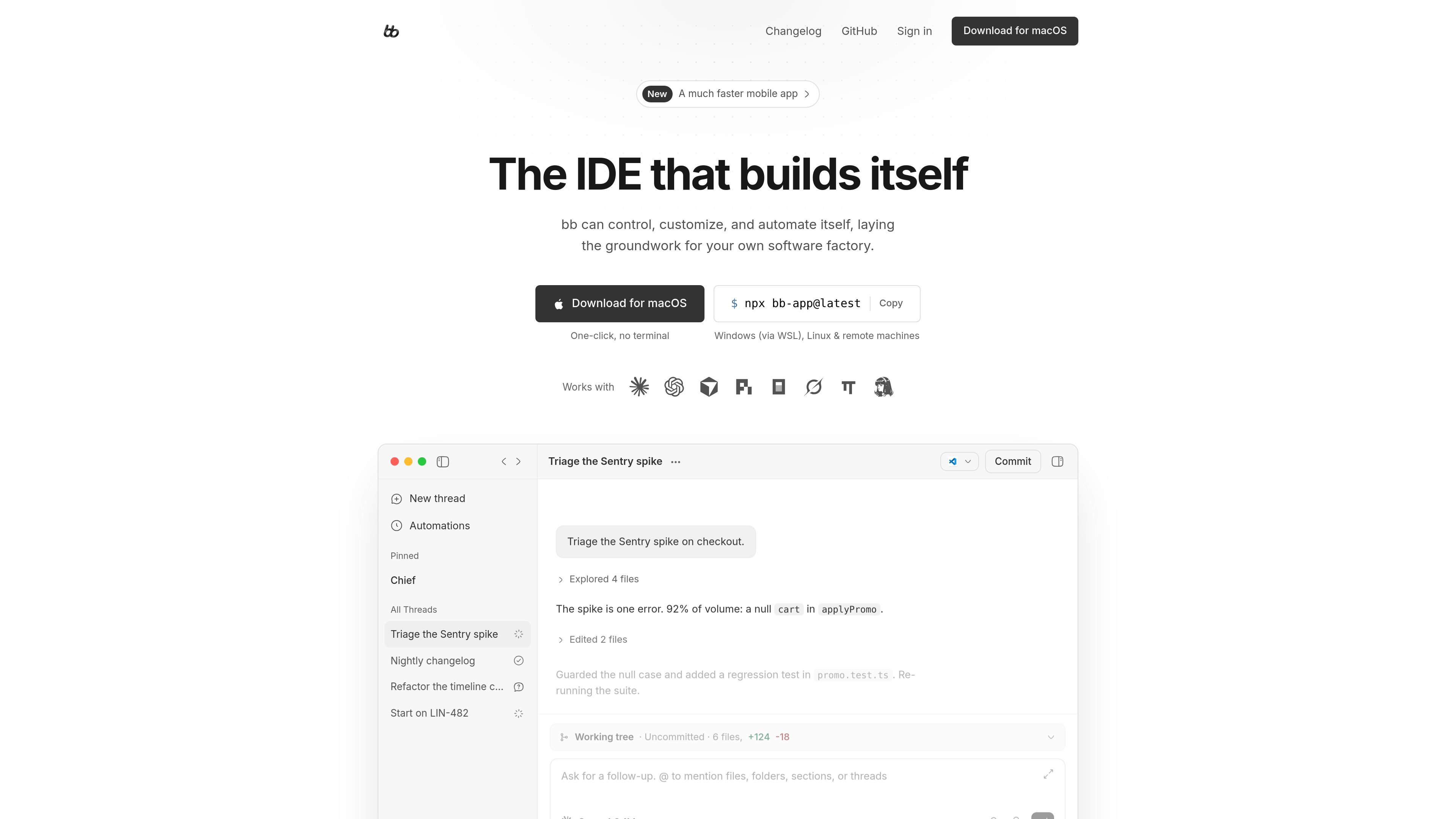
bb is a local-first agent workbench for controlling, customizing, and automating software work on your own machine. The homepage frames it as a place where agents can run in threads, appear in a sidebar, and keep working while you are away.
The product is designed around plugins and a command-line interface, so users can add capabilities such as task tracking, GitHub integration, agent memory, scheduled jobs, and remote access. The site also shows bb being used to triage bugs, manage a worktree, and coordinate several coding agents at once.
bb is free, open source, and MIT-licensed end to end according to the homepage. The download section offers a one-click macOS install and a GitHub path for Windows via WSL, Linux, and remote machines.
bb is presented as a local-first workbench where agents run on your machine and wait for you to return. The site positions this as a way to keep work in a sidebar thread instead of relying on a separate hosted workspace.
The homepage shows bb can create and manage tasks through the sidebar, a bb tasks command, and a custom skill so every agent can use the same workflow.
The site says features like the GitHub integration, agent memory, scheduled jobs, and remote access are plugins, which means they can be added or changed rather than fixed into the core product.
bb exposes a CLI that other programs can call, including shell scripts, cron jobs, and external bots in Telegram, Signal, or Slack. Each call can spawn a thread that appears in the sidebar.
The homepage shows multiple agent providers living together in bb, including Claude Code, Codex, Cursor, Pi, OpenCode, Grok, and Hermes, with each agent able to work in its own thread.
bb is described as MIT-licensed end to end and forkable, with the source available for teams that want to customize agents, tools, UI, and deployment.
A developer can point bb at a bug spike, let it inspect files, make a code change, and re-run the suite while the work is tracked in a sidebar thread.
A team can add a task plugin so agents can create, list, and manage work items from both the sidebar and the bb tasks CLI command.
A shell script, cron job, or external bot can spawn a thread in bb, letting automated work arrive in the same interface a person uses to monitor progress.
A user can run several agents from different providers in parallel, each handling a different thread or handoff, instead of forcing every task through one model.
An organization can fork bb, adjust plugins and UI, and deploy a customized build across its own machines while keeping a local-first workflow.
bb is installed locally on macOS, and the source also indicates it can be used on Windows through WSL, on Linux, and on remote machines.
The homepage says bb is free, open source, and local-first, and the download section offers a one-click macOS install as well as a GitHub link for other platforms.
The product is built around a local workbench for agents: users can start work in the sidebar, the CLI, or through plugins and scheduled jobs, then let agents continue in their own threads.
The homepage says bb can be customized with plugins and that features such as a GitHub integration, agent memory, scheduled jobs, and remote access are implemented as plugins.
The pricing page at the provided URL returns Not Found, so this source set does not confirm pricing tiers or plan details.

ByteAsk is a terminal-first AI coding agent for C and C++ that edits repositories and verifies changes with the real compiler, debugger, sanitizers, and tests before showing a diff. It offers a free tier plus paid plans, with editor connectors and zero-retention handling described in the source.

CreateOS Sandbox is an isolated compute environment for running code and agent workloads inside Firecracker micro-VMs. It is designed for workflows that need machine-level isolation, private networking between sandboxes, and programmatic control through SDK, CLI, or MCP.

hob is an independent workspace for coding agents that keeps agent sessions, terminals, history, and follow-up work organized around the tools and providers you already use. It is aimed at developers who want local control over routing, history, and workspace structure rather than a bundled model stack.

Manta AI is an autonomous web app testing tool for teams that want to map application behavior, catch regressions, and generate tests without writing scripts or maintaining selectors. It works from a URL and supports plain-English test flows, run results with screenshots, and scheduled or deployment-triggered checks.

Redline is a budgeting tool for Claude Code that paces sessions to stay within time, token, cost, or plan-percentage limits. It uses Claude Code’s native hooks and statusline to help sessions finish with a usable result instead of stopping abruptly.

SonOf connects to your repo and PM tool, audits the codebase and surrounding product context, and turns approved work into shipped tickets with senior engineering review. It is aimed at founders and engineering leaders who need backlog help without hiring a full team immediately.