
Persistent room memory
Persistent project rooms retain conversations, decisions, feedback, assets, and versions so teams can return to an ongoing review without reconstructing prior context.

Pactto is a browser-based collaboration platform for creative teams that combines shared project rooms, asset presentation, contextual feedback, AI-assisted actions, and approval tracking. It supports workflows such as podcast production, agency campaigns, and presentations involving creative assets.
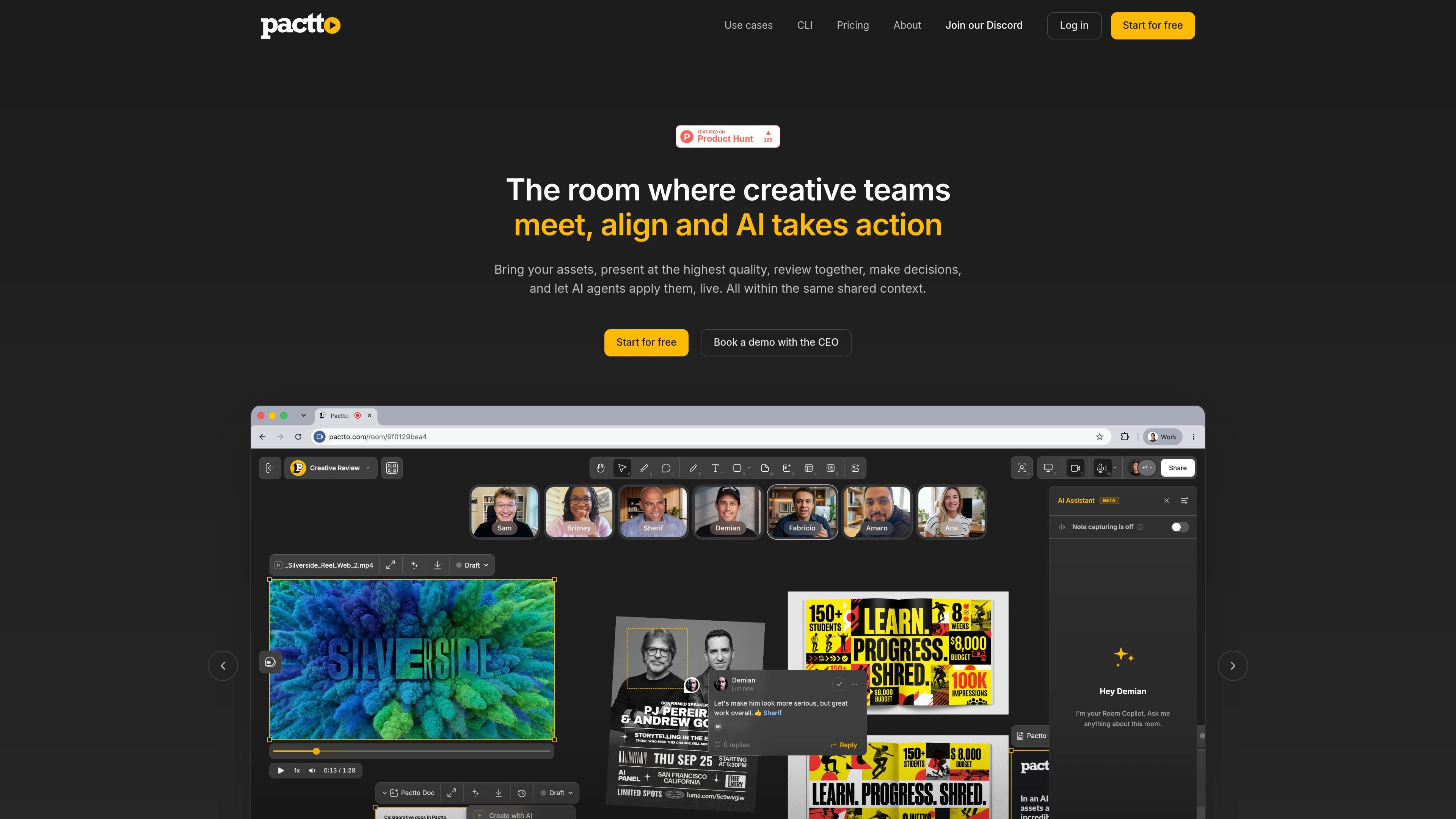
Pactto is a browser-based collaboration platform for creative teams. It organizes assets, presentations, reviews, decisions, and follow-up work inside persistent project rooms rather than separating the meeting, feedback, files, and notes into different tools.
Each room provides a shared canvas for videos, images, PDFs, SVGs, audio, documents, and multi-screen sharing. Teams can present work, discuss it at the asset or frame level, annotate it, track statuses, and use an AI assistant to capture context and carry out selected actions. The product is intended for workflows where creative work must be reviewed and approved across multiple sessions or contributors.
Persistent project rooms retain conversations, decisions, feedback, assets, and versions so teams can return to an ongoing review without reconstructing prior context.
A shared canvas supports videos, images, PDFs, SVGs, audio, documents, and multi-screen sharing for presenting work in one workspace.
Teams can speak or type feedback, draw lines, shapes, text, and freehand marks, and pin comments to specific video frames or frame ranges.
The AI assistant can turn conversation and feedback into structured comments, summaries, action items, documents, and selected edits or canvas actions.
The assistant transcribes speech by speaker and timestamp and offers live translation across the languages listed on the site, including English, Portuguese, Spanish, French, Chinese, Japanese, Korean, German, Indonesian, Italian, and Arabic.
Teams can visually track asset statuses and approvals, with the site describing live-updated docs, notifications, and status changes during the workflow.
Create one room for an episode, place the brief beside the cut, review audio and video, generate or iterate cover-art options, and map 9:16, 1:1, and 16:9 social deliverables with statuses for editing, approval, scheduling, and publication.
Keep campaign assets, briefs, annotations, and decisions together while agency teams and clients review work across sessions. The persistent room gives the AI assistant the context needed to create follow-up documents and tasks.
Present renders and plans in a shared, high-resolution canvas, discuss changes with stakeholders, annotate the work, and track sign-off in the same project room.
Use simultaneous screen sharing to show work from creative applications while other participants review, comment, and make decisions without moving the discussion into separate meeting notes.
Pactto provides persistent collaboration rooms where teams can bring in creative assets, present them, discuss feedback, track decisions, and continue work in later sessions with the room's stored context.
The site states that rooms support videos, images, PDFs, SVGs, audio, documents, and multi-screen sharing. Assets can be added from local files, Adobe Frame.io, or Google Drive; Dropbox is listed as coming soon.
Pactto's AI assistant can transcribe conversation by speaker and timestamp, translate it in real time, capture structured comments, summarize discussions, create tasks or documents, and perform certain canvas or asset actions from instructions.
Teams can use a room to present work, review it with voice or drawn annotations, track statuses and approvals, and keep the conversation, decisions, versions, and assets together. The podcast workflow also describes guests joining free without an account to give feedback.
The available page content includes a “Start for free” option and a demo booking option, but it does not provide verifiable prices, plan limits, or billing terms.

Biji es una plataforma versátil diseñada para mejorar la productividad a través de herramientas y características innovadoras.

hob is an independent workspace for coding agents that keeps agent sessions, terminals, history, and follow-up work organized around the tools and providers you already use. It is aimed at developers who want local control over routing, history, and workspace structure rather than a bundled model stack.

Dcyde is a decision log for product teams that captures what was decided, the reasoning behind it, and the source in one shared place. It supports pinning decisions from Slack, Figma, or inside Dcyde and keeps the record searchable over time.

runevr is a connected workspace for creative teams that combines boards, media review, chat, recordings, drive, calls, and AI agents in one room-based environment. It is designed to reduce tool switching and keep project context together.

Carbon Voice is an asynchronous voice messaging app for teams and individuals, with transcripts, AI catch-up, and cross-device access. It helps people and agents communicate without needing a live call.

BotBoard is a task-management layer for AI agents that helps teams assign work, track progress, and review output. It supports CLI, MCP, and HTTP connections for tools like OpenClaw, Codex, Claude Code, and Cursor.