
Read common personal ebook formats
Keep EPUB, PDF, MOBI and AZW3 files in one iPhone and iPad library, including books prepared in Calibre.

Reader Alive is an AI ebook reader for iPhone and iPad that supports EPUB, PDF, MOBI and AZW3 files. It adds translation, text-to-speech, summaries and book-aware chat for personal ebook libraries.
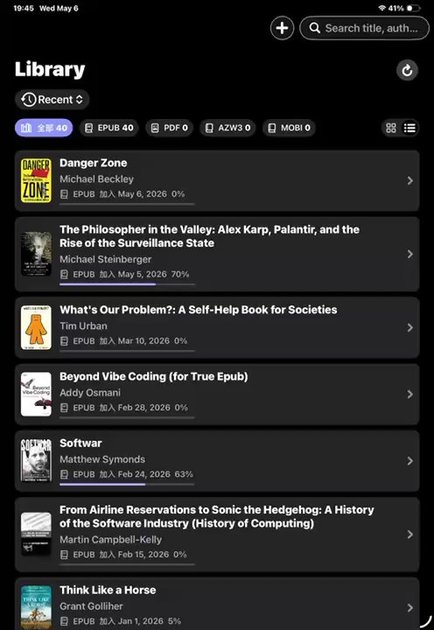
Reader Alive is an AI ebook reader for iPhone and iPad built for people who read their own files, not just books from a single store. It supports EPUB, PDF, MOBI and AZW3 and adds translation, natural text-to-speech, chapter summaries and book-aware chat to the reading flow.
The app is designed to keep reading and comprehension tools close to the page. You can import files from common iOS and desktop workflows, continue across devices with iCloud continuity, and use AI features only when you need help with a passage, chapter or question grounded in the text.
Keep EPUB, PDF, MOBI and AZW3 files in one iPhone and iPad library, including books prepared in Calibre.
Translate selected text or chapters while staying in the book you are reading.
Use natural voices to keep reading by listening when you do not want to stay on the page.
Turn chapters into summaries, key ideas, timelines and action lists for faster review.
Ask questions about the passage or chapter you are reading and keep the answers grounded in the text.
Keep your library and reading position available across your own Apple devices through iCloud continuity.
Read foreign-language books with translation and text-to-speech available while you stay in the chapter or passage you are working through.
Keep novels, nonfiction, manuals and personal documents in a calm mobile library, with support for common ebook and document formats.
Summarize chapters, extract key ideas and ask grounded questions while staying in context on iPhone or iPad.
Import DRM-free personal files through Files, AirDrop, Finder, iCloud Drive, Wi-Fi transfer or the iOS Share Sheet.
Use Calibre to organize and prepare books on desktop, then read the exported EPUB, PDF, MOBI or AZW3 files in Reader Alive on mobile.
Yes. Reader Alive supports EPUB books on iPhone and iPad, alongside PDF, MOBI and AZW3 files.
Yes. Reader Alive can open MOBI and AZW3 files, so you can keep personal ebook files in one reading library on iPhone and iPad.
Only when you use AI features such as translation, text-to-speech, summaries or book-aware chat. For those requests, the selected text, relevant excerpts, voice input or your question may be sent to AI service providers.
You can read imported books and use ordinary reading controls without starting an AI request. AI features, iCloud sync and some imports require a network connection.
Yes. Reader Alive uses iCloud continuity so your library and reading progress can stay available across your own Apple devices.

ArtDeck is a visual reference board app for iPhone, iPad, and Mac that lets artists collect mixed reference material on one canvas and study it with ToolBox lenses. It works offline, supports optional iCloud sync, and is sold as a one-time purchase with no account required.

Codex Plugins bundle reusable skills, app integrations, and MCP servers into workflows you can install in the Codex app or use from Codex CLI. They help extend Codex with connected-service tasks, reusable instructions, and shared team workflows.

Una herramienta impulsada por IA que resume documentos PDF de manera rápida y eficiente, proporcionando información clara y permitiendo a los usuarios interactuar con el contenido.

Tactiq is an AI note taker for Google Meet, Zoom, and Microsoft Teams that transcribes meetings live and turns them into summaries, action items, and follow-up outputs. It is built around a Chrome extension and supports team workflows through sharing and integrations.

Wallie is an open-source AI streamer that watches your screen, hears chat, and generates live commentary in a configurable persona. It runs locally on your machine with your own keys and is aimed at faceless content, autonomous streams, and real-time reactions.

Snapmark is a VS Code extension that lets you annotate clipboard screenshots before pasting them into AI chats. It supports blur redaction, numbered callouts, and automatic resizing for large images.