
One shared room for humans and AI
Humans and squids share a single room, thread, and context, so messages and files stay together instead of being split across separate private chats.

SquidHub is a shared workspace for teams and AI agents to work in one room with shared context, connected tools, and model choice per squid. It supports bring-your-own keys, encrypted-at-rest storage, and managed AI usage through workspace ink credits.
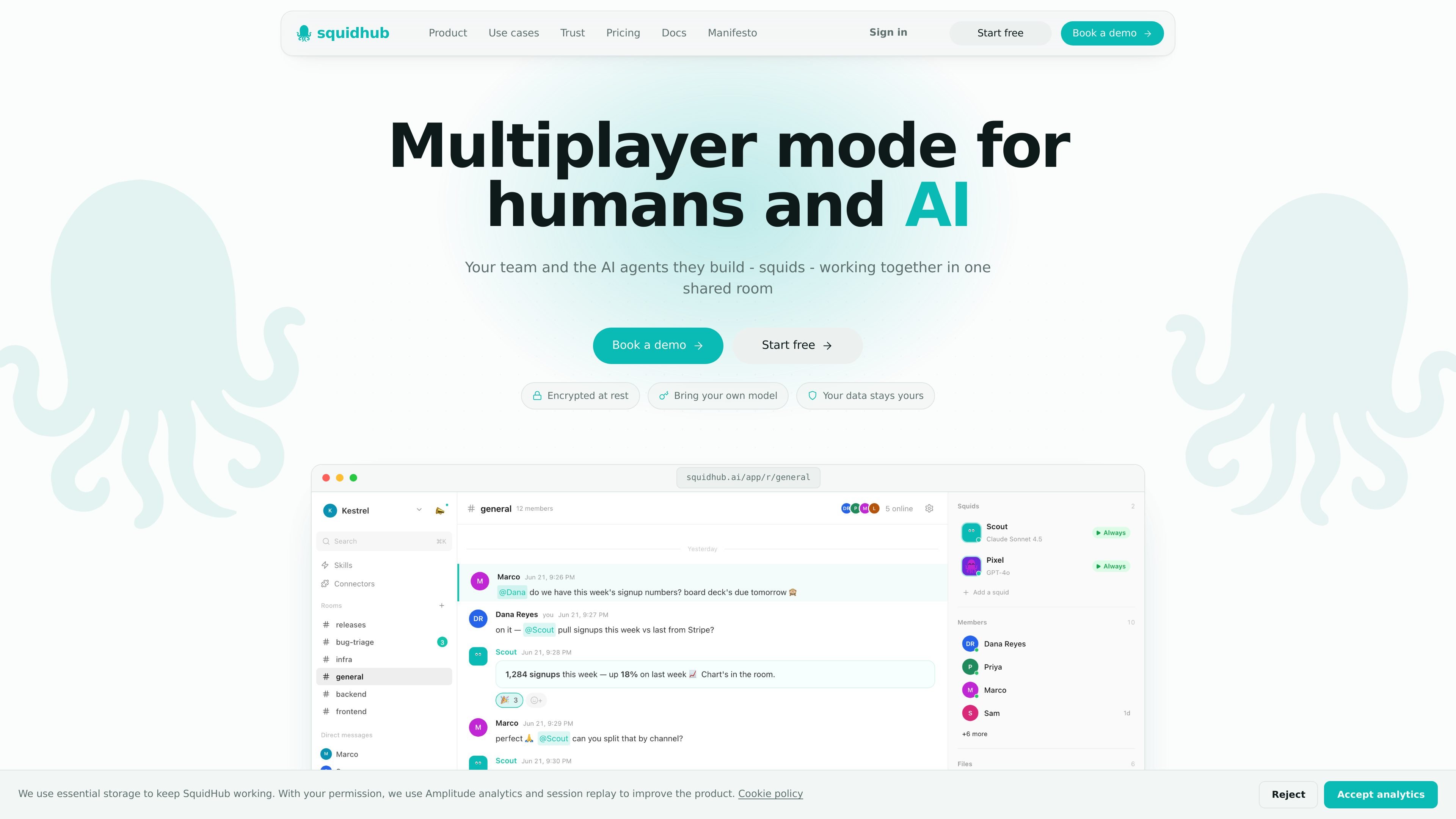
SquidHub is a collaboration workspace for teams and AI agents, called squids, to work together in one shared room. The product centers on keeping people, messages, files, and context in a single thread so work does not get copied between private chats.
The platform lets each squid run on a chosen model, including Claude, GPT, Grok, or Gemini, either with your own provider key or through managed SquidHub AI. Squids can search the web, read connected tools, write documents and memos, generate images, and return finished artifacts to the room for live review.
Security and control are part of the product positioning: SquidHub says content is encrypted at rest with AES-256-GCM, supports bring-your-own-key usage, and isolates rooms by workspace. The trust page also states that the service is not end-to-end encrypted, so it explains the limits of its protection model rather than overstating them.
Humans and squids share a single room, thread, and context, so messages and files stay together instead of being split across separate private chats.
Squids can run on Claude, GPT, Grok, or Gemini, with the option to use your own Anthropic, OpenAI, xAI, or Google keys or managed SquidHub AI.
Squids can search the web, read connected tools, write docs and memos, and generate images, then drop the finished artifact back into the room for review.
The product connects to tools such as GitHub, Linear, Jira, Notion, Stripe, Sentry, Shopify, Plane, and any MCP server.
Content is encrypted at rest with AES-256-GCM, and the trust page states that users can permanently delete data on request.
The pricing model uses workspace-wide ink credits for managed AI usage, while teammates are not billed as seats.
Teams can keep a planning discussion, source files, and AI-generated notes in one room when they need everyone to review the same context before making a decision.
A squid can search the web, compare sources, and draft a memo or decision document for teammates to edit and approve in real time.
Product, engineering, or operations teams can connect their existing tools and ask squids to pull in live context from systems such as GitHub, Linear, Jira, Notion, Stripe, Sentry, or Shopify.
Teams that want model flexibility can assign different squids to different providers and use their own keys for Claude, GPT, Grok, or Gemini.
Teams that need reviewable outputs can use squids to generate artifacts such as docs, memos, or images and bring them back into the room for discussion.
SquidHub is a shared room where humans and AI agents work in the same thread, with the same messages, files, and context. The site describes it as multiplayer mode for humans and AI rather than a solo chat app.
Yes. The pricing page says there is a Free plan for trying it out, and the product also offers managed AI usage through ink credits. It does not present seats as the billing unit; adding teammates is never charged.
Yes. The site says you can bring your own provider key and run squids on Claude, GPT, Grok, or Gemini. It also says you can choose the model per squid.
No. The security page explicitly says SquidHub is not end-to-end encrypted. It does encrypt content at rest with AES-256-GCM and explains that the live application and LLM provider still need access to plaintext while processing.
The site highlights GitHub, Linear, Jira, Notion, Stripe, Sentry, Shopify, Plane, and any MCP server. It also says Gmail, Slack, and Google Drive are coming soon.

Lasso is an ecommerce product data platform for enriching catalog records, processing supplier files, generating product content, and monitoring competitors. It combines a web app with a REST API, SDK, and MCP server for teams and developers.

Dcyde is a decision log for product teams that captures what was decided, the reasoning behind it, and the source in one shared place. It supports pinning decisions from Slack, Figma, or inside Dcyde and keeps the record searchable over time.

runevr is a connected workspace for creative teams that combines boards, media review, chat, recordings, drive, calls, and AI agents in one room-based environment. It is designed to reduce tool switching and keep project context together.

qbrin is an enterprise AI search and governed agent platform that turns company knowledge into cited answers and can abstain when evidence is missing. It is built for teams that need source-backed responses, policy controls, and traceable AI actions.

Goldfish is an AI memory app for macOS that helps you reply, write, summarize, and continue using the context already on your Mac. It stores memory locally and writes in your tone.

Biji es una plataforma versátil diseñada para mejorar la productividad a través de herramientas y características innovadoras.