
Multiple synth engines and presets
Create sounds with analog saw-square synthesis with sub, FM synthesis, or cluster-based engines. Preset categories cover common instrument roles such as bass, keys, strings, brass, lead, pad, pluck, and bell.

Wavepocket is an iPhone and iPad music app that combines synthesis, sampling, drum programming, and 4-track recording in an offline, touch-first workspace. It is built for sketching and saving song ideas locally on the device.
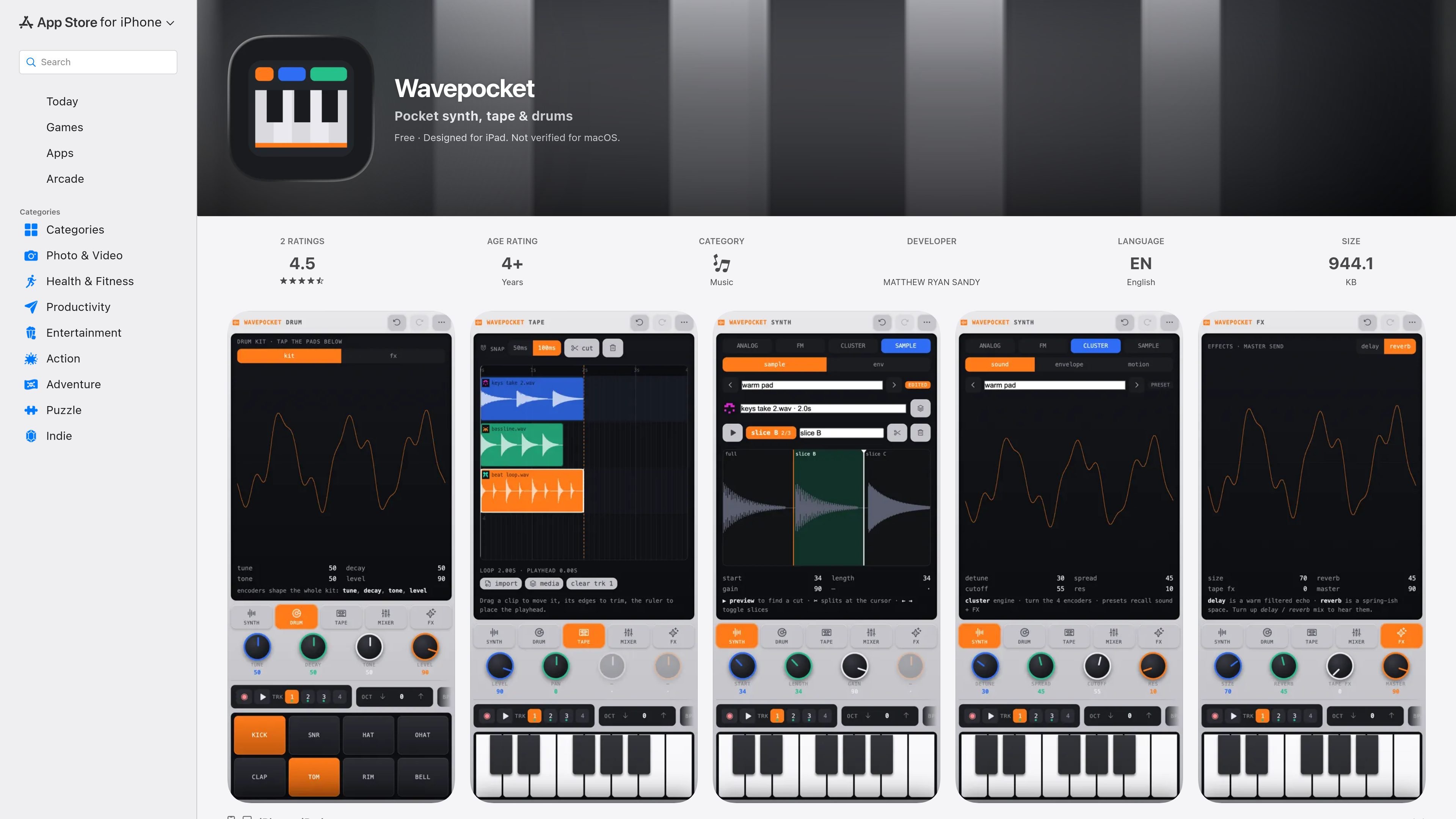
Wavepocket is a pocket music-making app for iPhone and iPad that combines synthesis, sampling, drum programming, and multitrack tape-style recording in a single offline workspace. The App Store listing describes it as a pocket studio for sketching songs quickly, with touch-first controls built around chords, slides, drum pads, and color-coded encoders.
The app’s core workflow is to make a sound, build a beat, then record everything into a shared 4-track loop. It supports analog, FM, and cluster synthesis, chromatic sample playback, sample slicing, and a drum kit, while the timeline and mixer handle arrangement and basic mix shaping. Project files can be saved with settings, history, presets, and audio, and mixes can be rendered to MP3.
Wavepocket is positioned for solo music sketching on-device rather than cloud-based collaboration. The listing also says it works completely offline, does not require an account, and does not collect data from the app according to the developer’s App Store privacy disclosure.
Create sounds with analog saw-square synthesis with sub, FM synthesis, or cluster-based engines. Preset categories cover common instrument roles such as bass, keys, strings, brass, lead, pad, pluck, and bell.
Use the sampler engine to play recordings chromatically across the keys. The waveform editor lets you slice samples, name slices, and switch between them.
Build beats with an 8-pad drum kit that includes kick, snare, hats, clap, tom, rim, and bell sounds. Kit-wide tune, decay, tone, and level controls shape the kit as a whole.
Arrange ideas on a 4-track tape timeline where you can record in any mode, drag clips between lanes, trim clip edges, and cut at the playhead. All layers share one loop boundary.
Mix and shape the project with per-track level, pan, and mute controls, plus filtered delay and spring-style reverb sends. Four color-coded encoders are described as always controlling the current view.
Manage takes and versions with undo, redo, timeline scrubbing, and version annotations. The app also lets you save the entire project, including settings, history, presets, and audio, as one file.
Use the app to sketch melody, harmony, and rhythm ideas quickly without setting up a full DAW. The sound engines, drum pads, and tape loop make it practical for short writing sessions.
Program a beat with the 8-pad kit, then refine it with kit-wide tuning and envelope controls. The arpeggiator and metronome support more structured rhythm work.
Record a layered idea across the 4-track tape timeline, move clips between lanes, and trim them into a complete loop. The shared loop boundary helps parts stay aligned.
Slice a sampled recording into named segments and play those slices chromatically across the keyboard. This is useful for turning field recordings or audio snippets into playable instruments.
Save the entire session as a single project file so settings, history, presets, and audio stay together. This helps when revisiting unfinished sketches later on the same device.
It is an iOS/iPadOS music app that combines a synthesizer, drum kit, sampler, and 4-track tape recorder in one interface. The App Store listing says it is designed for iPad and also lists iPhone and iPad compatibility.
The listing says Wavepocket works completely offline, with no account, no ads, and no tracking. It also says recordings and imports persist on the device between sessions.
You can make sound with analog, FM, and cluster synth engines or with the sampler engine. The app also includes a drum kit, clip timeline recording, and mix controls for building complete sketches or songs.
The App Store page says you can save the whole project with settings, history, presets, and audio as a single file, and render your mix to MP3.
The source does not mention built-in collaboration, cloud sync, or third-party integrations. The app focuses on local, offline creation on the device.

LALAL.AI is an AI audio processing platform for stem separation, voice cleanup, and voice transformation. It supports browser-based upload, preview, and download workflows for audio and video files, plus premium and enterprise options.

Kits AI is an AI music production platform for voice cloning, vocal generation, and vocal processing. It offers a Free plan, paid tiers, and a Windows desktop app for producers and creators working with studio-style audio workflows.

ElevenMusic is a web-based music platform for discovering tracks, remixing music, and creating original songs. It also supports prompt-led generation with mood tags and account-based saving for libraries, generations, and playlists.

TME Studio is an online music creation assistant from Tencent Music Entertainment. It supports music separation, MIR computation, assisted lyric writing, and smart score creation for music enthusiasts.

Beatoven.ai is an AI music generator for creating original background music and sound effects for content projects. It also offers an API for adding prompt-based audio generation to other workflows.

CAMB.AI Streams dubs live audio in multiple languages in real time for broadcasts on platforms like YouTube, Twitch, and X. It plugs into existing live workflows using common streaming protocols and avoids a post-production step.