
Menu bar system monitoring
Shows live memory pressure, storage, and CPU details from the menu bar, with the monitoring view refreshed every few seconds. Monitoring remains free after the trial.

WTMemory is a lightweight macOS menu bar utility that monitors system resources and identifies storage used by local AI models, developer caches, app leftovers, and background processes. Free inspection remains available after the trial, while Pro adds cleanup and process-control actions.
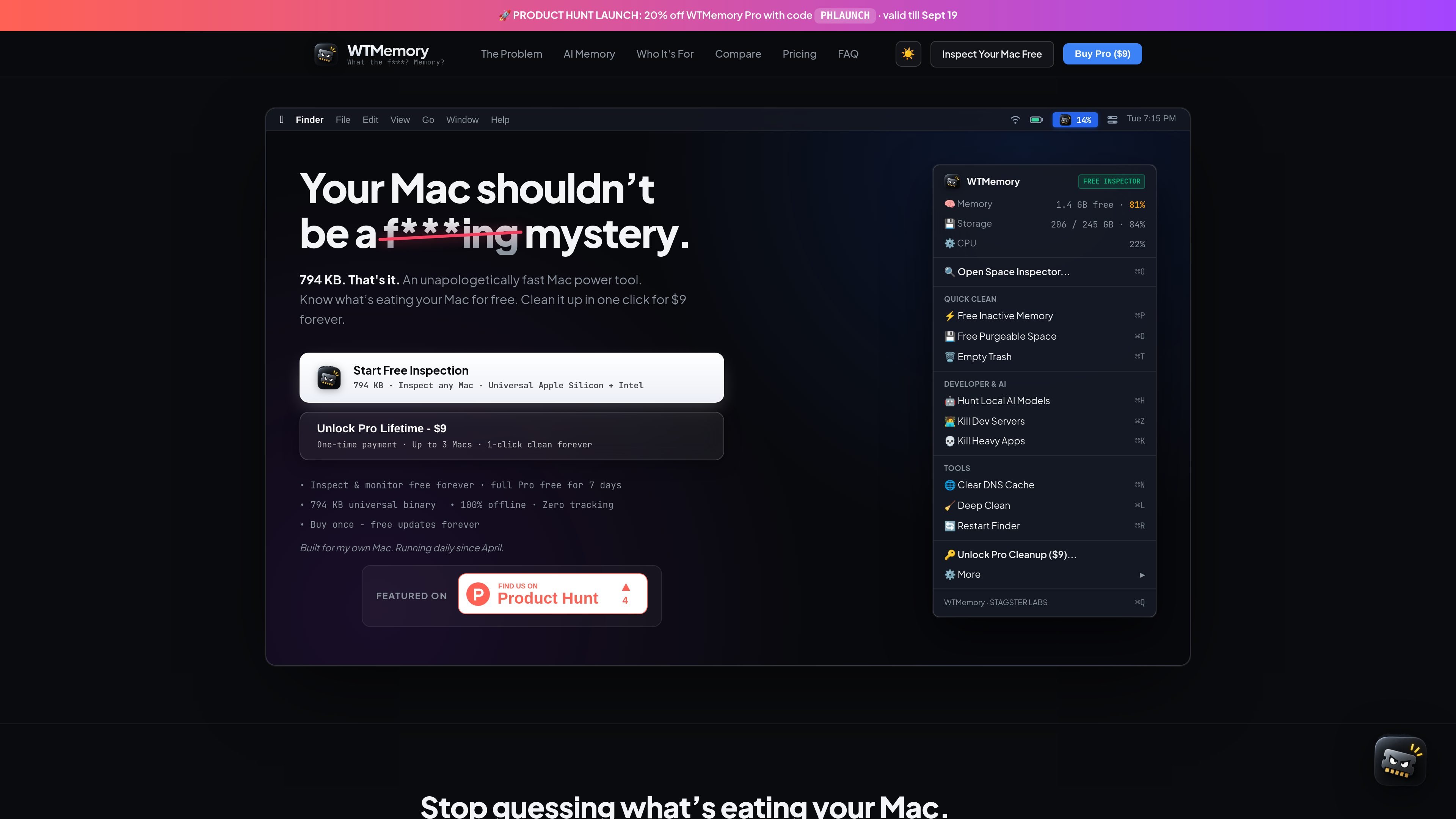
WTMemory is a lightweight macOS menu bar utility for inspecting memory, CPU activity, and disk usage, with particular attention to the storage and background processes common on development machines. It helps users locate local AI model weights, build caches, app leftovers, and development servers instead of presenting only broad system-junk categories.
Monitoring and inspection are available free, including a seven-day full Pro trial on each installation. Pro adds cleanup, memory and storage reclaim actions, and process-killing tools. Cleanup is designed to be reviewable: Safe Mode moves selected items to the macOS Trash by default, while the utility states that documents, projects, and code are not modified.
Shows live memory pressure, storage, and CPU details from the menu bar, with the monitoring view refreshed every few seconds. Monitoring remains free after the trial.
Scans local AI and LLM storage, developer and build artifacts, system caches and logs, and leftovers from deleted applications. Results can be reviewed before any cleanup.
Targets forgotten local model data, including Ollama weights, Hugging Face downloads, LM Studio models, Cursor workspace data, and Claude Code caches.
Provides cleanup actions for selected storage categories and developer artifacts, including Xcode DerivedData, package-manager caches, Bun, Cargo, Gradle, Docker, and simulator data. Safe Mode moves items to Trash by default.
Offers one-click actions for runaway Vite, Next.js, nodemon, esbuild, Wrangler/workerd, and related development processes. It can also ask resource-heavy browsers, Electron apps, IDEs, and Docker to quit.
Includes macOS-focused actions such as inactive-memory purge, purgeable-space reclaim through local snapshot thinning, Trash emptying, DNS-cache flushing, Finder restart, and a combined Deep Clean workflow.
Run the Space Inspector to review large Ollama, Hugging Face, LM Studio, Cursor, or Claude Code directories before deciding what to remove. This is useful when local models and related caches have accumulated outside the folders users normally check.
Inspect Xcode DerivedData, simulator runtimes, Docker virtual disks, and npm, pnpm, Yarn, Bun, Cargo, or Gradle caches when a development Mac’s storage is unexpectedly full.
Use the process controls when a Vite, Next.js, nodemon, esbuild, Wrangler/workerd, or Python development process remains active after a project is closed or continues holding a port.
Open the menu bar monitor when the Mac feels slow or fans are active, then review memory pressure and CPU usage before using an available purge or quit action.
Use the app as a simpler alternative to a broad consumer cleaning suite when the priority is offline inspection and developer-oriented storage cleanup rather than malware, browser, or photo management.
WTMemory is a Mac menu bar utility. Install it and it begins with a seven-day full Pro trial; no email address or account is required. After the trial, monitoring and inspection remain available for free.
The Space Inspector scans AI and LLM storage, developer and build artifacts, system caches and logs, and leftovers from apps that have been deleted. Scanning and reviewing results are free; cleaning selected items requires Pro.
By default, cleanup moves selected items to the macOS Trash, making the action reversible. You can turn off Safe Mode for permanent deletion. WTMemory states that it does not modify documents, projects, or code.
The utility can identify local Ollama weights, Hugging Face downloads, LM Studio models, Cursor workspace data, and Claude Code caches, as well as caches and artifacts associated with tools such as Xcode, package managers, Bun, Cargo, and Docker.
WTMemory is designed for macOS users who want menu bar monitoring, storage inspection, and cleanup of developer or local-AI artifacts. It does not include malware scanning, browser privacy cleanup, or photo-duplicate detection, so it is not a full consumer security and media-management suite.

ByteAsk is a terminal-first AI coding agent for C and C++ that edits repositories and verifies changes with the real compiler, debugger, sanitizers, and tests before showing a diff. It offers a free tier plus paid plans, with editor connectors and zero-retention handling described in the source.

CreateOS Sandbox is an isolated compute environment for running code and agent workloads inside Firecracker micro-VMs. It is designed for workflows that need machine-level isolation, private networking between sandboxes, and programmatic control through SDK, CLI, or MCP.

hob is an independent workspace for coding agents that keeps agent sessions, terminals, history, and follow-up work organized around the tools and providers you already use. It is aimed at developers who want local control over routing, history, and workspace structure rather than a bundled model stack.

Ably Chat is a chat API platform for building custom realtime chat applications. It supports room-based messaging, typing indicators, presence, reactions, and message updates, with usage-based pricing options for different deployment stages.

Manta AI is an autonomous web app testing tool for teams that want to map application behavior, catch regressions, and generate tests without writing scripts or maintaining selectors. It works from a URL and supports plain-English test flows, run results with screenshots, and scheduled or deployment-triggered checks.

SonOf connects to your repo and PM tool, audits the codebase and surrounding product context, and turns approved work into shipped tickets with senior engineering review. It is aimed at founders and engineering leaders who need backlog help without hiring a full team immediately.