
Siri AI
Siri AI helps users find information and get tasks done by voice. Apple says the initial availability is in English and that usage limits may apply.

Apple HomeView is a smart display that combines Siri AI, a Liquid Retina display, high-fidelity audio, FaceTime, and controls for compatible smart-home accessories. It is designed for households that want shared assistance, communication, media, and home management in one place.
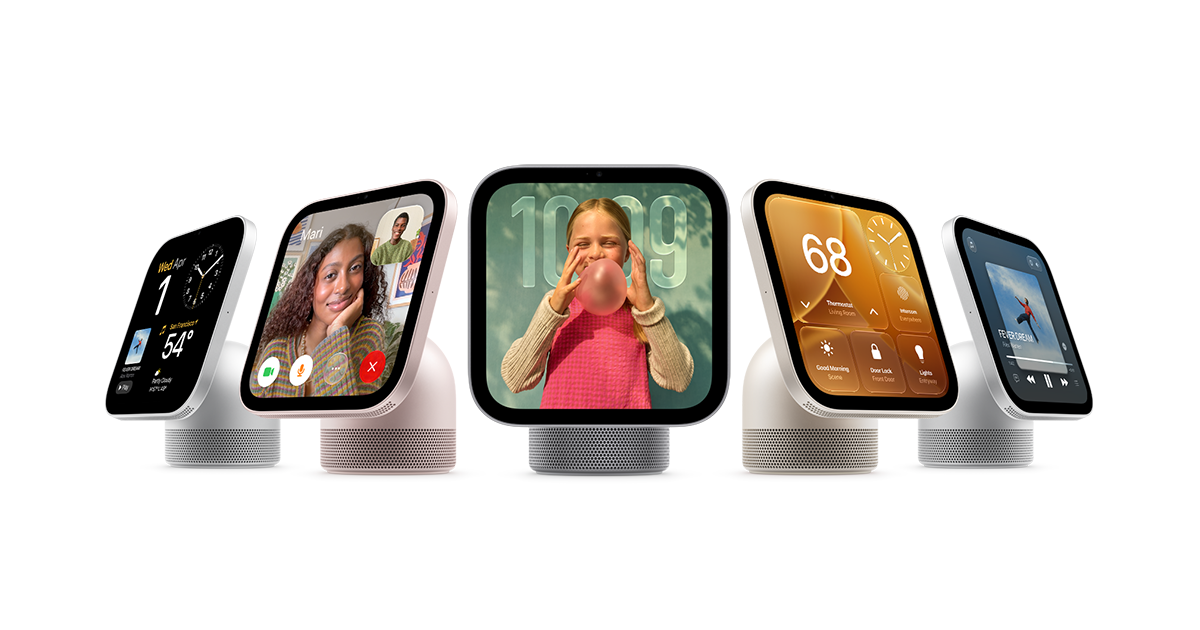
Apple HomeView is a smart display for bringing everyday assistance, media, communication, and home controls together in one place. It combines Siri AI with a Liquid Retina display, high-fidelity audio, FaceTime, and a smart-home dashboard.
The device is intended to help people stay informed and connected around the home without switching between separate products. Its multiuser experience recognizes up to six people, while the Home app provides access to compatible third-party accessories and organizes controls for areas such as lighting, security, and climate. Apple also emphasizes built-in privacy for household use.
Siri AI helps users find information and get tasks done by voice. Apple says the initial availability is in English and that usage limits may apply.
The device recognizes up to six people and delivers a personalized experience for each one.
A Liquid Retina display presents apps, information, and smart-home controls, while high-fidelity audio supports music and other content.
FaceTime brings video calling to the home display, adding a visual communication option alongside voice assistance.
The smart-home dashboard brings home controls into one place. Through the Home app, users can access compatible third-party accessories and view categories such as lights, security, and climate.
Apple positions HomeView as private for the home, with built-in privacy features. The supplied source does not specify the underlying hardware or settings in detail.
Use the display and Siri to find information or complete everyday tasks from a shared home location, with the experience adapting to the recognized person.
Use the Home app dashboard to check and manage compatible accessories by areas such as lights, security, and climate instead of opening separate controls for each category.
Use FaceTime for visual calls from a home display, giving household members a hands-free way to communicate when a screen is useful.
Use the display and high-fidelity audio for visual and audio content in a common room, while keeping information and entertainment in the same device.
Apple HomeView is designed to bring Siri, visual information, audio, FaceTime, and smart-home controls together in one device for the home.
The product page says Apple HomeView recognizes up to six people and provides a personalized experience for each one.
The Home app provides access to compatible third-party accessories and organizes controls for categories such as lights, security, and climate. Specific accessory compatibility should be checked before purchase.
The product page states that Siri AI is available in English to start and that usage limits may apply.
Apple HomeView is shown in a wall-mounted presentation, but the available mounting options, installation requirements, and included contents are not specified in the supplied source.

Gemma AI is a phone call reminder app that calls you with scheduled reminders instead of push notifications. It helps people who want a more direct way to stay on schedule, with Google Calendar sync and conversational call interactions.

Spotit est une app macOS qui lit votre écran et met en évidence exactement où cliquer, via des questions vocales et des indications à l’écran.

ConscioussAI is an AI assistant for macOS, Windows, iOS, and Android that helps execute tasks across apps, files, the browser, and messages. It is aimed at people who want permission-based help on both desktop and mobile.

Flunkey is a voice-first productivity layer for Windows that converts speech into text, AI-assisted outputs, and remembered context. It is built for users who want to capture ideas and actions without leaving the app they are working in.

Malyatko is a baby tracker for logging feeding, sleep, growth, teething, and milestones in one app. It works on iPhone, Apple Watch, and widgets, with no sign-up, offline use, and family sharing through iCloud.

Une plateforme IA tout-en-un qui combine des outils pour l'image, la vidéo, la voix, l'écriture et le chat afin d'améliorer la créativité et la collaboration.