
Infinite canvas workspace
Create conversations on an infinite canvas instead of staying in a single linear thread, so related ideas can live alongside each other.

CanopyAI is an infinite-canvas workspace for AI conversations that helps users branch ideas, compare models, and keep context across parallel threads. It offers a 3-day free trial and paid plans for individuals who want a more organized way to work with multiple AI discussions.
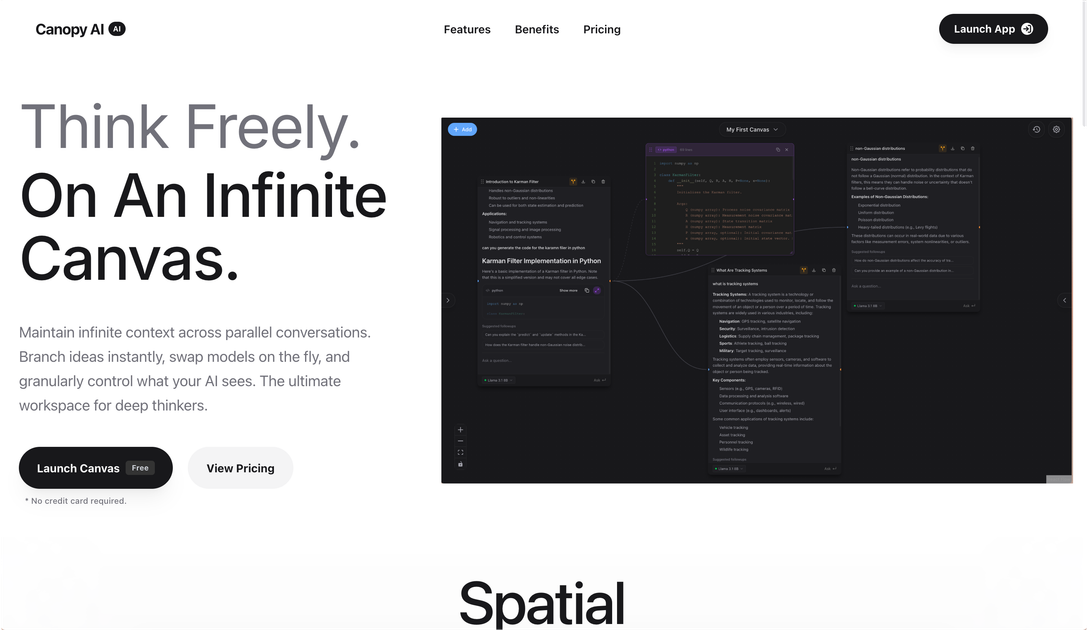
CanopyAI is an AI conversation workspace built around an infinite canvas instead of a single chat thread. It lets you place related ideas together, branch discussions into new paths, and keep the original context available as you explore.
The product is aimed at people who work through complex problems in parallel, such as entrepreneurs and developers managing multiple ongoing dialogues. Its positioning emphasizes maintaining context, switching models, and controlling what the AI sees as you move across branches.
Create conversations on an infinite canvas instead of staying in a single linear thread, so related ideas can live alongside each other.
Fork a conversation into separate branches to explore alternate directions without losing the original context.
Switch between AI models within the same workspace, with examples on the site showing models such as GPT-4o, Perplexity, Claude 3.5, and Grok 3.
Adjust generation settings such as temperature and max tokens, and stream responses as you work.
Use your own API key with no usage limits, according to the homepage copy.
Export your work from the trial plan, and keep canvases and history available if you return later.
Map a complex topic across multiple branches while keeping the original line of thought intact, useful for research, strategy, or problem solving.
Compare responses from different models in one workspace when you want to evaluate reasoning styles or outputs on the same prompt.
Work through an idea that may split into several directions, such as product planning or brainstorming, without losing earlier context.
Manage multiple ongoing AI conversations in one control center instead of opening many separate chat tabs.
Yes. The pricing page offers a 3-day free trial with full access to the product and no credit card required.
Yes. The pricing page says you can upgrade or downgrade at any time, and changes take effect on the next billing cycle.
If you cancel, your data remains available and you can reactivate your subscription later with your canvases and history waiting for you.
The pricing page lists a 30-day money-back guarantee on paid plans.

Goldfish is an AI memory app for macOS that helps you reply, write, summarize, and continue using the context already on your Mac. It stores memory locally and writes in your tone.

Dcyde is a decision log for product teams that captures what was decided, the reasoning behind it, and the source in one shared place. It supports pinning decisions from Slack, Figma, or inside Dcyde and keeps the record searchable over time.

BookAI vous permet de discuter avec vos livres en utilisant l'IA en fournissant simplement le titre et l'auteur.

Lasso is an ecommerce product data platform for enriching catalog records, processing supplier files, generating product content, and monitoring competitors. It combines a web app with a REST API, SDK, and MCP server for teams and developers.

Biji est une plateforme polyvalente conçue pour améliorer la productivité grâce à des outils et des fonctionnalités innovants.

Struere is an AI-native platform for turning spreadsheet data into structured operational software with dashboards, alerts, and automations. It is aimed at teams that want to replace manual spreadsheet workflows without building custom tools from scratch.