
Connect tools and data
Use MCP servers, REST APIs, local files, and local stdio-based processes as agent sources. Sources can provide access to services such as GitHub, Linear, Craft, local repositories, and Obsidian vaults.

Craft Agents is an open-source desktop workspace for using AI agents with MCP servers, REST APIs, local files, and browser-based services. It helps developers and knowledge workers organize persistent tasks, review agent plans, and execute connected workflows across macOS, Windows, and Linux.
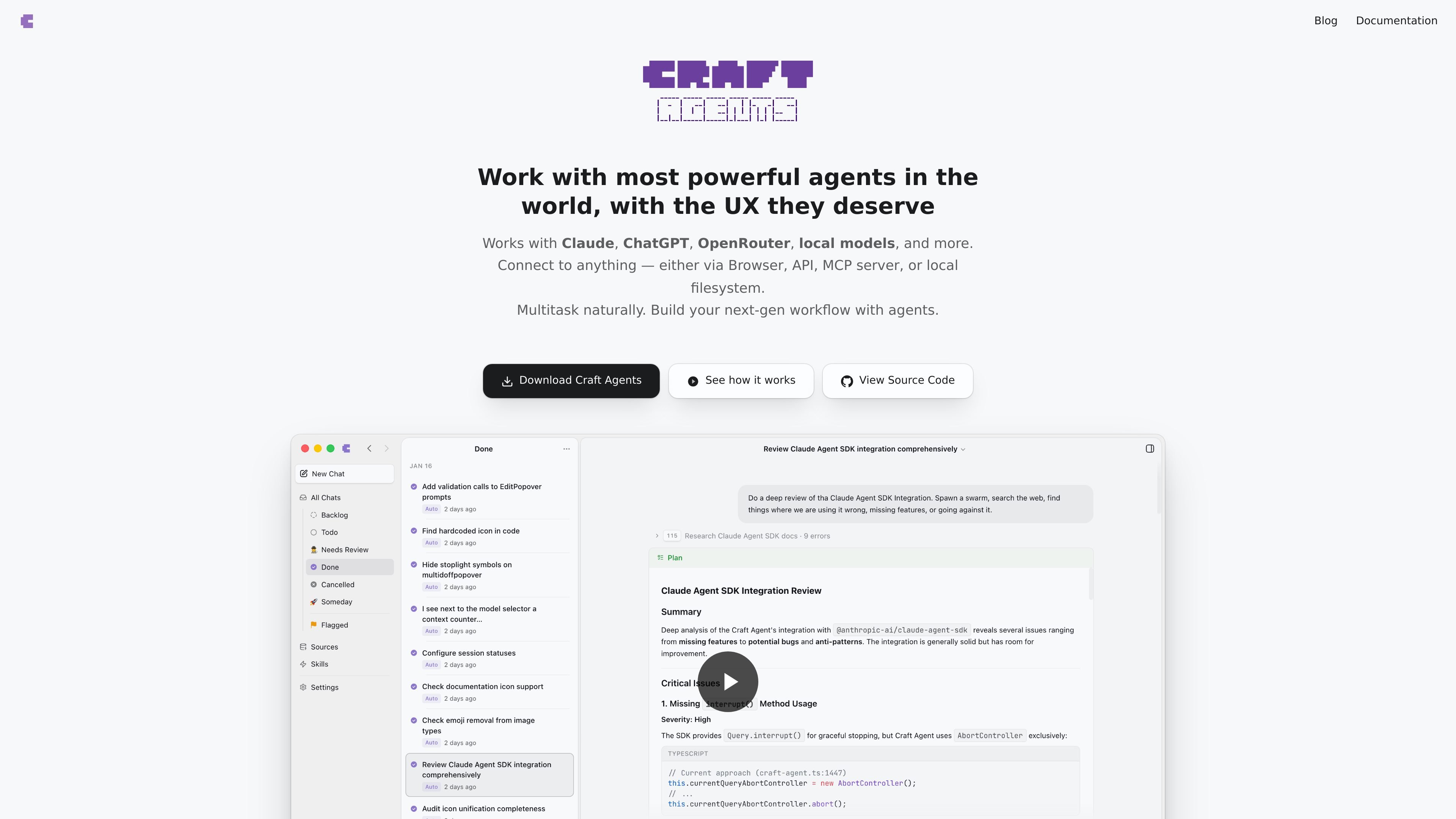
Craft Agents is an open-source desktop interface for using AI agents across coding and general digital workflows. It provides an inbox-style workspace for persistent conversations, task statuses, planning, execution, and background work rather than limiting agent use to a terminal.
Agents can work with MCP servers, REST APIs, local files, and browser-based services. Users can connect sources conversationally, review plans in read-only Explore mode, and then allow edits or autonomous execution. Sessions preserve the reasoning and implementation details that can be shared or attached to related work items.
Use MCP servers, REST APIs, local files, and local stdio-based processes as agent sources. Sources can provide access to services such as GitHub, Linear, Craft, local repositories, and Obsidian vaults.
A built-in Chromium browser lets agents navigate pages, fill forms, click controls, extract structured information, and take screenshots. Users can authenticate in a service before handing the browser workflow to the agent.
Organize persistent conversations in an inbox-style interface with statuses and full history. Pause one task, start another, and return to the previous session while long-running work continues in the background.
Use Explore for read-only research and planning, Ask to Edit for approval before changes, or Execute for autonomous work after the approach is agreed.
Attach sessions to Linear issues, GitHub pull requests, or Confluence pages, and share the conversation so decisions, trade-offs, and implementation details remain available alongside the result.
Use Claude, ChatGPT Plus, OpenRouter, Vercel AI Gateway, local Ollama or LM Studio endpoints, and other listed compatible providers. The application also supports importing Claude Code skills and creating skills through natural-language instructions.
Combine issue data, repository context, conversations, and documents in one persistent session, then share the reasoning or attach it to the related issue or pull request.
Let an agent research websites, complete form-based tasks, extract tables or listings, and capture screenshots when a service lacks a suitable API.
Connect private endpoints, internal databases, local files, or company tools and use permission rules to control what an agent can read, write, or execute.
Run long-running coding, analysis, or content tasks in the background while switching among conversations, with each session retaining its history and status.
Create reusable skills, import Claude Code skills, and configure workspace-specific themes, statuses, and permissions for recurring workflows.
Craft Agents is an open-source desktop application for working with AI agents across coding and broader digital workflows. It connects agents to MCP servers, REST APIs, local files, and browser-based services.
You can connect an MCP server, REST API, local file source, or compatible model provider. The product describes conversational setup for sources, support for pasted MCP configuration, and local stdio-based MCP servers run as subprocesses.
Yes. Craft Agents includes Explore mode for read-only research and planning, Ask to Edit for approval before changes, and Execute mode for uninterrupted agent work.
The documentation lists desktop support for macOS, Windows, and Linux. It also describes remote workspaces accessible through desktop, browser, or CLI clients, with a standalone server installation for Linux or macOS.
Craft Agents is open source under the Apache 2.0 license. The site describes themes, skills, statuses, permissions, and workspace settings as configurable through files and agent-assisted changes.

CreateOS Sandbox is an isolated compute environment for running code and agent workloads inside Firecracker micro-VMs. It is designed for workflows that need machine-level isolation, private networking between sandboxes, and programmatic control through SDK, CLI, or MCP.

GitBot is a local browser-based workspace for creating reusable coding bots powered by Claude Code, Codex, or OpenCode. It helps developers run those agents across repository folders with persistent threads and configurable permissions.

ByteAsk is a terminal-first AI coding agent for C and C++ that edits repositories and verifies changes with the real compiler, debugger, sanitizers, and tests before showing a diff. It offers a free tier plus paid plans, with editor connectors and zero-retention handling described in the source.

Epherem is a static security scanner for web apps built with AI coding tools such as Lovable, Bolt, v0, Replit, Cursor, and Claude Code. It checks source files and dependencies for common security mistakes, then provides categorized findings and suggested fixes without running the app.

Lasso is an ecommerce product data platform for enriching catalog records, processing supplier files, generating product content, and monitoring competitors. It combines a web app with a REST API, SDK, and MCP server for teams and developers.

Codex Plugins bundle reusable skills, app integrations, and MCP servers into workflows you can install in the Codex app or use from Codex CLI. They help extend Codex with connected-service tasks, reusable instructions, and shared team workflows.