
Per-project workspaces
Keep a board, terminal, panes and cost records for each repository, with the workspace stored in `~/.devpit` rather than in the project tree.

devpit is a native desktop workspace for managing coding agents across software projects, combining project terminals, boards, chat, diffs and execution costs. It currently drives Claude Code directly and runs on Linux, macOS and Windows as a free, open-source application.
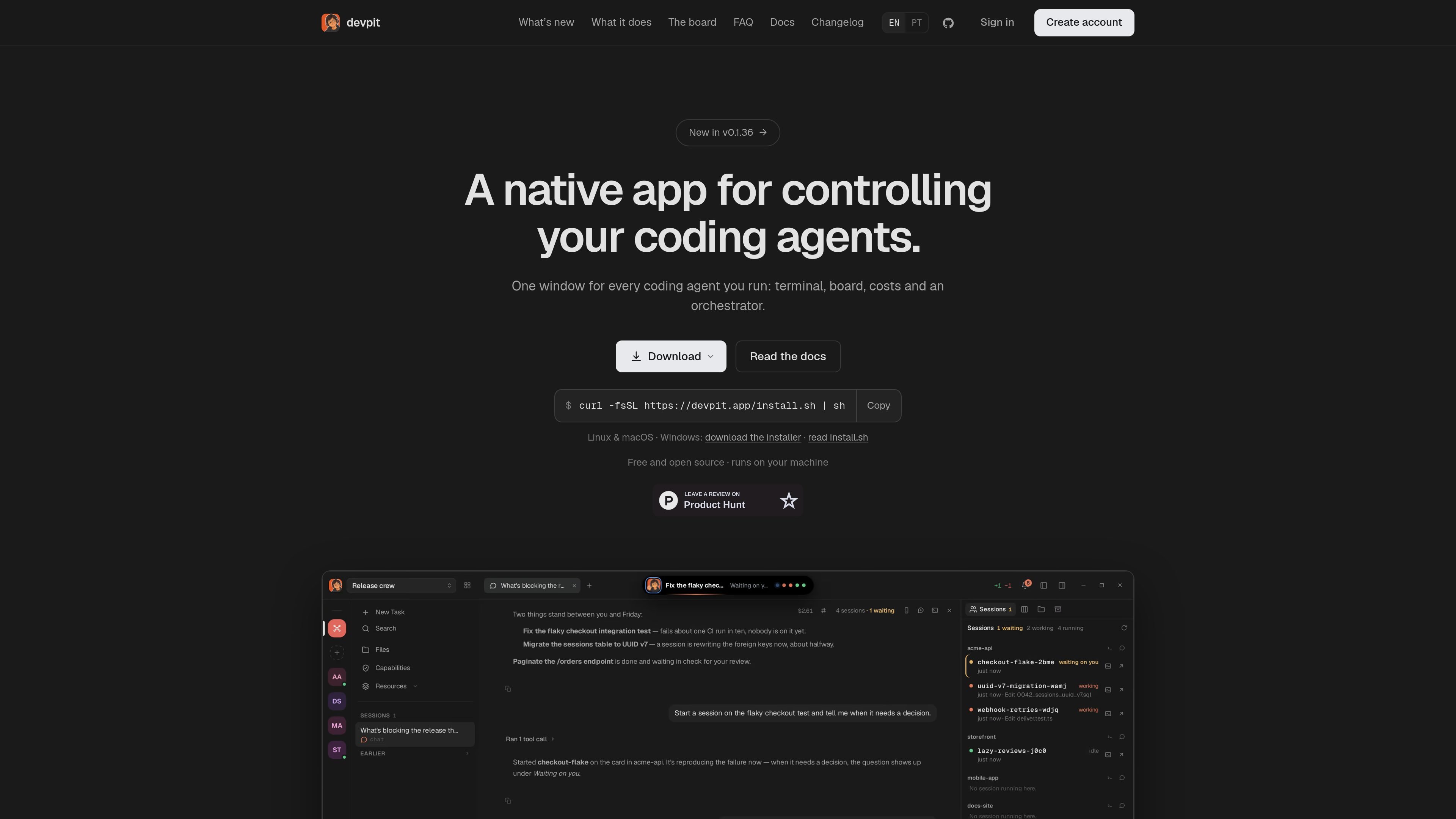
devpit is a native desktop workspace for controlling coding agents across one or more software projects. It combines a project terminal, board, chat, file and diff views, cost information and an optional orchestrator in one application, so agent-driven work can be started and reviewed without switching among several tools.
Each project has its own board, panes, terminal target and workspace state. Board steps can run an agent, session or command and then stop with their output, exit code and cost recorded; moving the card forward remains manual unless a lane is configured to move it. devpit keeps this state in `~/.devpit`, separate from the repository, and uses tmux or psmux to keep terminal sessions alive. It currently drives Claude Code through the installed CLI, with additional agent integrations and status hooks documented for other tools.
Keep a board, terminal, panes and cost records for each repository, with the workspace stored in `~/.devpit` rather than in the project tree.
Use columns and cards to organize work. A card can run an agent, session or command when it reaches a step, and each execution records output, exit code and actual cost.
Run a real pty behind tmux, or psmux on Windows. The target terminal follows the active project, while sessions continue running after the devpit window closes.
See the cost of individual chat turns and step executions, including tokens and model details where available. A column can define a spending ceiling for calls.
Link projects to an orchestrator chat that can inspect their boards, start a session from a card and report back. The orchestrator drafts replies but does not send them without your action.
Review files, diffs and a project's served web page beside the terminal. Built-in project capabilities include Notes and Excalidraw, opened as panes.
Create a project board with columns and cards, attach agent or command steps, and review each run's output, exit status and cost before deciding whether to move the work forward.
Keep several repositories active at once while preserving a separate terminal, board and workspace for each. Switching projects changes the attached terminal without ending the previous session.
Inspect an agent's changed files and diffs, open the page served by the project, and use Notes or Excalidraw in adjacent panes during implementation or review.
Link multiple project boards to an orchestrator, give it a card through chat and receive a report when a session starts or needs attention, while retaining control over replies and approvals.
Leave long-running agent sessions in tmux, close the desktop window and return later to the active process and its project workspace instead of restarting the work.
devpit drives Claude Code through the Claude CLI already installed on your machine. Other agents can report status through the devpit-agent hook, and Gemini CLI works with no additional setup. The documentation also lists Codex, Cursor and other CLIs as supported or terminal-based providers, but the home page identifies Claude Code as the primary supported agent today.
On Linux and macOS, installation is provided through the command `curl -fsSL https://devpit.app/install.sh | sh`. Windows has a per-user installer that includes psmux, the Windows equivalent used for terminal persistence. The Linux build also runs in WSL 2.
Yes. devpit is free and open source under the Apache 2.0 license. It uses an existing Claude Code plan and does not require new API keys for that workflow.
No. Project boards, panes, terminal state and cost information are stored in `~/.devpit`, while the repository remains separate. Worktrees may be created for lines of work when a checkout is needed, and they are not removed while they contain uncommitted changes.
The orchestrator can read the boards you link, start a session from a card and report back. It does not move cards into lanes that run steps, act on a timer or approve actions in another session. Drafted replies are sent only when you explicitly send them.

SonOf connects to your repo and PM tool, audits the codebase and surrounding product context, and turns approved work into shipped tickets with senior engineering review. It is aimed at founders and engineering leaders who need backlog help without hiring a full team immediately.

ByteAsk is a terminal-first AI coding agent for C and C++ that edits repositories and verifies changes with the real compiler, debugger, sanitizers, and tests before showing a diff. It offers a free tier plus paid plans, with editor connectors and zero-retention handling described in the source.

CreateOS Sandbox is an isolated compute environment for running code and agent workloads inside Firecracker micro-VMs. It is designed for workflows that need machine-level isolation, private networking between sandboxes, and programmatic control through SDK, CLI, or MCP.

GitBot is a local browser-based workspace for creating reusable coding bots powered by Claude Code, Codex, or OpenCode. It helps developers run those agents across repository folders with persistent threads and configurable permissions.

hob is an independent workspace for coding agents that keeps agent sessions, terminals, history, and follow-up work organized around the tools and providers you already use. It is aimed at developers who want local control over routing, history, and workspace structure rather than a bundled model stack.

Manta AI is an autonomous web app testing tool for teams that want to map application behavior, catch regressions, and generate tests without writing scripts or maintaining selectors. It works from a URL and supports plain-English test flows, run results with screenshots, and scheduled or deployment-triggered checks.