
YouTube player
Drag or paste a YouTube link onto the notch to open a player. Keep a tutorial or talk beside other work, or detach, move, and resize the player without restarting playback.
Dots is a Mac utility that places media, focus, capture, file, and productivity tools in a compact workspace at the top of the display. It also connects developer services and coding agents to surface tasks, reviews, deployments, services, and session activity.
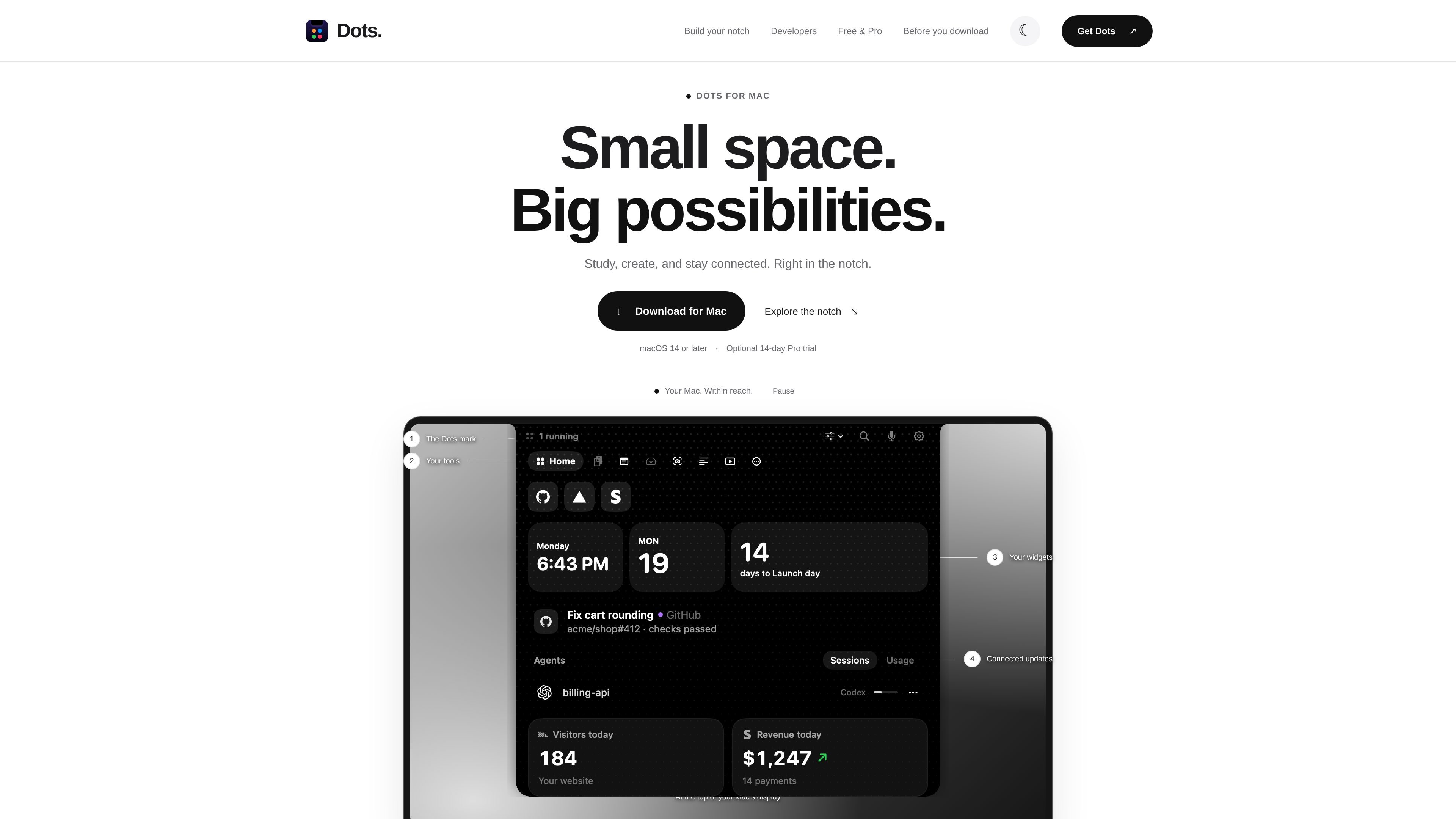
Dots is a native utility app for Mac that places everyday tools, updates, and selected connected services in a compact interface at the top of the display. It combines a YouTube player, Pomodoro timer, notes, to-dos, clipboard, file shelf, screenshots, widgets, and other tools so users can access them without switching away from their current work.
For developers, Dots can connect to services and coding agents including GitHub, GitLab, Bitbucket, Linear, Jira Cloud, Docker, SSH, Vercel, Cloudflare, Sentry, PostHog, Stripe, Shopify, Codex, Claude Code, and Cursor. It can surface activity and status information, while Pro adds capabilities such as live agent sessions, SSH sessions, pull-request review actions, recording, drawing, microphone safety, more file formats, and unlimited active connections. Dots runs on macOS 14 or later and offers Free and Pro access, with an optional 14-day Pro trial.
Drag or paste a YouTube link onto the notch to open a player. Keep a tutorial or talk beside other work, or detach, move, and resize the player without restarting playback.
Select a region, scroll through a long page, and finish to combine the outlined content into one PNG saved on the Mac and placed on the Shelf.
Start a Pomodoro session from the notch toolbar with a 25-minute focus period and configurable break pattern described as 5 minutes, or 15 after four sessions. Sessions can be paused and resumed.
Drop an image or video onto the notch and choose an output format. Image exports include PNG, HEIC, TIFF, and PDF; video can be converted to MP4 or audio to M4A while the original remains in place.
Use the drawing canvas during meetings or presentations to highlight, sketch, or add arrows. Dots supports color selection, undo, clearing, click-through mode, and sharing the display with annotations.
Connect developer services and agents to view compact updates for tasks, pull requests, deployments, containers, errors, commerce, and coding-agent sessions. The workspace also includes a CLI for reporting progress, sending decisions, and tracking commands.
Drag a tutorial or presentation from a browser into Dots and keep it visible beside the document, code, or other work. The player can remain in the notch or be detached and resized.
Capture a long webpage, document, or list as one continuous PNG instead of taking several separate screenshots. The saved image can be retrieved from the Shelf for later use.
Run a focused study or work interval from the notch and pause or resume it as needed. The break timing gives users a lightweight structure without opening a separate timer app.
During a remote meeting or presentation, draw directly over the screen to point out an area, sketch an idea, or highlight an issue, then clear or disable the marks when finished.
Developers can monitor repository activity, tasks, deployments, services, and coding-agent progress in one place, then use the CLI to report command status or request a decision from a script.
Dots is a native Mac app for macOS 14 or later. Install it in Applications and launch it; developer features can also use the bundled command-line tool installed from Settings → Advanced.
Yes. The site describes a Free tier and an optional 14-day Pro trial. After the trial, Dots returns to Free unless Pro is purchased.
Dots can capture a selected scrolling region as one long PNG, with the result saved on the Mac and available on the File Shelf. Its converter can export images as PNG, HEIC, TIFF, or PDF, and video as MP4 or audio as M4A.
Developer connections include GitHub, GitLab, Bitbucket, Linear, Jira Cloud, Docker, SSH, Vercel, Cloudflare, Sentry, PostHog, Stripe, Shopify, and coding-agent tools such as Codex, Claude Code, and Cursor. Availability and access requirements vary by connection; Free supports up to five active connections, while Pro removes that limit.
Dots is primarily a personal Mac utility. The developer workspace can show team tasks, pull requests, deployments, services, and agent activity, but the source does not document shared accounts, team administration, or collaborative editing.

Goldfish is an AI memory app for macOS that helps you reply, write, summarize, and continue using the context already on your Mac. It stores memory locally and writes in your tone.

ArtDeck is a visual reference board app for iPhone, iPad, and Mac that lets artists collect mixed reference material on one canvas and study it with ToolBox lenses. It works offline, supports optional iCloud sync, and is sold as a one-time purchase with no account required.

Biji est une plateforme polyvalente conçue pour améliorer la productivité grâce à des outils et des fonctionnalités innovants.

Malyatko is a baby tracker for logging feeding, sleep, growth, teething, and milestones in one app. It works on iPhone, Apple Watch, and widgets, with no sign-up, offline use, and family sharing through iCloud.

Redline is a budgeting tool for Claude Code that paces sessions to stay within time, token, cost, or plan-percentage limits. It uses Claude Code’s native hooks and statusline to help sessions finish with a usable result instead of stopping abruptly.

Claude Overlay is a Windows desktop overlay for Claude Code that reads your screen so you can ask questions, inspect content, and request edits without leaving the current app. It runs on your existing Claude subscription through the Claude CLI, so no separate API key is required.