Evlat icon

Evlat

Evlat is a native macOS status strip for tracking Claude Code, Codex, Antigravity, and other command-line work. It shows which sessions are working or waiting, supports local scripts and SSH-connected machines, and runs without an account or hosted relay.

Evlat

A status strip for AI coding work

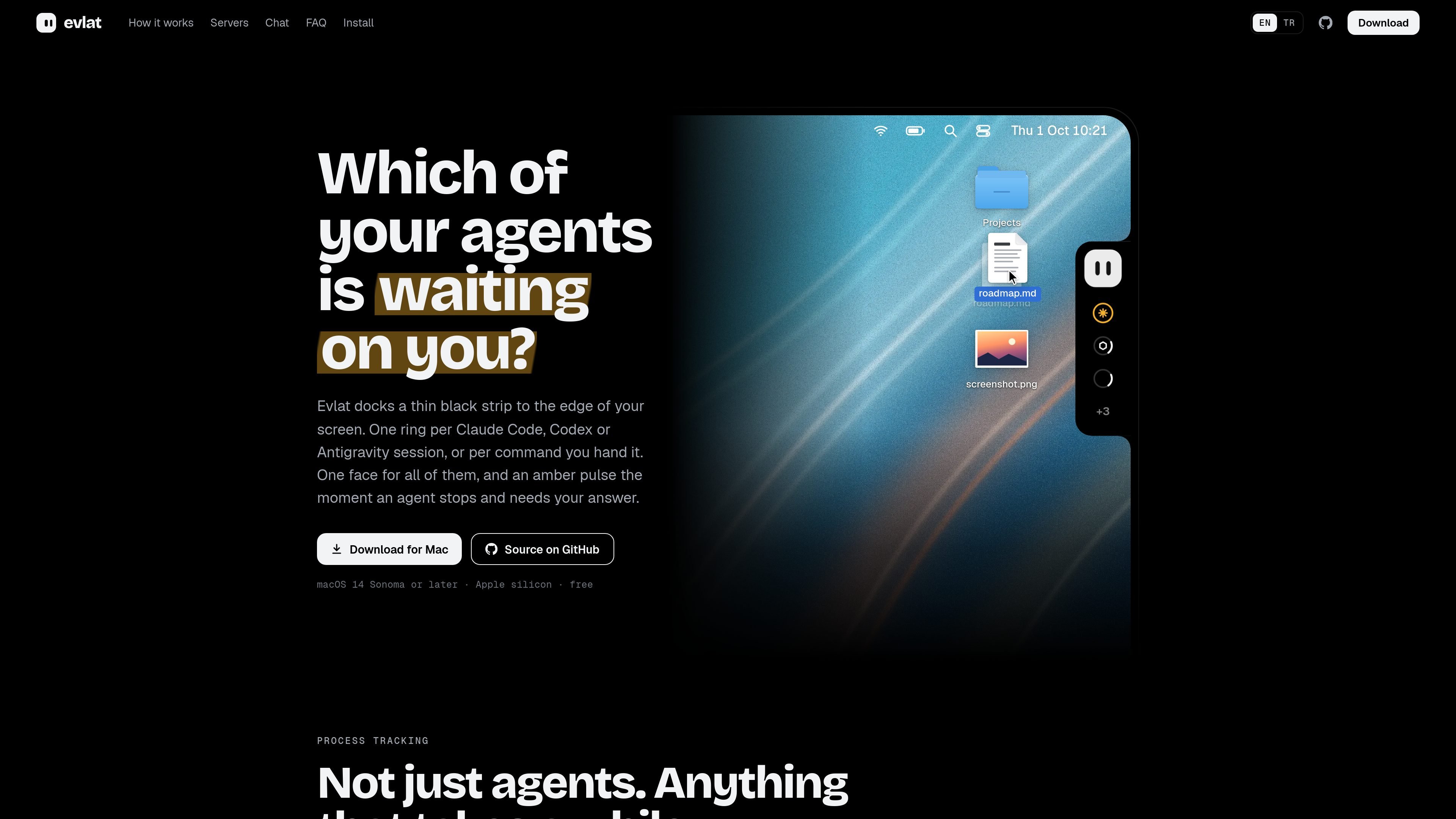
Evlat is a macOS status strip for monitoring AI coding sessions and other long-running commands. It places a narrow bar at the edge of the screen, using a ring for each Claude Code, Codex, or Antigravity session—or for a command sent through its command-line tools. The bar's overall indicator and individual rings change state when work is active, complete, failed, idle, or waiting for input.

The product is designed to reduce the need to inspect multiple terminals. Hovering a row shows what a session is doing and how long it has been running; a session card can show the tool or command that needs attention and provide a way to open the owning terminal or application. Evlat also extends the same status view to SSH-connected machines, while keeping communication on the local machine and its SSH connection.


Features

At-a-glance session status

A thin strip docks to the left or right edge of the screen, with one ring for each session or tracked command. An amber pulse identifies sessions waiting for an answer, while finished, failed, idle, and working states remain visible without requiring a terminal scan.

AI coding session monitoring

Install hooks for Claude Code, Codex, and Antigravity to report session activity. Hovering the strip reveals session names, current activity, duration, usage information where available, and the terminal or application associated with a session.

Commands and script progress

Run any command through evlat watch and preserve its colors, input, Ctrl-C behavior, and exit code. For scripts with their own progress state, evlat signal can fill a progress ring and mark a row waiting, done, or failed; rows expire automatically.

Remote machine tracking

Jobs on SSH-accessible servers appear on the Mac with the server name attached. Evlat uses a reverse tunnel over the server's existing SSH connection, reports a lost connection instead of showing stale state, and retries until the link returns.

In-bar Claude Code interaction

The mascot opens an in-bar chat balloon that runs the Claude Code CLI installed on the user's machine. Users can answer supported Claude questions, return to a session, and drop files onto the mascot for the chat context.

Quiet native macOS interface

The native Swift, AppKit, and SwiftUI app does not use a web view or Electron, does not take focus, and asks for no Accessibility or screen-recording permissions. It can appear above the Dock across Spaces and draws no frames while idle.

Use cases

  • Managing parallel coding sessions

    Keep several Claude Code, Codex, or Antigravity sessions visible while moving between projects. The strip identifies which session needs an answer, and the session card can take the user back to its terminal or supported application.

  • Following long-running local commands

    Put a build, test suite, deployment, or other long-running command behind evlat watch. Its output continues normally in the terminal while the strip provides a separate completion, failure, or waiting signal.

  • Reporting custom job progress

    Use evlat signal from a renderer, data job, or custom script when a simple process exit is not enough. Progress can be represented as a partially filled ring, with explicit waiting, done, and failed states for a lightweight status channel.

  • Monitoring remote development jobs

    Watch work running on a development server or another SSH-reachable machine from the Mac. Machine labels distinguish rows from different hosts, and a disconnected host is shown as unavailable rather than leaving an outdated status on screen.

Pros and Cons

Pros

  • Supports Claude Code, Codex, Antigravity, arbitrary watched commands, and script-driven progress in one status view.
  • Preserves command behavior when using evlat watch, including output colors, input, Ctrl-C, and exit codes.
  • Tracks jobs on SSH-accessible servers and labels them by machine without requiring a hosted account or relay.
  • Runs locally as a native macOS app with no account, telemetry, Accessibility permission, or screen-recording permission.
  • Free to use with source code available under the Functional Source License 1.1 and Apache 2.0 conversion after two years per version.

Cons

  • The app is limited to macOS 14 or later on Apple silicon; there is no Intel, Windows, or Linux app.
  • Antigravity does not emit an approval event, so a session waiting for approval there may continue to appear as working rather than amber.
  • Remote monitoring requires SSH access and depends on the connection; disconnected rows are marked as unavailable until the link returns.

FAQ

How do you install and set up Evlat?

Download Evlat.dmg, drag the app to Applications, open it, and use the mascot menu to install hooks for Claude Code, Codex, and Antigravity. Existing sessions can appear after setup, and settings can be changed later.

What sessions and commands can Evlat track?

Evlat displays Claude Code, Codex, and Antigravity sessions through hooks. It can also show other work, such as builds, tests, deploys, or scripts, when they are run with evlat watch or reported with evlat signal.

Does Evlat send session data or code to a remote service?

No. Evlat has no account or telemetry, and sessions, commands, and usage stay on the Mac. Its local listener uses 127.0.0.1; the app checks GitHub once a day for its own updates. Chat requests use the Claude Code installation already on your machine and follow that tool's existing data handling.

What platforms and machines does Evlat support?

The app requires macOS 14 Sonoma or later on Apple silicon. There is no Intel, Windows, or Linux app. Remote jobs can run on other machines that you can reach over SSH.

Is Evlat free, and can it be used at work?

Yes. Evlat is free, has no paid tier or account requirement, and its source is published under the Functional Source License 1.1 with Apache 2.0 conversion two years after each version's release. The license permits company use but restricts offering Evlat or a substantially similar product as a competing commercial product.

Quick Facts

Category
Developer Tool; macOS utility
Platform
macOS 14 Sonoma or later
Hardware
Apple silicon
Tracked tools
Claude Code, Codex, and Antigravity
Remote workflow
SSH-accessible machines via reverse tunnel
Pricing and license
Free; Functional Source License 1.1, Apache 2.0 conversion after two years per version

Alternatives à Evlat

ByteAsk icon

ByteAsk

ByteAsk is a terminal-first AI coding agent for C and C++ that edits repositories and verifies changes with the real compiler, debugger, sanitizers, and tests before showing a diff. It offers a free tier plus paid plans, with editor connectors and zero-retention handling described in the source.

Epherem icon

Epherem

Epherem is a static security scanner for web apps built with AI coding tools such as Lovable, Bolt, v0, Replit, Cursor, and Claude Code. It checks source files and dependencies for common security mistakes, then provides categorized findings and suggested fixes without running the app.

PromptScout icon

PromptScout

PromptScout tracks how ChatGPT, Gemini, Google AI Overviews, and Perplexity mention your brand or competitors, then pairs those results with source analysis and website audits. It helps teams decide what to fix in content, positioning, or site readiness next.

CreateOS Sandbox icon

CreateOS Sandbox

CreateOS Sandbox is an isolated compute environment for running code and agent workloads inside Firecracker micro-VMs. It is designed for workflows that need machine-level isolation, private networking between sandboxes, and programmatic control through SDK, CLI, or MCP.

Sleek Analytics icon

Sleek Analytics

Sleek Analytics is a privacy-friendly web analytics tool with real-time visitor tracking, Core Web Vitals, and revenue attribution. It helps site owners understand traffic and conversions without cookie banners or a heavy setup.

GitBot icon

GitBot

GitBot is a local browser-based workspace for creating reusable coding bots powered by Claude Code, Codex, or OpenCode. It helps developers run those agents across repository folders with persistent threads and configurable permissions.