
Review diffs
Inspect working-tree, staged, and untracked changes in unified or split views, with optional whitespace handling and file-history access.

GitGlow is a local-first desktop Git workbench for developers who need to review diffs, prepare focused commits, verify changes, and inspect coding-agent work. It supports macOS, Windows, and Linux, with a free local workflow and Pro features for concurrent workspaces and connected release workflows.
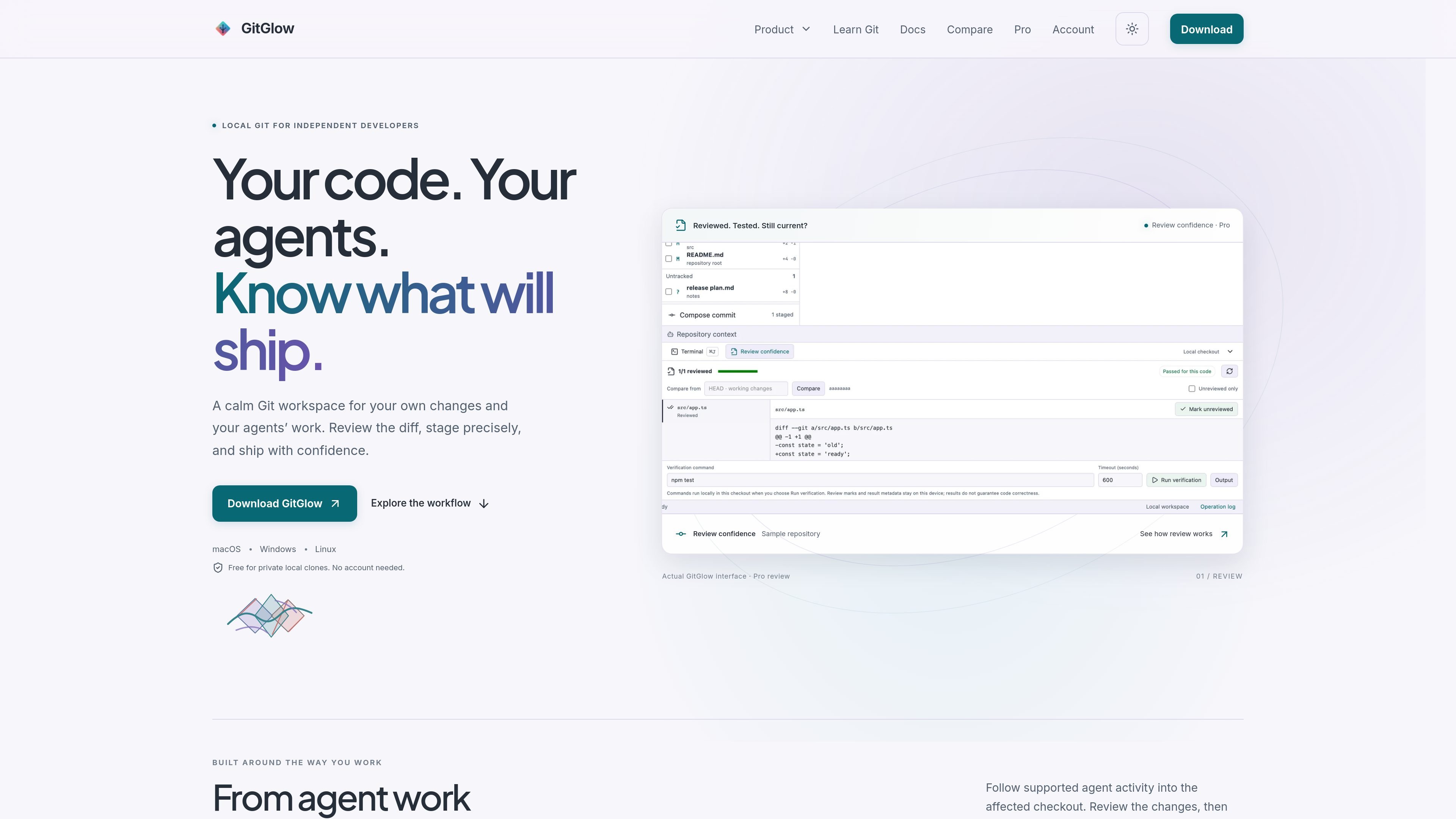
GitGlow is a local-first visual Git workbench for independent developers who want to inspect changes, prepare commits, review coding-agent work, and move toward release from one desktop application. It keeps the selected repository and checkout in context across Changes, History, Activity, Insights, GitHub, and Release surfaces.
The free edition supports a private local clone without an account and covers the everyday Git loop, including precise staging, commits, branches, conflicts, history, and an embedded terminal. Pro adds concurrent workspaces, managed-agent controls, advanced review and retention, GitHub connections, and release-oriented workflows; AI provider subscriptions and API usage are separate.
Inspect working-tree, staged, and untracked changes in unified or split views, with optional whitespace handling and file-history access.
Stage whole files, hunks, or supported line selections, then use the commit composer to keep unrelated edits out of a commit.
Mark files reviewed and run an explicit check with timeout and cancellation. Later edits return files to attention and make earlier verification stale.
Use branches, remotes, stashes, tags, worktrees, topology history, compare, blame, reflog, merge and rebase conflict handling, and an embedded checkout-aware terminal.
Observe agent signals, runs, repository attribution, changed paths, attention, and Activity Tape events. Review changes can open the exact checkout and attributed files.
Connect authorized GitHub repositories, pull requests, issues, workflows, and checks, then use release preparation and editable Indie Log report packs in the same workspace.
Open a local clone, inspect staged and unstaged files, select only the intended hunks or lines, and create a focused local commit without leaving the repository context.
Mark reviewed files, run a bounded check, and return later to see which files changed after verification. This gives a developer a concrete way to distinguish current review from stale results.
Watch supported agent signals, confirm the repository and branch or worktree associated with a run, and open the exact attributed paths in Changes for human review.
Use concurrent workspaces, selected-repository fetches, GitHub context, checks, report packs, and release preparation when several projects or a release need to be coordinated.
GitGlow publishes desktop packages for macOS, Windows x64, and Linux x86_64/aarch64. Version 2.0.5 was manually checked on macOS; Windows and Linux packages were build-validated for architecture, version, payloads, sidecars, and checksums.
No. Free supports one active local repository without an account and includes everyday Git workflows such as precise staging, commits, branches, history, conflicts, and terminal tabs. Pro adds concurrent workspaces and advanced agent, review, GitHub, and release workflows.
Local repository files, status, diffs, history, paths, previews, and audit records stay on the device. Optional GitHub, agent-provider, billing, and consented analytics connections have separate data boundaries.
Free MCP access is read-only. On Pro, an allow-listed Git or GitHub action can be previewed, but MCP-originated writes require native approval in Agent Observatory while the desktop app is open. Arbitrary shell or Git commands, destructive cleanup, history editing, force pushes, and pull-request merges are excluded.
AI provider subscriptions and API usage are separate from GitGlow Pro. Managed workflows use a supported provider connection; the product site also documents observation or managed workflows for local Codex and Claude sessions.

ByteAsk is a terminal-first AI coding agent for C and C++ that edits repositories and verifies changes with the real compiler, debugger, sanitizers, and tests before showing a diff. It offers a free tier plus paid plans, with editor connectors and zero-retention handling described in the source.

CreateOS Sandbox is an isolated compute environment for running code and agent workloads inside Firecracker micro-VMs. It is designed for workflows that need machine-level isolation, private networking between sandboxes, and programmatic control through SDK, CLI, or MCP.

GitBot is a local browser-based workspace for creating reusable coding bots powered by Claude Code, Codex, or OpenCode. It helps developers run those agents across repository folders with persistent threads and configurable permissions.

hob is an independent workspace for coding agents that keeps agent sessions, terminals, history, and follow-up work organized around the tools and providers you already use. It is aimed at developers who want local control over routing, history, and workspace structure rather than a bundled model stack.

Ably Chat is a chat API platform for building custom realtime chat applications. It supports room-based messaging, typing indicators, presence, reactions, and message updates, with usage-based pricing options for different deployment stages.

Manta AI is an autonomous web app testing tool for teams that want to map application behavior, catch regressions, and generate tests without writing scripts or maintaining selectors. It works from a URL and supports plain-English test flows, run results with screenshots, and scheduled or deployment-triggered checks.