
No Mac-side Headroom installation
Uses macOS Screen Sharing over VNC, so the Mac needs no Headroom server app or agent. Enable Screen Sharing in macOS and connect with a Mac account or VNC password.

Headroom is a remote desktop app for controlling a Mac from an iPhone, iPad, or another Mac. It uses macOS’s built-in Screen Sharing, with local Bonjour discovery and optional Tailscale setup for access outside the local network.
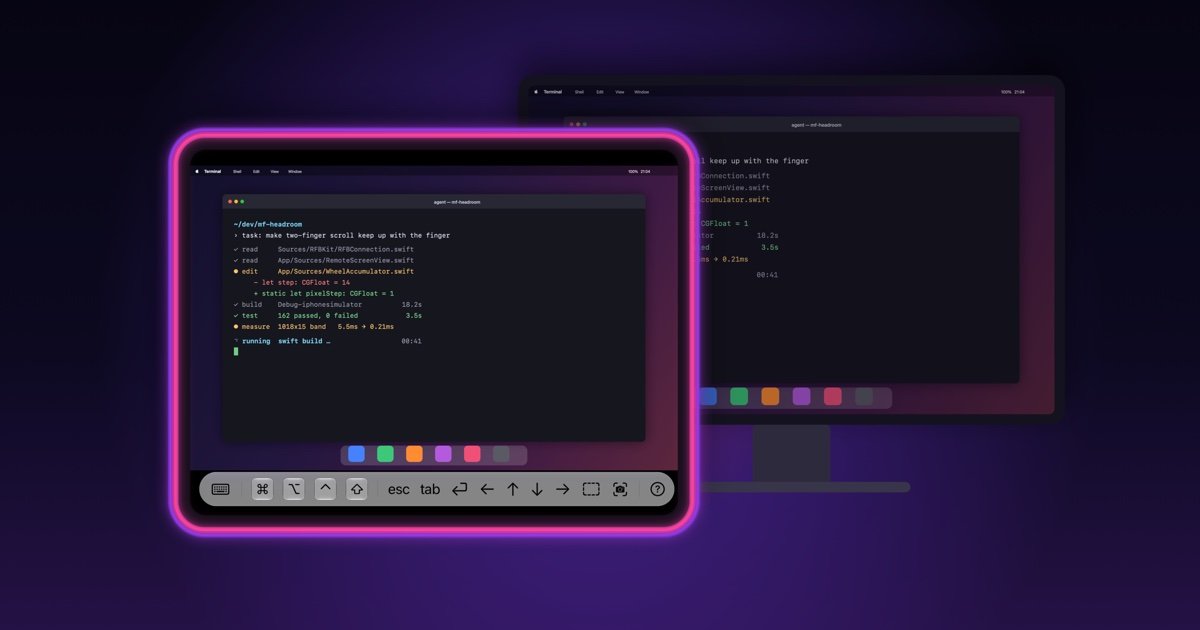
Headroom is a remote desktop app for controlling a Mac from an iPhone, iPad, or another Mac. It connects to macOS’s built-in Screen Sharing service over VNC, so there is no Headroom server or agent to install on the Mac; the main Mac-side requirement is enabling Screen Sharing.
On a local network, Headroom discovers Macs through Bonjour, while manual host or IP entry supports saved connections and remote-network setups. The app combines touch or mouse input with software and hardware keyboard support, making it suitable for accessing a Mac that is in another room, a headless Mac mini, or a Mac reached through a Tailscale network.
Uses macOS Screen Sharing over VNC, so the Mac needs no Headroom server app or agent. Enable Screen Sharing in macOS and connect with a Mac account or VNC password.
Macs on the same Wi‑Fi appear automatically through Bonjour. A host name or IP address can also be entered manually, including port 5900 for a saved connection.
Metal rendering and ZRLE compression are designed to keep remote display interaction responsive on a local network and usable over thinner connections.
On iPhone and iPad, taps, long presses, and pinch gestures provide click, drag, and zoom controls. The Mac version forwards clicks, drags, and right-clicks directly.
Software and hardware keyboards are supported, with Command, Option, Control, and Shift modifiers for Mac shortcuts.
The iPhone Duo layout adapts to half-open, closed, and fully open positions, keeping the Mac view and controls arranged around the fold.
Use an iPad or iPhone to operate a Mac in another room without moving to the desk, provided the Mac is awake and Screen Sharing is enabled.
Access a headless Mac mini or similar Mac for routine interaction, keyboard input, and shortcut-driven tasks without attaching a permanent display and input setup.
Turn an iPhone Duo into a portable Mac control surface: in the half-open position, view the Mac on the upper display and type on the lower screen.
Open a saved connection from outside the local network by placing the Mac and client device on the same Tailscale account, then connecting through its MagicDNS name or Tailscale IP.
Use another Mac as the client when a larger display, physical keyboard, or mouse-oriented remote workflow is more appropriate than touch control.
On the Mac, open System Settings › General › Sharing and turn on Screen Sharing. In Headroom, select the Mac discovered on the same Wi‑Fi or add its host name or IP address manually, then sign in with a macOS user account or configured VNC password.
Yes. Install Tailscale on both the Mac and the device running Headroom, sign in to the same Tailscale account, and add the Mac manually in Headroom using its MagicDNS name or Tailscale IP address on port 5900. Local Bonjour discovery does not work across Tailscale.
Headroom runs on iPhone, iPad, and Mac. On iPhone Duo, the Mac appears on the upper display in the half-open laptop position while the lower display provides the keyboard and controls.
The free version allows 3 minutes of connection per day. Headroom Pro is a one-time purchase rather than a subscription and removes the connection time limit; the purchase is shared across iPhone, iPad, and Mac on the same Apple Account.
Headroom can wake a sleeping Mac using a Wake button when a MAC address is configured, but Wake-on-LAN broadcasts work only on the local network and do not cross Tailscale. A Mac reached remotely must be kept awake or woken locally.

MacSpoof change ou randomise l’adresse MAC Wi‑Fi sur macOS pour reconnecter aux réseaux et limiter l’enregistrement de votre identité sur Wi‑Fi public.

DemoTV is an audience-ranked station for discovering and comparing independent product demos. Founders can submit videos, embed approved demos on their websites, collect viewer inquiries and optionally commission demo production or labelled promotion without buying ranking.

Ship It: Idle Dev Tycoon is an iPhone incremental simulation game about building apps, managing a software studio, and selling it for lasting progression benefits. It supports offline play, automated builds, adviser collection, and optional in-app purchases.

NomNak est une app iPhone gratuite pour découvrir des restaurants grâce aux recommandations d’amis, avec spots enregistrés, passeport food et recherche par ville.
CAPTA is a mobile GPS waypoint app for quickly saving, organizing, and revisiting locations. It supports offline use, camera-based coordinate capture, optional cross-device synchronization, and GPX export for fishermen, explorers, and field professionals.

Ctrl+Shift+3 is a calm, text-first community platform with a chronological feed, profiles, RSS, and private groups called Clicks. It is built for reading, posting, and joining smaller communities without algorithmic ranking or vanity counts.