
Natural-language capture
Write a single line and have Kept classify it as a task, event, or note. Review the interpretation before saving and choose a different type when necessary.

Kept is a personal productivity app for capturing tasks, events, and notes, then connecting daily priorities with goals, habits, and calendar planning. It is designed for iPhone, with the listing also describing account sync with a Mac version.
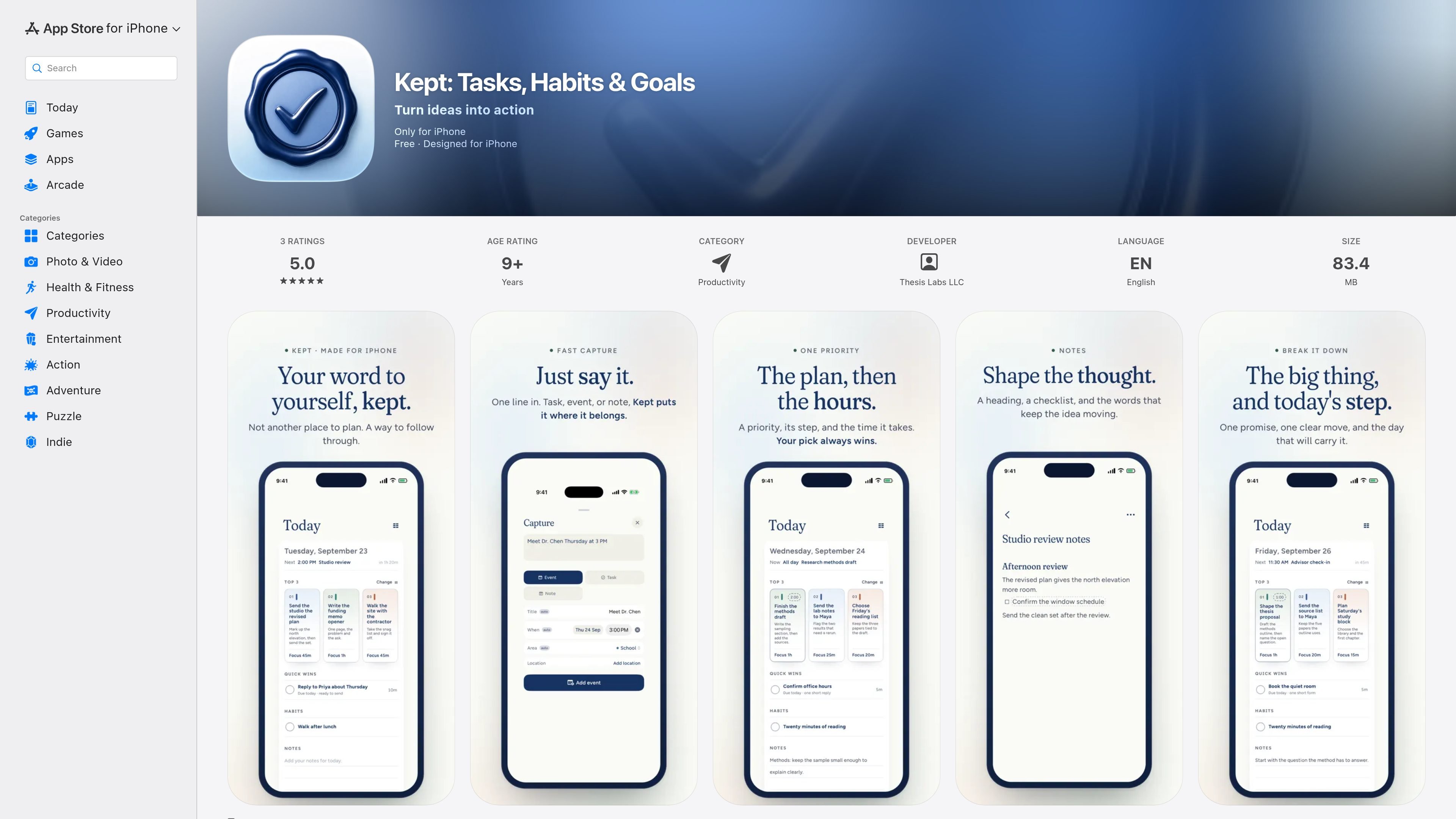
Kept is a personal productivity app from Thesis Labs LLC for turning loosely stated intentions into tasks, calendar events, notes, goals, and habits. Its central workflow starts with a short capture: write one line, review how Kept interpreted it, and save it as the item type you want.
The app combines daily prioritization with planning tools. Today presents a Top 3, reads goals and calendar context to suggest what matters, and lets you schedule a priority, start a Focus timer, or move plans when the day changes. Goal Builder and habit tracking connect longer-term aims with smaller actions, while daily notes keep writing alongside the day’s work.
Write a single line and have Kept classify it as a task, event, or note. Review the interpretation before saving and choose a different type when necessary.
Today surfaces three priorities based on your goals and calendar, with quick wins, calendar items, asks, and habits available underneath. You can hide sections and undo changes.
Plan a priority, choose a next step, start a Focus timer, and place the item on the calendar. The time estimate acts as the scheduling control, with 15-minute adjustments and clash visibility.
Goal Builder turns a written goal or selected life area into a tracker, first step, and weekly check-in after up to three questions. Drafts can be resumed later.
Create cue-based habits such as a step to do after coffee or the school run, then track check-ins in a weekly record. Habits can be archived and restored.
Keep a daily note close to the Today view. Notes support templates, headings, word counts, search across notes and subpages, links, formatting, and continued writing.
Capture an idea or obligation as soon as it occurs without deciding whether it belongs in a task list, calendar, or notebook. Review Kept’s interpretation and save it in the appropriate place.
Start the morning with a short list of priorities, then compare them with existing events and available time. Schedule a priority in 15-minute increments and use the clash preview before committing.
Turn a broad personal objective into a trackable routine by answering Goal Builder’s questions, accepting a first step, and reviewing progress through weekly check-ins.
Attach a repeatable behavior to an existing cue, such as coffee or the school run, and record each check-in without treating a missed day as a failure state.
Use the daily note for planning, reflection, or structured writing while keeping templates, headings, search, links, and word counts available in the same workspace.
Kept is designed for iPhone. The listing also says one account can sync across iPhone and Mac, with the Mac app available at kept.do.
You can write a one-line capture, and Kept files it as a task, event, or note. Before saving, you can review and change the interpretation if needed.
Kept can work with its own calendar, Google Calendar, and Apple Calendar with full access. The listing does not specify setup requirements or sync direction.
Kept is presented as a personal productivity app with tasks, goals, habits, notes, and calendar planning. The available information does not establish team or multi-user collaboration features.
The App Store listing shows Kept as free, but the available pricing evidence does not establish subscriptions, in-app purchases, or feature limits.

Goldfish is an AI memory app for macOS that helps you reply, write, summarize, and continue using the context already on your Mac. It stores memory locally and writes in your tone.

ArtDeck is a visual reference board app for iPhone, iPad, and Mac that lets artists collect mixed reference material on one canvas and study it with ToolBox lenses. It works offline, supports optional iCloud sync, and is sold as a one-time purchase with no account required.

Biji est une plateforme polyvalente conçue pour améliorer la productivité grâce à des outils et des fonctionnalités innovants.

Malyatko is a baby tracker for logging feeding, sleep, growth, teething, and milestones in one app. It works on iPhone, Apple Watch, and widgets, with no sign-up, offline use, and family sharing through iCloud.

Redline is a budgeting tool for Claude Code that paces sessions to stay within time, token, cost, or plan-percentage limits. It uses Claude Code’s native hooks and statusline to help sessions finish with a usable result instead of stopping abruptly.

Claude Overlay is a Windows desktop overlay for Claude Code that reads your screen so you can ask questions, inspect content, and request edits without leaving the current app. It runs on your existing Claude subscription through the Claude CLI, so no separate API key is required.