
No-code to code workflow
Build with no-code for supported micro-apps, then switch into a coding interface when a project outgrows the no-code scope. The source says you can keep existing data and logic when moving between modes.
MarsX is a developer platform that combines no-code, code, AI, and micro-apps for building SaaS tools and other app types. It supports self-hosting, reusable micro-apps, and a workflow that can move from no-code into code as projects grow.
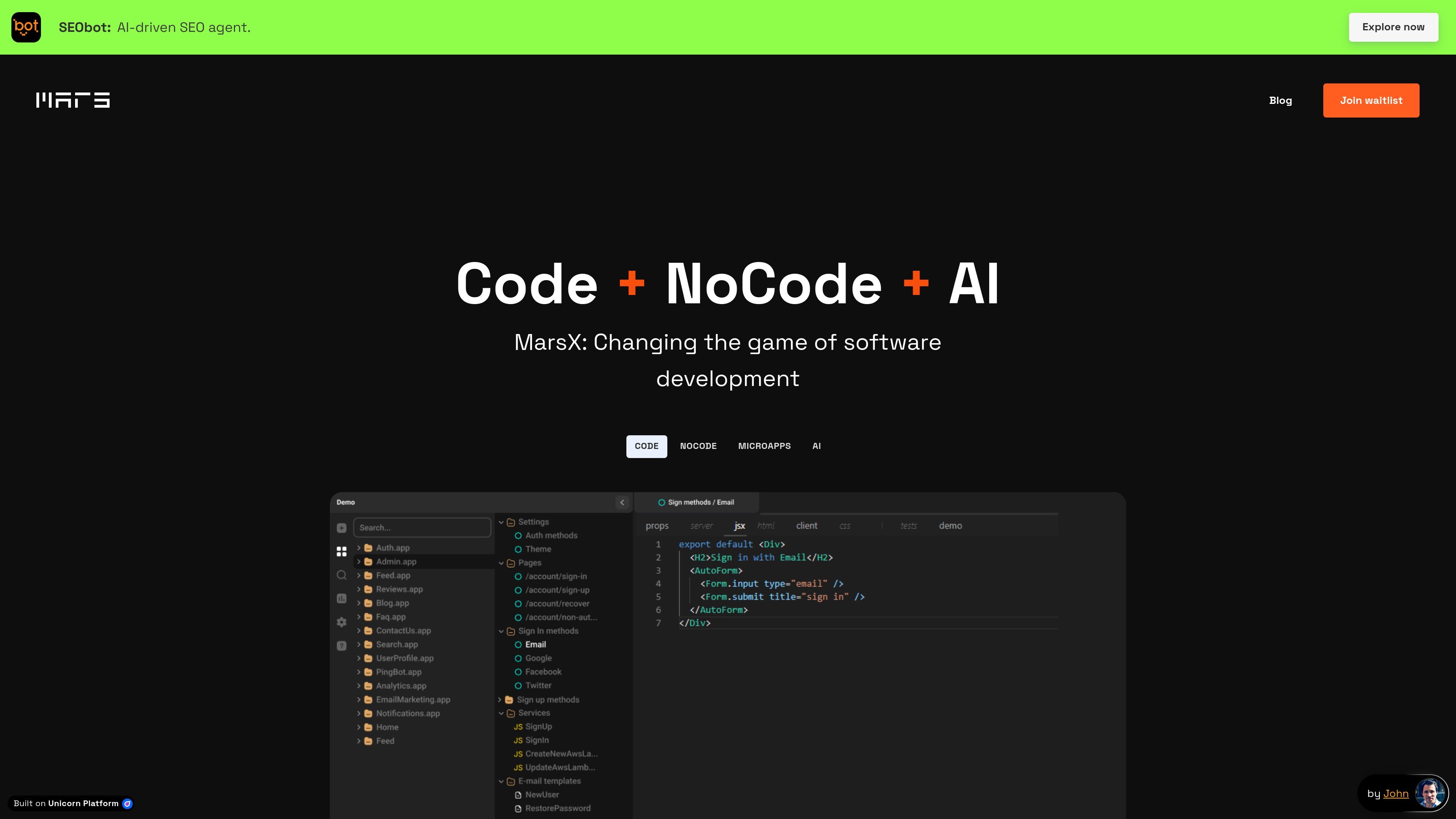
MarsX is a developer platform that combines no-code, code, AI, and micro-apps in one environment. It is designed to help teams start products quickly with prebuilt app components, then move into code when they need custom logic or platform-level changes.
The source positions Mars as a way to build SaaS tools, marketplaces, social apps, video portals, and other product types without starting from scratch. Its model centers on reusable micro-apps, a full-stack IDE, and the ability to customize or self-host the platform rather than being locked into a fixed no-code workflow.
Build with no-code for supported micro-apps, then switch into a coding interface when a project outgrows the no-code scope. The source says you can keep existing data and logic when moving between modes.
Use prebuilt micro-apps for common product patterns such as marketplaces, social networks, video portals, and photo-sharing apps. The homepage says these are designed to cover large parts of a project.
Work in a full-stack IDE that the source says includes JavaScript, optional TypeScript, and the ability to modify the engine itself. Mars describes this as one environment for the full application stack.
Deploy projects on your own server, on a local machine, or in a closed network. The source also notes cloud hosting as an available convenience option.
Use platform-level capabilities such as server, client, and database together, plus content management, administration dashboards, email marketing, push notifications, and localization. These are listed on the pricing page.
Access a marketplace and ecosystem of micro-apps built by third-party developers. The source says these creators are motivated by revenue and that apps are updated regularly.
Use Mars to assemble an MVP from existing micro-apps, then move into code only for the pieces that need custom logic. This fits teams that want to test a product idea quickly without building every layer from zero.
Build marketplace-style products such as peer-to-peer services, NFT marketplaces, or other two-sided platforms using prebuilt components for payments, listings, and related workflows. The homepage examples show several marketplace patterns.
Create client projects where simple parts are handled in no-code and harder parts are handled in code, reducing the amount of custom development work. The dev-shops page specifically frames Mars as a way to save time and lower maintenance.
Freelancers can use Mars to clone common app patterns, build custom client work faster, and potentially earn by creating or selling micro-apps. The freelancing page also mentions joining the marketplace and becoming a Mars developer.
Teams that need control over hosting or environment can run Mars on their own infrastructure instead of relying only on a managed SaaS setup. The source says it can run on your servers, locally, or in a closed network.
Mars is positioned as a dev tool that starts with no-code for supported micro-apps and switches to code when you need custom logic. The source says you can build fully no-code within the scope of existing micro apps, and then move into the Mars Code interface for deeper customization.
The source says Mars engine is free and open-sourced on GitHub under the Apache 2.0 license, while micro-apps are created by third parties and may be free or premium.
Yes. The source says there is no vendor lock and that Mars can run on your own servers, on a local machine, or in a closed network.
The source describes Mars as suitable for starting with simple app parts in no-code and moving to code for custom logic without throwing away what you built. It also says the platform includes a full-stack IDE and micro-apps that can be mixed and customized.
The pricing page shows a free plan for startups and an enterprise option with custom quotes and dedicated support. It also mentions project deployment on your or local server in the free plan details.

Ghost est un assistant IA en terminal pour discuter, générer du code et lancer des tâches en ligne de commande. Modèles gratuits, Linux, macOS, Windows, open source.

Devin is an AI coding agent and software engineer that helps developers and engineering teams plan and execute complex software tasks. It is available through desktop, cloud, JetBrains, and CLI surfaces, with plans for individuals, teams, and enterprises.

imgcook is a design-to-code tool that converts design drafts into front-end code. It supports plugin-based and developer workflows for Sketch, Photoshop, VS Code, and CLI usage.

Pi Coding Agent is a terminal-based coding agent for developers who want a minimal, extensible harness for interactive work and automation. It supports model switching, session branching, and multiple run modes including TUI, print/JSON, RPC, and SDK.

FigPrompt is an AI tool for creating production-ready Figma plugins from a written description. It helps Figma users move from idea to plugin logic without writing code.
Assemble by Cohesium AI is an open-source prompt orchestration system for AI coding tools. It generates native config files that turn one project into a structured multi-agent setup across 21 platforms.