
Diagram-based PR review
PR Lens presents code changes as animated architecture and data flow diagrams instead of relying only on raw diff text. The goal is to make the shape of the change easier to understand before reading line-by-line code.

PR Lens helps developers review pull requests by turning code changes into animated architecture and data flow diagrams inside the PR. It is aimed at AI-generated and other complex changes where understanding the system shape matters more than reading a long diff first.
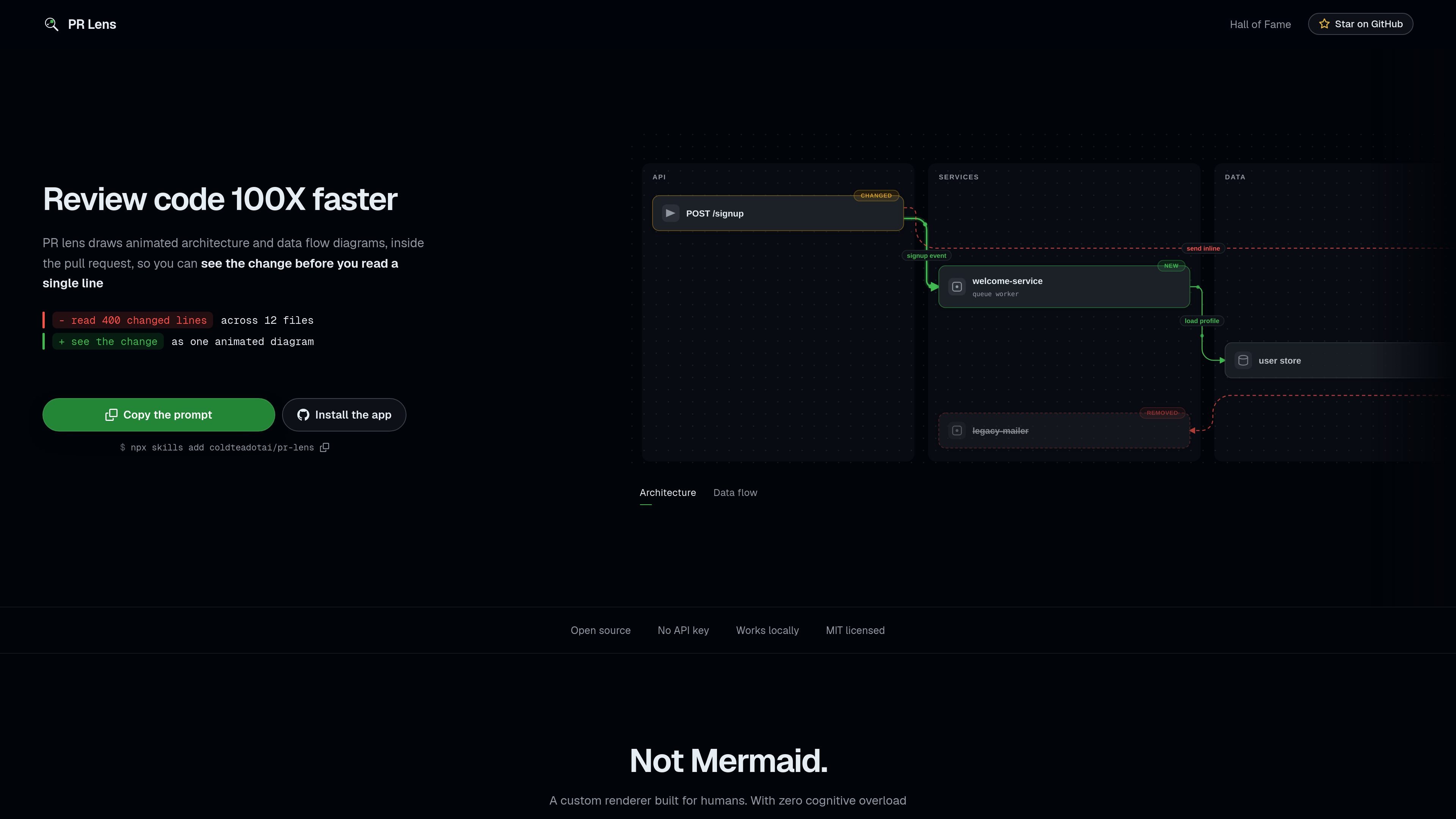
PR Lens is a developer tool for reviewing pull requests through animated architecture and data flow diagrams rendered inside the PR itself. Instead of forcing reviewers to parse a long wall of diff, it emphasizes the shape of the change, the parts that were touched, and the relationships between them.
The site positions the product for AI-generated and complex code changes where cognitive load is high. Example PRs show a change summary card, linked diagrams, and an interactive canvas that lets reviewers inspect architecture, data flow, and walkthrough steps in more detail.
PR Lens presents code changes as animated architecture and data flow diagrams instead of relying only on raw diff text. The goal is to make the shape of the change easier to understand before reading line-by-line code.
The rendered views highlight additions, changes, and deletions in context so reviewers can see what changed and what stayed in place. This helps preserve the system model across multi-file changes.
Architecture and data-flow lenses are both shown in the product examples, with the ability to drill into either view from the comment card or the canvas. That supports reviewing structure and runtime movement separately.
The gallery and PR examples show walkthrough-style interaction, including play controls, keyboard navigation, panning, zooming, themes, and fit-to-view controls on the canvas.
The site describes the renderer as deterministic and based on a strongly typed schema, which suggests the same input produces consistent diagrams suitable for repeatable review.
PR Lens is described as open source, local-first, and free of API-key requirements, with an example install command shown on the homepage.
Use it when a pull request spans several files or layers and a reviewer needs to understand how pieces connect before reading detailed code.
Use it for agent-authored changes, where a reviewer wants a higher-level view of the architecture and data flow before checking implementation details.
Use it when a change adds, removes, or reorganizes runtime paths such as queues, workers, or API calls and the sequence matters.
Use it when you want an interactive canvas for exploring a PR, including walkthrough steps, zooming, and theme switching, rather than a static summary.
Use it when reviewing codebases that benefit from a local, no-API-key workflow and a deterministic render from structured input.
The site shows a copy prompt and an install command using npm skills add coldteadotai/pr-lens, but it does not document a broader setup flow or prerequisites beyond that.
The homepage says PR Lens works locally, is open source, and does not require an API key.
The product renders pull requests as animated architecture and data flow diagrams inside the PR itself, with comments that link to a full-size interactive canvas.
The source does not document supported repositories, CI systems, or other platform integrations beyond the examples shown on the site.
The pricing page does not list plan details or prices in the provided source, so the site only confirms that a pricing page exists.

ByteAsk is a terminal-first AI coding agent for C and C++ that edits repositories and verifies changes with the real compiler, debugger, sanitizers, and tests before showing a diff. It offers a free tier plus paid plans, with editor connectors and zero-retention handling described in the source.

Manta AI is an autonomous web app testing tool for teams that want to map application behavior, catch regressions, and generate tests without writing scripts or maintaining selectors. It works from a URL and supports plain-English test flows, run results with screenshots, and scheduled or deployment-triggered checks.

Lucid Train is a local-first AI coding harness that turns repository code into architecture diagrams and uses those diagrams as specifications for coding agents. It is available as a desktop app and a lightweight Rust CLI, and it can run with local models or your own API keys.

Epherem is a static security scanner for web apps built with AI coding tools such as Lovable, Bolt, v0, Replit, Cursor, and Claude Code. It checks source files and dependencies for common security mistakes, then provides categorized findings and suggested fixes without running the app.

CreateOS Sandbox is an isolated compute environment for running code and agent workloads inside Firecracker micro-VMs. It is designed for workflows that need machine-level isolation, private networking between sandboxes, and programmatic control through SDK, CLI, or MCP.

GitBot is a local browser-based workspace for creating reusable coding bots powered by Claude Code, Codex, or OpenCode. It helps developers run those agents across repository folders with persistent threads and configurable permissions.