
App blocking
Choose apps that should prompt a deliberate decision before opening instead of relying only on a conventional time-limit warning.

Squirrel is an iPhone productivity app that puts selected apps behind a deliberate decision and records a user-defined amount as a personal savings commitment. It is designed for people who want to reduce habitual app use while handling any actual investing independently.
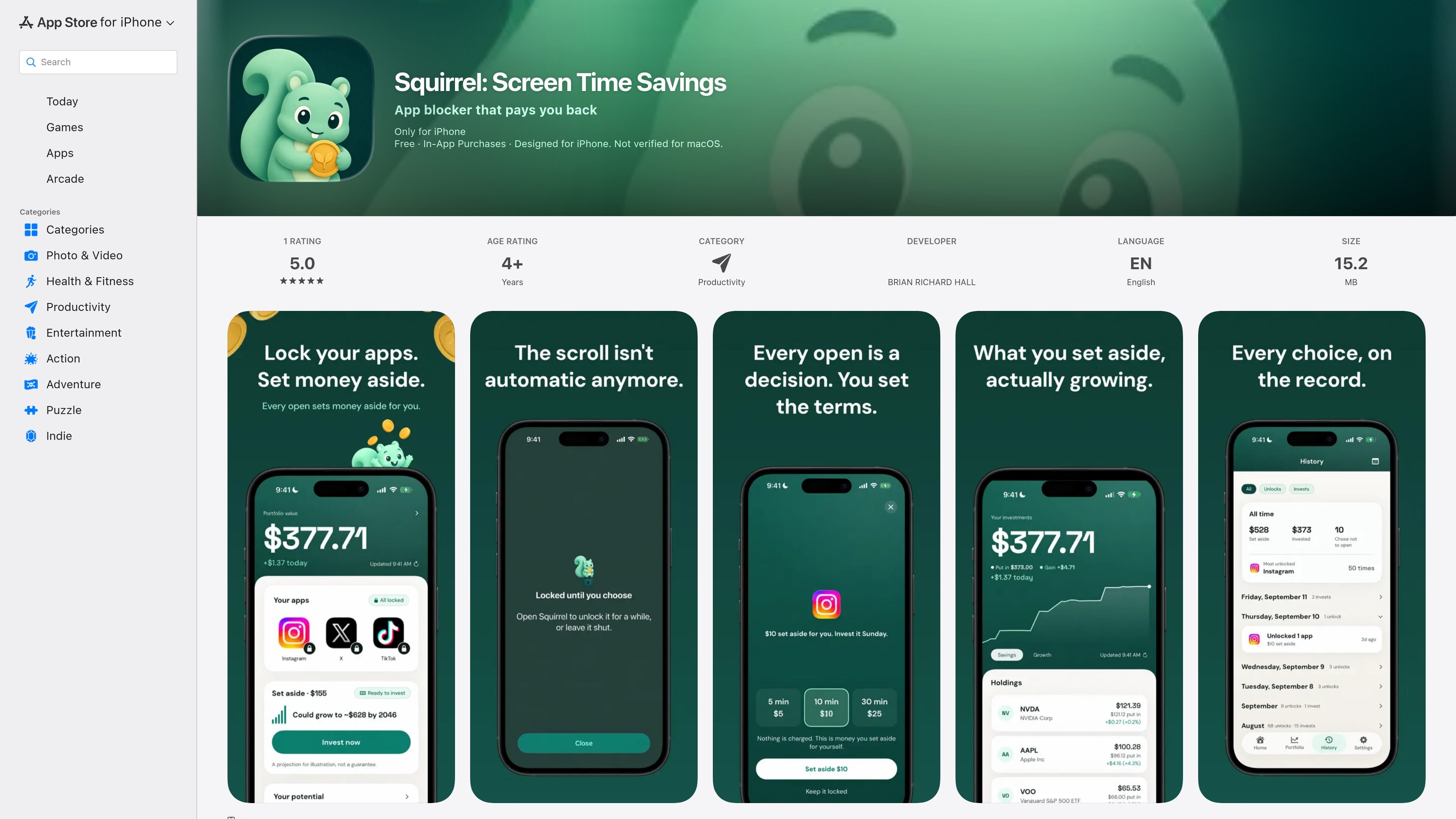
Squirrel is an iPhone productivity app for putting deliberate friction around habitual app opening. Users select apps to place behind a decision; opening one becomes a cue to set an amount aside for themselves rather than an automatic payment or transfer.
The app connects this screen-time intervention with a personal investing habit. Squirrel records the user's chosen amounts, while the user handles any actual investing independently. A free tier includes blocking, commitments, and savings history; an optional Portfolio upgrade adds investment-tracking views. Squirrel does not provide investment advice or operate as a financial account.
The product is aimed at people who want to keep access to social media or other apps while making habitual openings more intentional. Its App Store example describes reducing unplanned Instagram use without deleting the service.
Choose apps that should prompt a deliberate decision before opening instead of relying only on a conventional time-limit warning.
Assign a few dollars to an app-opening commitment. Squirrel records the amount as a note to yourself; it does not charge you or transfer funds.
Review the amounts you have set aside over time using the free savings history feature.
The optional Portfolio upgrade can track entered holdings and display growth charts, market prices, and projections.
The app states that it requires no account or login, shows no ads, and keeps information on the phone and in the user's own iCloud.
Select a social app that is often opened automatically and use the opening prompt to pause before scrolling, while keeping the app available for intentional communication or memories.
Use the app's commitment mechanic as a simple personal reminder to set money aside whenever a distracting app is opened, without authorizing an automatic charge.
Keep a record of repeated commitments in Squirrel, then invest the money yourself through an existing brokerage or other service rather than through the app.
Use the optional Portfolio view if you want Squirrel to display entered holdings, market prices, charts, and projections alongside the habit workflow.
Squirrel lets you choose apps to put behind a decision. When you open one, it prompts you to set an amount aside as a personal commitment. The app records the amount, but no payment is made through Squirrel and no money moves automatically.
The blocking workflow, setting money aside, and savings history are free. An optional Portfolio upgrade is listed as either $19.99 for lifetime access or $8.99 per year with auto-renewal; prices may vary by region.
No. Squirrel says it does not connect to a bank or brokerage, process payments, or move money. You invest separately wherever you already invest and can tell Squirrel what you bought.
The paid Portfolio view can show holdings, growth charts, market prices, and projections. The app states that displayed growth figures are illustrations, not guarantees, and that it is not a bank, broker, or financial adviser.
The App Store listing identifies Squirrel as an iPhone app and requires iOS 26.0 or later. It is listed as designed for iPhone and is not verified for macOS in the product description.

Goldfish is an AI memory app for macOS that helps you reply, write, summarize, and continue using the context already on your Mac. It stores memory locally and writes in your tone.

ArtDeck is a visual reference board app for iPhone, iPad, and Mac that lets artists collect mixed reference material on one canvas and study it with ToolBox lenses. It works offline, supports optional iCloud sync, and is sold as a one-time purchase with no account required.

Biji est une plateforme polyvalente conçue pour améliorer la productivité grâce à des outils et des fonctionnalités innovants.

Malyatko is a baby tracker for logging feeding, sleep, growth, teething, and milestones in one app. It works on iPhone, Apple Watch, and widgets, with no sign-up, offline use, and family sharing through iCloud.

Redline is a budgeting tool for Claude Code that paces sessions to stay within time, token, cost, or plan-percentage limits. It uses Claude Code’s native hooks and statusline to help sessions finish with a usable result instead of stopping abruptly.

Claude Overlay is a Windows desktop overlay for Claude Code that reads your screen so you can ask questions, inspect content, and request edits without leaving the current app. It runs on your existing Claude subscription through the Claude CLI, so no separate API key is required.