
Humanize AI text
Paste text into the app to make stiff, AI-sounding writing read more naturally while keeping it in the same language.

TypeKey is an iPhone AI writing app with paste-based tools and an optional keyboard for revising, generating, summarizing, translating, and replying to text. It helps users work on messages, emails, notes, and job-application materials without leaving supported apps.
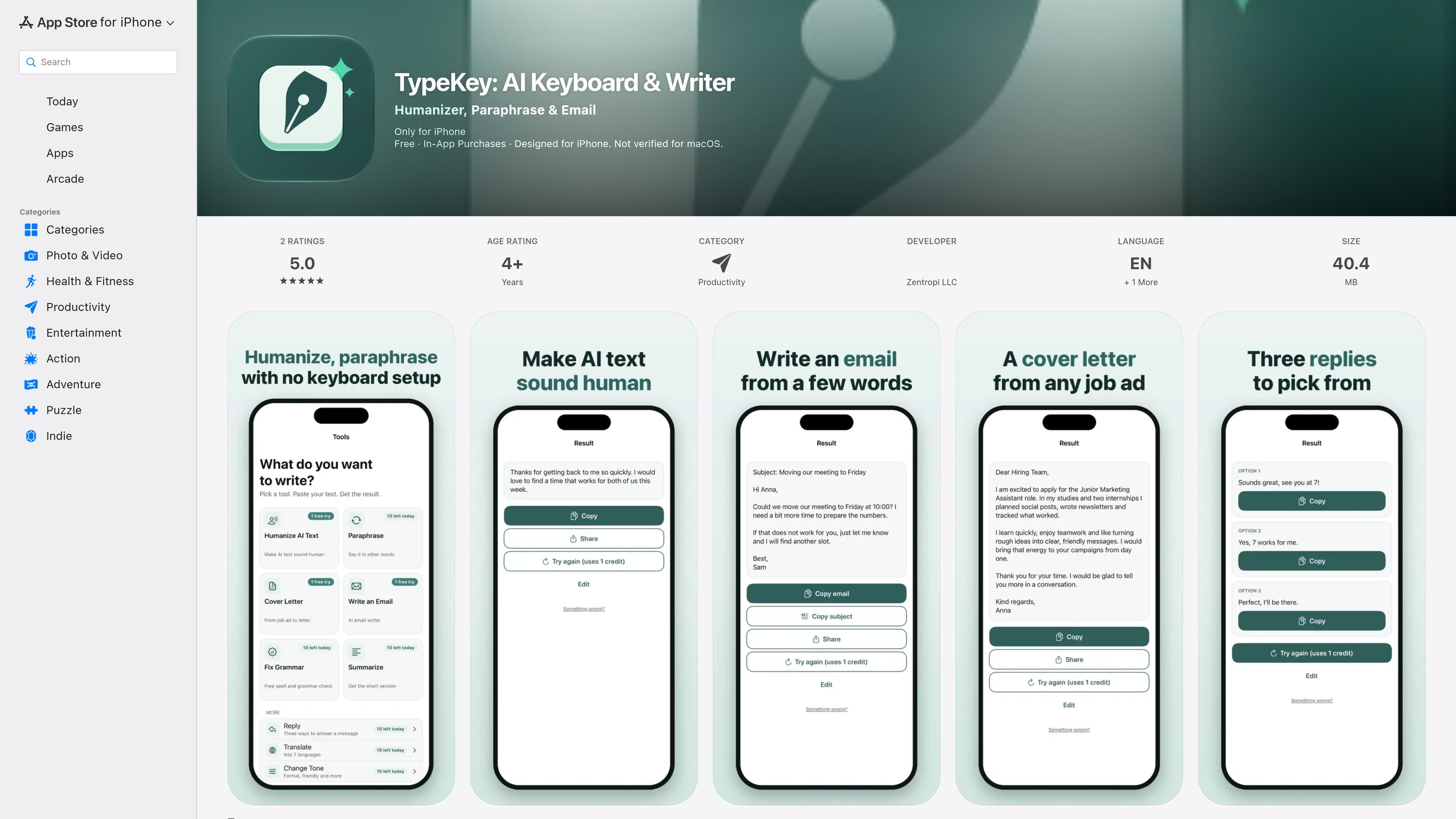
TypeKey is an iPhone productivity app from Zentropi LLC that combines an AI writing toolbox with an optional custom keyboard. It is designed for people who need to revise, generate, or shorten text while working in chats, email, notes, and other writing workflows.
The app’s tools can be used directly by pasting text, so keyboard setup is not required for the core workflow. Users can also enable the TypeKey keyboard to access actions inside Messages, Mail, WhatsApp, Instagram, Notes, and most other apps. Available actions include humanizing AI text, paraphrasing, correcting grammar, drafting emails and cover letters, summarizing, translating, changing tone, and generating message replies.
Paste text into the app to make stiff, AI-sounding writing read more naturally while keeping it in the same language.
Rewrite text with the same meaning, or correct spelling, grammar, and punctuation in complete sentences.
Provide a job ad and three lines about yourself to generate a cover letter in the language of the job ad.
Turn a few words into a complete email with a subject line, choosing Professional, Friendly, Short, or Persuasive as the style.
Create a shorter paragraph or bullet-point version of text, translate it into seven languages, or change its tone.
Use the TypeKey keyboard in supported apps to fix text, change tone, and reply to messages with three suggested answers.
Paste a rough message, choose a tone, and use the generated options to respond more quickly in personal or work conversations.
Turn notes or a short prompt into a complete email with a subject line, then select a Professional, Friendly, Short, or Persuasive style before editing and sending.
Give the tool a job advertisement and a few lines about your background to create a starting-point cover letter in the advertisement’s language.
Run grammar correction, paraphrasing, or tone changes on text written in Notes, Mail, or another supported app when the wording needs refinement.
Use summarization to convert longer material into a paragraph or bullet points, or translate text when communicating across supported languages.
TypeKey can be used in two ways: paste text into tools in the app without keyboard setup, or turn on the TypeKey keyboard to use its actions in Messages, Mail, WhatsApp, Instagram, Notes, and most other apps. Password fields and some apps only allow the iPhone keyboard.
The app supports English and German. Its Translate tool can translate text into seven languages, although the source does not list all seven languages.
TypeKey is free to download. Several tools have usage limits after an initial period, while Humanize, Cover letter, and Write an email can each be tried once for free. Premium unlocks every tool and preset every day; current prices are shown in the app and App Store before purchase.
TypeKey sends text to its server only when a user runs a tool or taps an action and agrees to AI processing in the app. The listing says the company does not store text on its server; Apple’s privacy disclosure separately indicates that some user content may be collected but not linked to the user.
The keyboard’s AI actions require Full Access. iOS requests this permission when the TypeKey keyboard is enabled. The app also offers its main tools without keyboard setup.

ProWritingAid is a writing assistant for storytellers that offers grammar checking, style editing, paraphrasing, and story analysis inside popular writing apps. It includes a free plan, paid tiers, and tools for chapter critique, manuscript review, and collaborative editing.

Dirac is an AI email assistant that prepares a morning brief, prioritizes important threads, and drafts replies in your voice. It is positioned for founders and other busy professionals who use Gmail and want to reduce morning inbox triage.

Dictro is a private AI dictation app for Mac that turns speech into polished text in any editable app. It works on Apple Silicon Macs, processes locally by default, and can also run in an optional cloud Fast Mode.

心流AI助手是一款面向知识获取与内容处理的 AI 助手,可用于实时问答、长文总结和写作辅助。公开页面显示它覆盖日常百科、生活信息和学术论文相关场景,并提供 App 体验入口。

Goldfish is an AI memory app for macOS that helps you reply, write, summarize, and continue using the context already on your Mac. It stores memory locally and writes in your tone.

Liam is an AI copilot for managing inboxes, writing replies, prioritizing email, and scheduling meetings. It is offered free for individuals, with custom pricing for teams and enterprise.