
Explore developer-built plugins
Browse plugins presented as agent skills, terminal tools, starter apps, feeds, and browser-based workflows built around daily.dev data or the public API.

daily.dev Marketplace is a directory of community-built plugins that add workflows on top of the daily.dev API. It helps developers and coding-agent users read feeds, search discussions, manage bookmarks, and connect daily.dev to terminals, apps, feeds, and agent workflows.
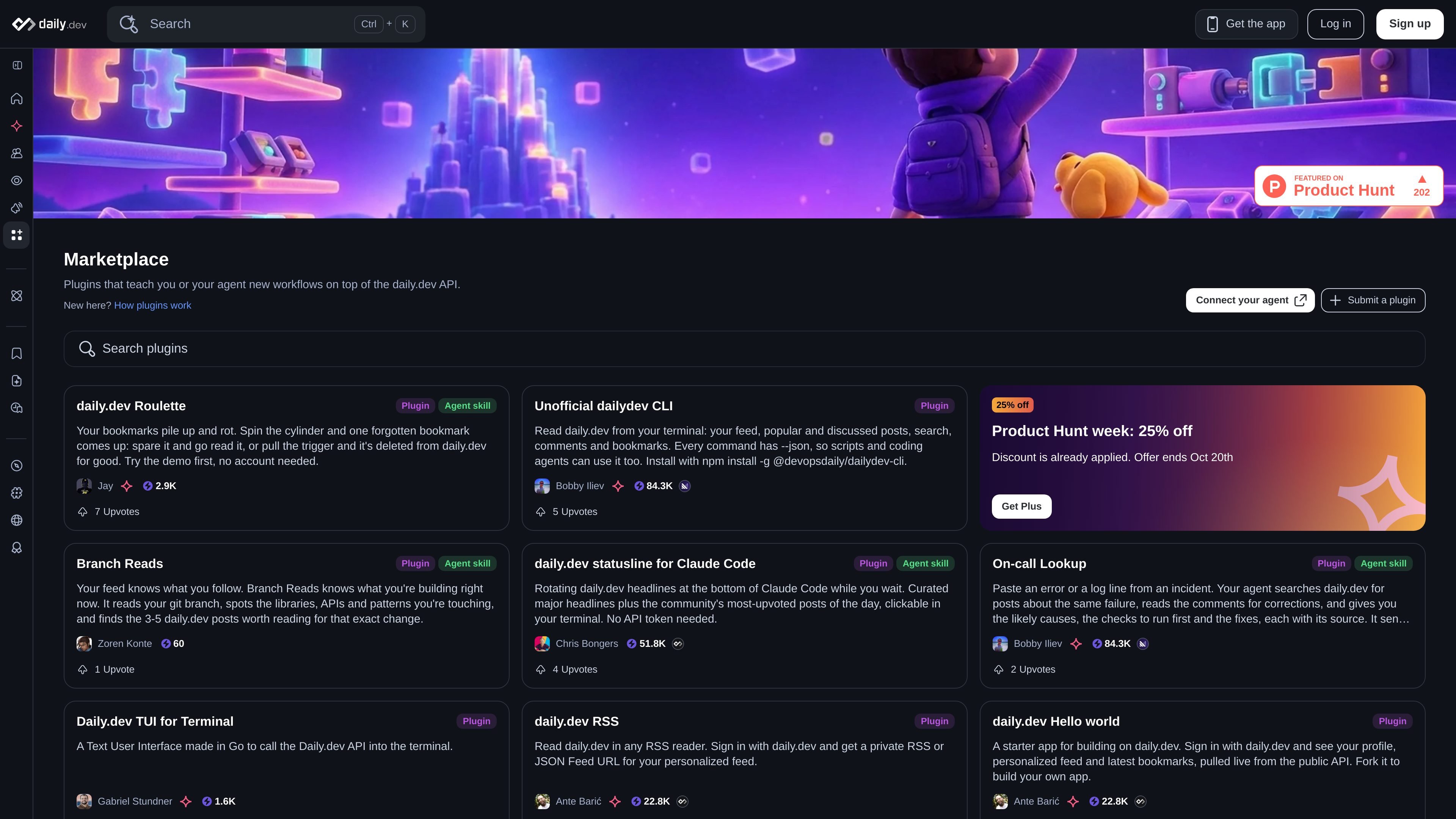
daily.dev Marketplace is a directory of plugins that add workflows on top of the daily.dev API. It includes tools for people using daily.dev directly as well as agent skills that let a connected coding agent retrieve, analyze, or update daily.dev information.
The catalog ranges from an unofficial command-line client and RSS access to bookmark utilities, feed customization, repository-aware recommendations, incident lookups, and starter applications. Each listing is built and shared by a developer, and the available setup, permissions, and compatibility depend on the individual plugin rather than on one marketplace-wide installation method.
Browse plugins presented as agent skills, terminal tools, starter apps, feeds, and browser-based workflows built around daily.dev data or the public API.
Use terminal-oriented tools to retrieve a personalized feed, popular or discussed posts, search results, comments, and bookmarks. The featured CLI also exposes JSON output for scripts and coding agents.
Connect daily.dev content to agent workflows. Featured skills cover bookmark review, branch-aware reading recommendations, incident research, notifications, profile updates, trend analysis, and release tracking.
Work with saved reading material through tools that select, summarize, export, or organize bookmarks. Examples include Roulette, Bookmarks to Notes, Bookmark Recap, and Inbox Zero.
Use integrations and sample applications beyond the main feed, including RSS or JSON Feed access, a Go terminal interface, a statusline for Claude Code, and a Hello World app using the public API.
Inspect community-submitted entries through descriptions, author information, links, upvotes, and—where provided—usage instructions or demos before choosing a workflow.
Use the Unofficial dailydev CLI to inspect a feed, search for a technical topic, open a post, read comments, or manage bookmarks without leaving a terminal. JSON output can be piped into shell tools or a coding agent.
Use Branch Reads or Stack Sync when working in a repository. These workflows connect the code context—such as a branch or dependency manifests—to daily.dev reading preferences and related posts.
Use Roulette, Bookmarks to Notes, or Bookmark Recap to reduce an accumulated reading list, export saved posts to a notes folder, or prepare a weekly summary for standup, Slack, or a newsletter.
Use On-call Lookup, Upgrade Scout, Release Radar, or Community Check when investigating an incident, planning a dependency change, tracking releases, or evaluating a tool. These workflows use daily.dev posts and, in some cases, comments as research input.
Build or connect a separate client with the daily.dev Hello World app, RSS or JSON Feed, TUI, or Claude Code statusline examples when the preferred reading surface is not the standard web feed.
The marketplace lists plugins that add workflows on top of the daily.dev API. The examples include terminal clients, agent skills, browser-based tools, RSS or JSON Feed access, and starter applications.
The available workflows depend on the individual plugin. Examples include reading feeds and discussions, searching posts, managing bookmarks, exporting saved posts, and using daily.dev content from an agent or terminal.
Some plugins provide their own installation or usage instructions. For example, the Unofficial dailydev CLI is installed with npm install -g @devopsdaily/dailydev-cli and requires Node.js 22 or later; other plugins can be used through an agent connected to the daily.dev API or MCP server.
The marketplace page does not establish a single pricing model for all plugins. daily.dev itself offers a free plan, while Plus is an optional paid subscription; the pricing or service requirements of an individual plugin should be checked on its detail page.
No single compatibility list is provided for the marketplace. Individual entries identify their supported usage pattern, such as an agent skill, terminal application, RSS or JSON Feed, or browser-based demo, so compatibility should be evaluated per plugin.

CreateOS Sandbox is an isolated compute environment for running code and agent workloads inside Firecracker micro-VMs. It is designed for workflows that need machine-level isolation, private networking between sandboxes, and programmatic control through SDK, CLI, or MCP.

GitBot is a local browser-based workspace for creating reusable coding bots powered by Claude Code, Codex, or OpenCode. It helps developers run those agents across repository folders with persistent threads and configurable permissions.

AakarDev AI helps teams manage AI provider access, project-level setups, logs, and analytics from one dashboard. It supports BYOK workflows and lists providers including OpenAI, Google Gemini, Anthropic, Groq, Mistral AI, and Perplexity AI.

Trigger.dev chat agent is a durable AI chat backend for developers building stateful conversations that can survive refreshes, crashes, and long-running turns. It connects with the AI SDK `useChat` flow and runs on managed infrastructure with no timeout on a turn.

ByteAsk is a terminal-first AI coding agent for C and C++ that edits repositories and verifies changes with the real compiler, debugger, sanitizers, and tests before showing a diff. It offers a free tier plus paid plans, with editor connectors and zero-retention handling described in the source.

Epherem is a static security scanner for web apps built with AI coding tools such as Lovable, Bolt, v0, Replit, Cursor, and Claude Code. It checks source files and dependencies for common security mistakes, then provides categorized findings and suggested fixes without running the app.