
Inbox scoring and prioritization
Connect Gmail or Outlook and have each email scored from 0 to 100 using urgency, revenue risk, deadline, and sender importance. The composite score re-ranks in real time as new mail arrives and as your day changes.

DailyTaskProAI is an AI email management tool for Gmail and Outlook that scores incoming messages, drafts replies, and helps teams prioritize what to handle first. It combines inbox triage, task assignment, and security-conscious email handling in a single web app.
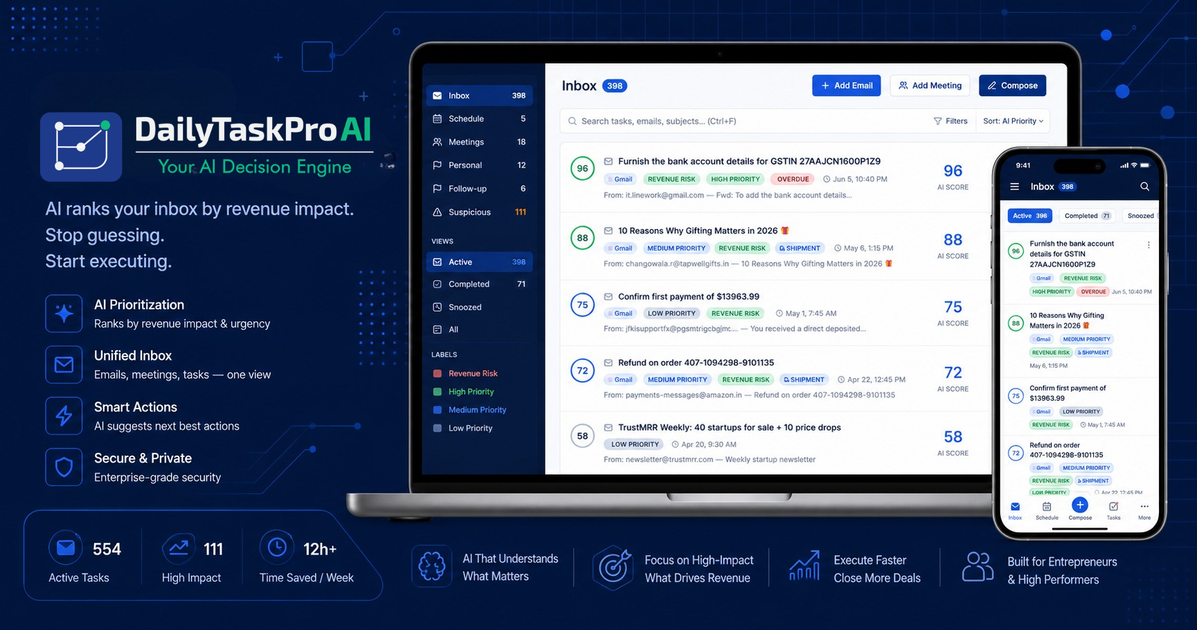
DailyTaskProAI is an AI email management tool for Gmail and Outlook that scores incoming messages, ranks them by urgency and revenue risk, and helps users decide what to handle first. The product frames itself around the question “What should I do first right now?” rather than around traditional inbox organization.
It combines inbox triage, AI-drafted replies, and task assignment in a single web app. The site says it connects to Gmail or Outlook through OAuth, shows priorities in a dashboard, and keeps revenue-risk emails under human review before anything is sent automatically.
Connect Gmail or Outlook and have each email scored from 0 to 100 using urgency, revenue risk, deadline, and sender importance. The composite score re-ranks in real time as new mail arrives and as your day changes.
AI generates reply drafts from the thread context and your past replies, with tone and length controls. Drafts can be reviewed, edited, sent manually, or sent with a 5-minute undo window if Auto-Send is enabled.
Gmail and Outlook accounts are merged into one inbox, sorted by AI priority rather than chronology. The interface shows task lists, to-do items, assignments, calendar, and connected accounts in one place.
Any email thread or task can be assigned to a teammate in one click, with notifications and tracking for both assigned-to-me and assigned-by-me work. Manager views include department breakdown and top-assignee visibility.
The product can auto-tag threads such as revenue risk, follow-up, client, overdue, and GST (India), helping users group mail by work type and urgency.
Security controls include Google OAuth sign-in, Microsoft sign-in support, TLS 1.3 in transit, AES-256 at rest, and a policy of not storing email passwords. The security page also says full email bodies and attachments are not persisted.
Use the priority score to identify which inbox threads need attention first, especially when the queue includes payment issues, client escalations, contract deadlines, and follow-ups.
Generate a draft reply from the incoming thread, then edit it or send it after review. This is useful when you need to respond quickly but still want control over the final message.
Assign an email or task to a teammate directly from the inbox when a request needs another person's action. The product keeps track of assigned work so requests do not disappear into email threads.
Monitor threads where money is at risk, such as invoices, payment requests, or deal-critical messages. The site says these emails receive higher priority and are blocked from auto-send.
Manage mixed Gmail and Outlook mail in one place instead of switching between accounts. The merged inbox and priority sorting are designed for users who handle several mail streams during the day.
DailyTaskProAI connects to Gmail or Outlook through OAuth. The site says setup takes about 2 minutes and the first score can appear in about 3 minutes.
It scores incoming email with a 0–100 composite score based on urgency, revenue risk, deadline, and sender importance, then surfaces priorities in a dashboard and inbox view.
The pricing page says you can start free, get 14 days of Pro access, and no credit card is required to begin. It also shows a founding offer with a locked $19/month price.
The site shows support for individual Gmail and Outlook accounts, plus team-oriented assignment and tracking features. It does not provide detailed seat limits or collaboration rules in the available text.
Revenue-risk emails are never auto-sent. The security page says full email bodies and attachments are processed in memory for scoring and draft generation, then discarded, while task context such as sender, subject, date, and a short snippet is retained.

Biji è una piattaforma versatile progettata per migliorare la produttività attraverso strumenti e funzionalità innovative.

Liam is an AI copilot for managing inboxes, writing replies, prioritizing email, and scheduling meetings. It is offered free for individuals, with custom pricing for teams and enterprise.

hob is an independent workspace for coding agents that keeps agent sessions, terminals, history, and follow-up work organized around the tools and providers you already use. It is aimed at developers who want local control over routing, history, and workspace structure rather than a bundled model stack.

Sequenzy is an email marketing and automation platform for SaaS teams, stores, and AI teams. It combines campaigns, event-driven workflows, transactional email, segmentation, and revenue attribution, with developer and AI-agent access.

Dcyde is a decision log for product teams that captures what was decided, the reasoning behind it, and the source in one shared place. It supports pinning decisions from Slack, Figma, or inside Dcyde and keeps the record searchable over time.

runevr is a connected workspace for creative teams that combines boards, media review, chat, recordings, drive, calls, and AI agents in one room-based environment. It is designed to reduce tool switching and keep project context together.