
Run inspection
Inspect the exact prompt each model received, every tool call and result, memory changes, and the agent or step that wrote each note.

guilds.run is an open-source platform for running teams of AI agents on your own machine, with schedules, shared data, scripts, and persistent workflow state. It helps individuals and teams inspect prompts, tool calls, memory changes, and agent work instead of treating multi-agent workflows as a black box.
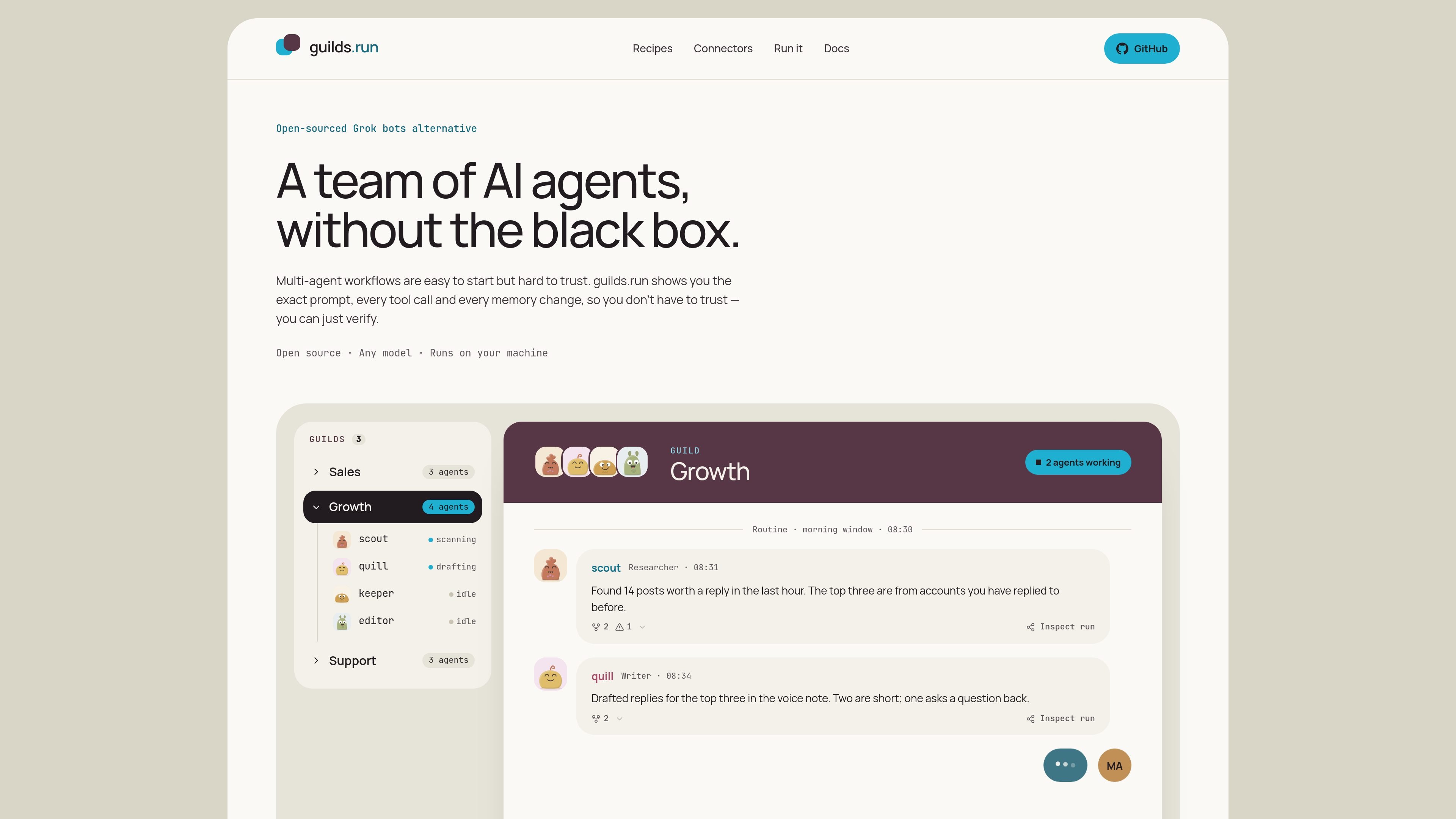
guilds.run is an open-source platform for running teams of AI agents on your own machine. A guild combines agents, tasks, schedules, shared tables, notes, memory, and scripts so multiple agents can work through a repeatable process rather than producing an isolated chat response.
The platform focuses on inspectability: each run records the prompt shown to the model, tool calls and their results, memory changes, and authorship of notes. Users can inspect and edit the resulting state, review proposed workflow changes in Studio, and keep control over when changes are published. A hosted version is planned, but it is not currently available.
Inspect the exact prompt each model received, every tool call and result, memory changes, and the agent or step that wrote each note.
Keep agent notes, memory, scripts, and tables between runs. Changes are editable, versioned, and attributed to the person or agent that made them.
Coordinate agents through routines, direct messages, and posts. Schedules can wake agents at defined intervals, while people can review and direct work in shared guild rooms.
Use shared tables that agents can read and write for queues, research records, monitoring data, and other workflow state.
Run scripts in an agent workspace, including Python examples for fetching, scoring, and writing records. The site describes these scripts as sandboxed.
Studio reviews runs, notes, memory, and schedules to identify a workflow problem and draft a proposed change. The change is not applied until a person publishes it.
A growth team can schedule watchlist sweeps, have one agent score posts, another draft replies, and a third maintain the queue. People can review drafts and tell the team which items to publish or hold.
Agents can research accounts, draft outreach in a defined voice, and store prospects or conversation state in shared tables so the process remains organized between runs.
An inbox-oriented team can read incoming requests, tag and route them, and draft first replies for human review before anything is sent.
Research agents can collect and score information, write records to tables, and maintain project or market-monitoring notes that other agents can use later.
Development teams can use agent roles to triage issues, review pull requests, and keep a backlog moving while retaining run history and workflow state.
Not yet. Hosted is coming soon. Until it opens, the open-source version can be run on your own machine.
The self-hosted version is started with the project's setup script and Docker Compose. It runs on your machine, and you provide the model keys and data environment.
Hosted is planned to start at $19 per month. The hosted service adds sign-in, invitations, billing, and access to the public recipe directory. Model usage is billed separately when platform keys are used.
You can use platform model keys on hosted, or connect your own OpenRouter, DeepInfra, or other provider keys and pay that provider directly. Self-hosted use requires keys that you set.
Yes, once hosted opens. A guild can be captured as a recipe and applied in the other environment, but recipes do not carry secrets, memory, or browser profiles; those must be reconnected after applying the recipe.

CreateOS Sandbox is an isolated compute environment for running code and agent workloads inside Firecracker micro-VMs. It is designed for workflows that need machine-level isolation, private networking between sandboxes, and programmatic control through SDK, CLI, or MCP.

GitBot is a local browser-based workspace for creating reusable coding bots powered by Claude Code, Codex, or OpenCode. It helps developers run those agents across repository folders with persistent threads and configurable permissions.

Codex Plugins bundle reusable skills, app integrations, and MCP servers into workflows you can install in the Codex app or use from Codex CLI. They help extend Codex with connected-service tasks, reusable instructions, and shared team workflows.

AakarDev AI helps teams manage AI provider access, project-level setups, logs, and analytics from one dashboard. It supports BYOK workflows and lists providers including OpenAI, Google Gemini, Anthropic, Groq, Mistral AI, and Perplexity AI.

Trigger.dev chat agent is a durable AI chat backend for developers building stateful conversations that can survive refreshes, crashes, and long-running turns. It connects with the AI SDK `useChat` flow and runs on managed infrastructure with no timeout on a turn.

ByteAsk is a terminal-first AI coding agent for C and C++ that edits repositories and verifies changes with the real compiler, debugger, sanitizers, and tests before showing a diff. It offers a free tier plus paid plans, with editor connectors and zero-retention handling described in the source.