
Two-photo scene setup
Assign one uploaded photo to the headphone-wearing listener and the other to the speaker. The scene choreography and dialogue timing are preset, so no text prompt or manual audio timeline is required.

I Love The Smiths AI turns two user-supplied photos into a 15-second, widescreen recreation of the viral elevator scene, with preset choreography, reference audio, and no watermark. It is intended for personal social clips featuring consenting adults or the user’s own pets, rather than general-purpose video editing.
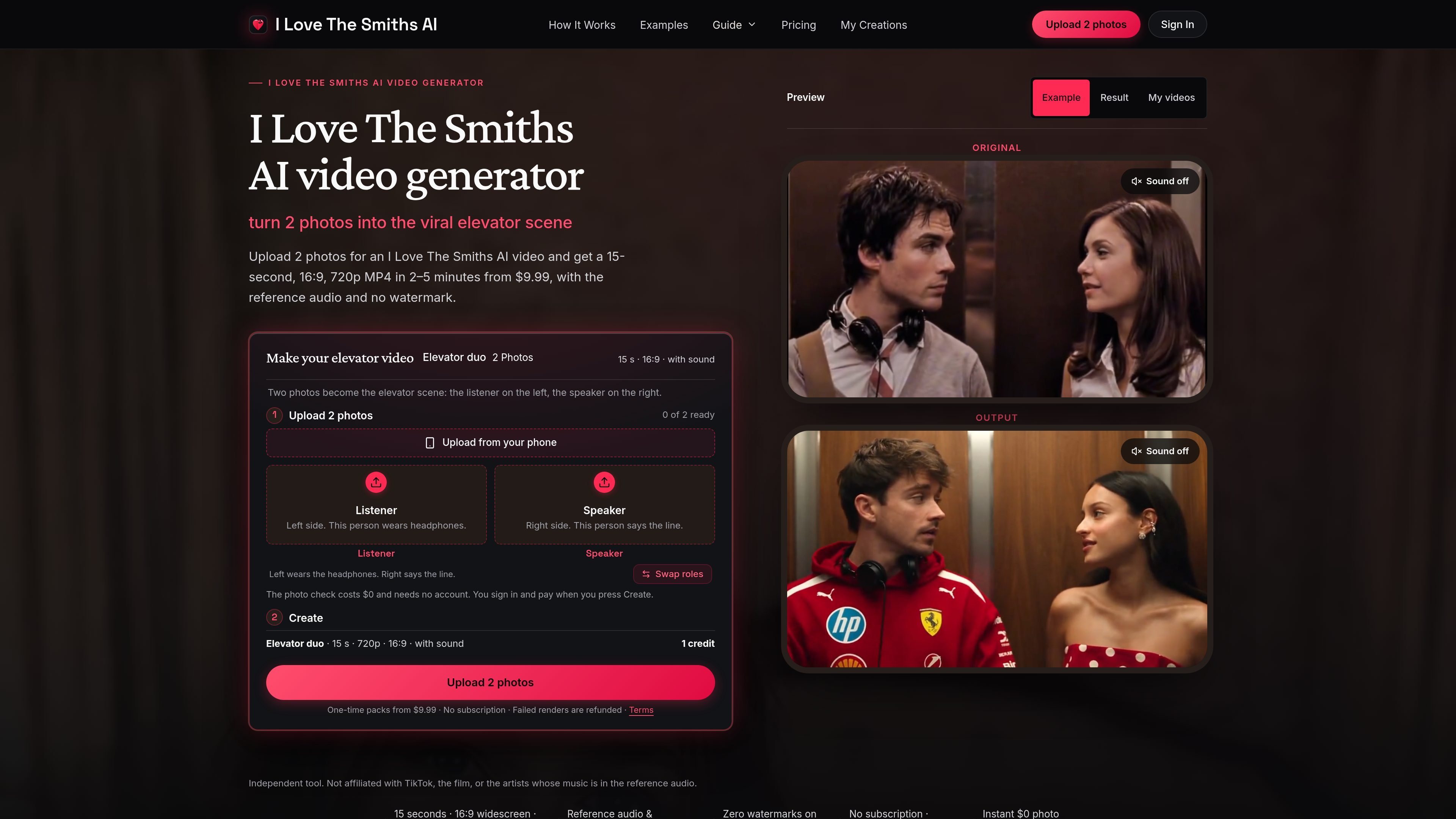
I Love The Smiths AI is a specialized AI video generator that turns two photos into a recreated elevator scene based on the reference moment from the 2009 film (500) Days of Summer. The user assigns a listener to the left slot and a speaker to the right; the generated scene keeps the subjects together in the elevator for 15 seconds.
The service is designed for people who want a ready-made meme or social video without writing prompts, synchronizing dialogue, or editing a timeline. It produces a 16:9 720p MP4 with reference audio and no watermark. The tool is independent and states that it is not affiliated with the film, TikTok, or the artists whose music appears in the reference audio.
Assign one uploaded photo to the headphone-wearing listener and the other to the speaker. The scene choreography and dialogue timing are preset, so no text prompt or manual audio timeline is required.
Creates a 15-second MP4 in 16:9 widescreen at 1280×720, 24 fps, with the reference audio and synchronized dialogue.
The reference elevator setting, camera movement, headphones, and audio structure are applied to the two selected subjects, while clothing comes from the uploaded photos.
A $0 validator checks each image for a single visible subject or pet head before checkout. It does not render a video preview.
Exports contain no watermark or on-screen text, and the service normally deletes uploaded photos, intermediate files, and finished videos after 24 hours.
One-time credit packs are available for one, three, or five videos, with no subscription or automatic renewal. Failed technical renders return the used credit.
Use two friends’ photos to create a short elevator clip for a group chat, with one person assigned to the listener role and the other to the speaker role.
Pair two photos of a couple or use the scene as a light anniversary or personal-message post, while keeping the output in the fixed widescreen format.
Place a dog or cat in either slot for a pet-focused version of the scene. A pet in the left slot remains an animal while taking the listener role.
Use separate family photos, or cast yourself in both roles with two files, to make a short family-chat video. Each slot still requires its own image.
Upload two separate photos, placing the listener in the left slot and the speaker in the right. Run the free photo check, then sign in, pay with a credit, and download the rendered MP4 from My Creations.
Each video is a 15-second, 16:9, 1280×720 MP4 at 24 fps, with the reference audio in sync and no watermark. The order flow does not offer 1080p or 9:16 output.
The photo check is free and does not require an account. Creating a video requires signing in and using one credit. The one-video pack costs $9.99; larger one-time packs are also available.
Each input should contain one person, dog, or cat facing the camera. Supported formats are JPG, PNG, and WebP, up to 10 MB, with a short side of at least 320 pixels. Photos are normally deleted after 24 hours.
If a render fails for a technical reason, the used credit is returned automatically. A finished video that you simply dislike is not described as eligible for a cash refund in the source material.

DANCING CATS App turns cat pictures into dancing kitty clips. The public homepage is sparse, so the core use case is clear while pricing, outputs, and feature depth remain undocumented.

VIDEOAI.ME is an AI video generator for making spokesperson-style videos, ads, explainers, and social content from a script. It is aimed at founders, marketers, agencies, and creators who want to produce videos without filming.

Topview AI is a web-based AI video creation platform for social ads, ecommerce creatives, avatar videos, and short drama workflows. It combines channel-based templates, prompt-driven generation, reference uploads, and storyboard-based production tools.

Virvid is an AI shorts generator for creators and marketers who want to make faceless short-form videos for TikTok, Instagram Reels, and YouTube Shorts. It supports both manual video creation and automated daily posting workflows.

MemeVideoMaker is a browser-based AI tool that places user-provided photos into predefined viral video templates. It helps individuals create short, watermark-free MP4 remakes for formats such as TikTok, Instagram Reels, and YouTube Shorts without manual timeline editing or prompt writing.
MIRA vision develops synthetic-data-driven AI for pathology image analysis in medical diagnostics. Its website positions the product for teams that need privacy-compliant training data, automatic annotations, and controlled data generation.