
On-device model execution
Run quantised open-weight models through llama.cpp on the phone's CPU and GPU. Once a model is downloaded, prompts can be processed without an internet round-trip.

KernelAI is a mobile AI app that runs 53 open-weight models locally on iPhone, iPad, and Android devices. It helps users chat, work with documents and images, code, and use AI offline without an account or subscription.
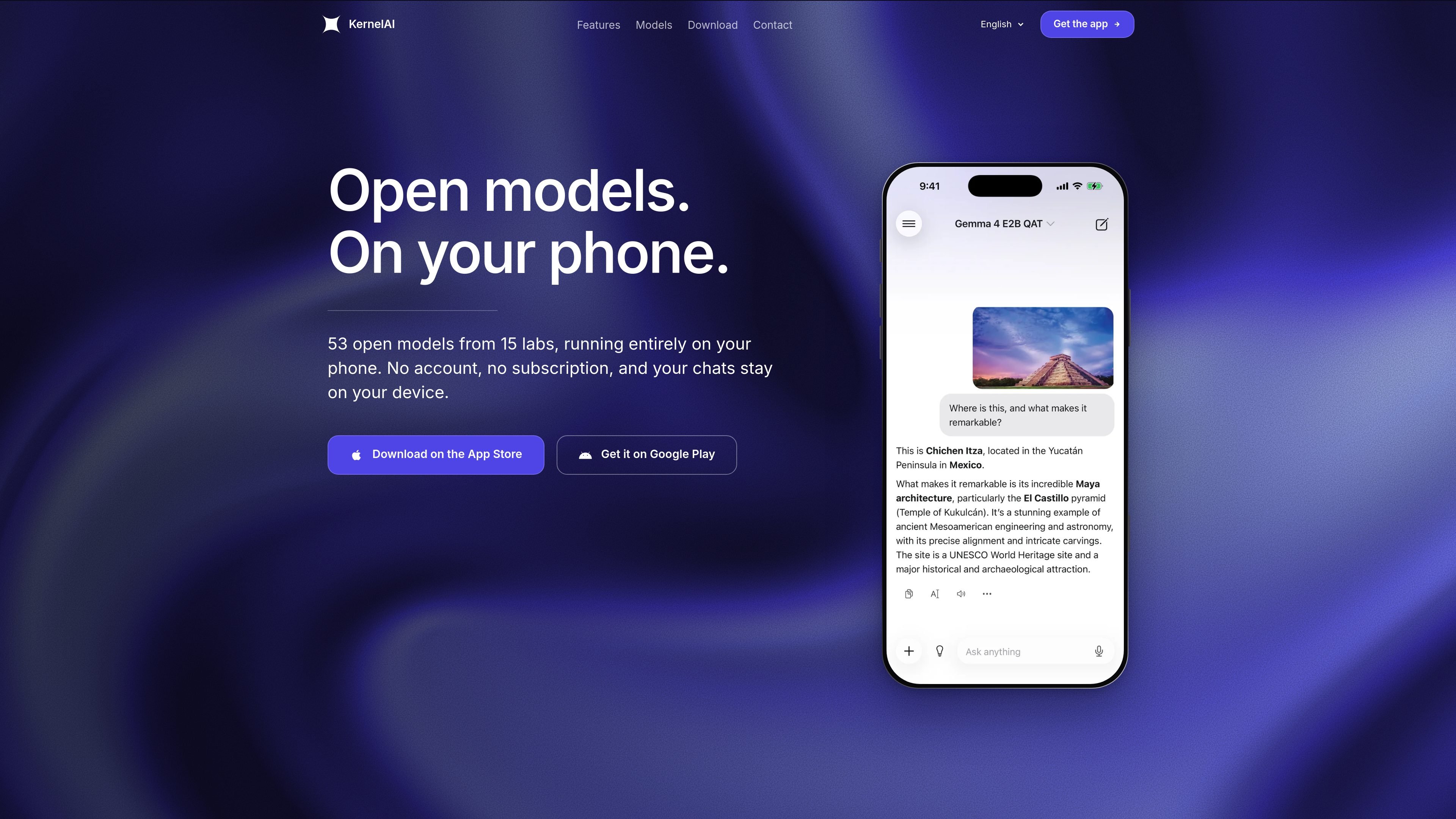
KernelAI is a mobile AI app for running open-weight language and multimodal models locally on iPhone, iPad, and Android devices. It offers a catalog of 53 models from 15 labs, with each model downloaded to the device and used for tasks such as chat, coding, document questions, image understanding, and translation.
The app is designed for workflows that do not require a cloud account or a continuous connection. After a model download, conversations can continue offline; the device checks available memory and hides models that will not fit. Optional web search adds current information through a user-provided Tavily or Exa key, while remaining disabled until the user turns it on.
Run quantised open-weight models through llama.cpp on the phone's CPU and GPU. Once a model is downloaded, prompts can be processed without an internet round-trip.
Choose from 53 models published by 15 labs, with downloads ranging from 112 MB to 3.11 GB. The catalog includes text, coding, multilingual, reasoning, vision, roleplay, and web-search models.
Attach a PDF, Word file, or spreadsheet and ask questions about it without uploading the attachment. Vision-capable models can also interpret photos, screenshots, signs, menus, charts, and receipts.
Enable web search only when needed by adding a personal Tavily or Exa API key. Supported models return answers with sources, while the key remains in the iOS Keychain.
Set a system prompt or use presets to define tone, format, or persona across conversations. Users can also import compatible GGUF models from Files or a URL as an experimental feature.
Use on-device dictation and system voices for spoken interaction, and trigger local AI through the Ask KernelAI and Extract Text from Document Shortcuts actions.
Download a suitable model before traveling, then draft text, ask questions, or work through ideas in airplane mode or places without reliable signal.
Attach a PDF, Word file, or spreadsheet and ask for explanations or specific information while keeping the file on the device rather than uploading it to KernelAI.
Use a vision model to read a photographed sign, menu, chart, receipt, or screenshot, including text contained in the image.
Ask for a function, debugging help, or an explanation and receive syntax-highlighted code even when disconnected. Shortcuts can also pass prompts or extract document text as part of a phone automation.
KernelAI is free to use with no account, subscription, usage caps, or feature-gated tip tier stated on the site. Optional tips support development but do not unlock features.
Install the app from the App Store or Google Play, choose a model, and download it separately. After the model is on the device, it can run without a network connection. The app measures available device memory and disables models it cannot fit.
The app supports iPhone and iPad with iOS 16.4 or later, and Android devices with Android 7.0 or later. Available models depend on the device's measured memory.
Ordinary chat, attached documents, images, and dictation are processed on the device according to the site. Model downloads and optional web search use the network. Web search is off by default and requires the user's own Tavily or Exa API key; queries go to the selected provider.
Yes. Users can import a GGUF file from Files or a direct URL, including a server on their own network. This feature is marked experimental because compatibility can vary between files.

Grok 4.7 is an xAI model for software development and knowledge work, including extended coding tasks and professional analysis. It is available through Grok Build, Cursor, the Grok API, and other developer platforms, with token pricing starting at $2 per million input tokens and $6 per million output tokens.

ByteAsk is a terminal-first AI coding agent for C and C++ that edits repositories and verifies changes with the real compiler, debugger, sanitizers, and tests before showing a diff. It offers a free tier plus paid plans, with editor connectors and zero-retention handling described in the source.

GitBot is a local browser-based workspace for creating reusable coding bots powered by Claude Code, Codex, or OpenCode. It helps developers run those agents across repository folders with persistent threads and configurable permissions.

Ghost è un assistente AI da terminale per chattare, generare codice ed eseguire task da riga di comando. Include modelli gratuiti, supporta Linux, macOS e Windows, ed è open source.

Vi3ecode is a maintained development environment for working with AI coding agents. It keeps project context, terminal, Git, memory, flows, review, and communication connected around the agent you already use.

AakarDev AI helps teams manage AI provider access, project-level setups, logs, and analytics from one dashboard. It supports BYOK workflows and lists providers including OpenAI, Google Gemini, Anthropic, Groq, Mistral AI, and Perplexity AI.