
Multi-channel AI sales agent
Knock Knock uses a single AI agent, Nox, to handle website chat, inbound calls, outbound calls, and video conversations from one workflow.

Knock Knock is an AI sales agent for websites that chats, calls, books meetings, and logs interactions to a CRM. It helps teams capture and qualify leads across onsite, phone, and outbound workflows.
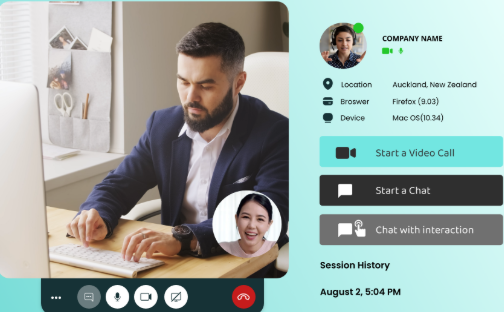
Knock Knock is an AI sales layer for websites built around an agent named Nox. It is positioned as a replacement for a stack of separate tools such as chat, voice, scheduling, visitor tracking, and CRM connectors by combining those tasks in one workflow.
The product is designed to engage visitors across onsite chat, inbound phone, and outbound follow-up, then qualify leads, book meetings, and log interactions back to a CRM. The site describes a simple setup flow: add a snippet, connect your CRM, and configure the offer, with a claimed setup time of about 10 minutes.
Knock Knock uses a single AI agent, Nox, to handle website chat, inbound calls, outbound calls, and video conversations from one workflow.
The product identifies visitors in real time, tracks what they view, and uses that context to decide when to engage.
Nox can chat, call, book meetings, and push interaction history into a CRM so follow-up information is retained outside the widget.
The site and pricing pages describe one-click takeover, letting a human step into chat, voice, or video with the conversation context preserved.
The product sends a plain-English morning brief and supports daily office hours support plus onboarding options on higher plans.
The pricing page includes white-label access, an agency portal, and reseller-oriented packaging for agencies managing multiple clients.
Use Nox to greet site visitors, identify high-intent prospects, answer questions, and book meetings without requiring a rep to be present at all hours.
Use the inbound voice workflow to answer calls, capture details, and route qualified callers to a calendar or a human when needed.
Use the outbound workflow to follow up with new leads before they cool off, run campaigns, and move warm leads into booked meetings.
Use the one-click takeover flow when a conversation becomes high value or needs a human, while retaining the visitor context and conversation history.
Use the agency and white-label packaging to run the product for clients under your own brand and manage multiple accounts from an agency portal.
Yes. The pricing page describes a 7-day free trial and says you can cancel anytime. The site also says setup takes about 10 minutes.
The pricing page says Knock Knock connects directly with HubSpot and integrates with other tools through Zapier. The homepage also says it sits between your website and CRM.
The site says Nox can be configured for AI-only or for AI-to-human handoff during defined work hours. It also says you can jump into chats, calls, or video conversations when needed.
The homepage presents three starting channels: onsite chat, inbound phone calls, and outbound calling. The FAQ also says many customers add the other channels within 60 days after starting with one.
The agency and pricing pages describe white-label access, an agency portal, and reselling under your own brand. The agency page positions this for agencies and white-label partners.

Gemma AI is a phone call reminder app that calls you with scheduled reminders instead of push notifications. It helps people who want a more direct way to stay on schedule, with Google Calendar sync and conversational call interactions.

Podium is an AI lead generation and lead management platform for local businesses. It centralizes lead conversations, automated follow-up, reviews, payments, and booking, with a 24/7 AI Employee available as an add-on.

Liam is an AI copilot for managing inboxes, writing replies, prioritizing email, and scheduling meetings. It is offered free for individuals, with custom pricing for teams and enterprise.

Una piattaforma AI tutto in uno che combina strumenti per immagini, video, voce, scrittura e chat per migliorare la creatività e la collaborazione.

Ably Chat is a chat API platform for building custom realtime chat applications. It supports room-based messaging, typing indicators, presence, reactions, and message updates, with usage-based pricing options for different deployment stages.

Wallie is an open-source AI streamer that watches your screen, hears chat, and generates live commentary in a configurable persona. It runs locally on your machine with your own keys and is aimed at faceless content, autonomous streams, and real-time reactions.