
Curated UX corpus served to agents
The server provides a curated UX corpus rather than generic design advice. Each unit is framed as a rule with severity, how to find it, what it costs, and what to do next.

Rubric is a UX knowledge service for coding agents that serves a curated corpus over MCP. It helps agents pull design guidance before implementation and audit live pages against the same rules after launch.
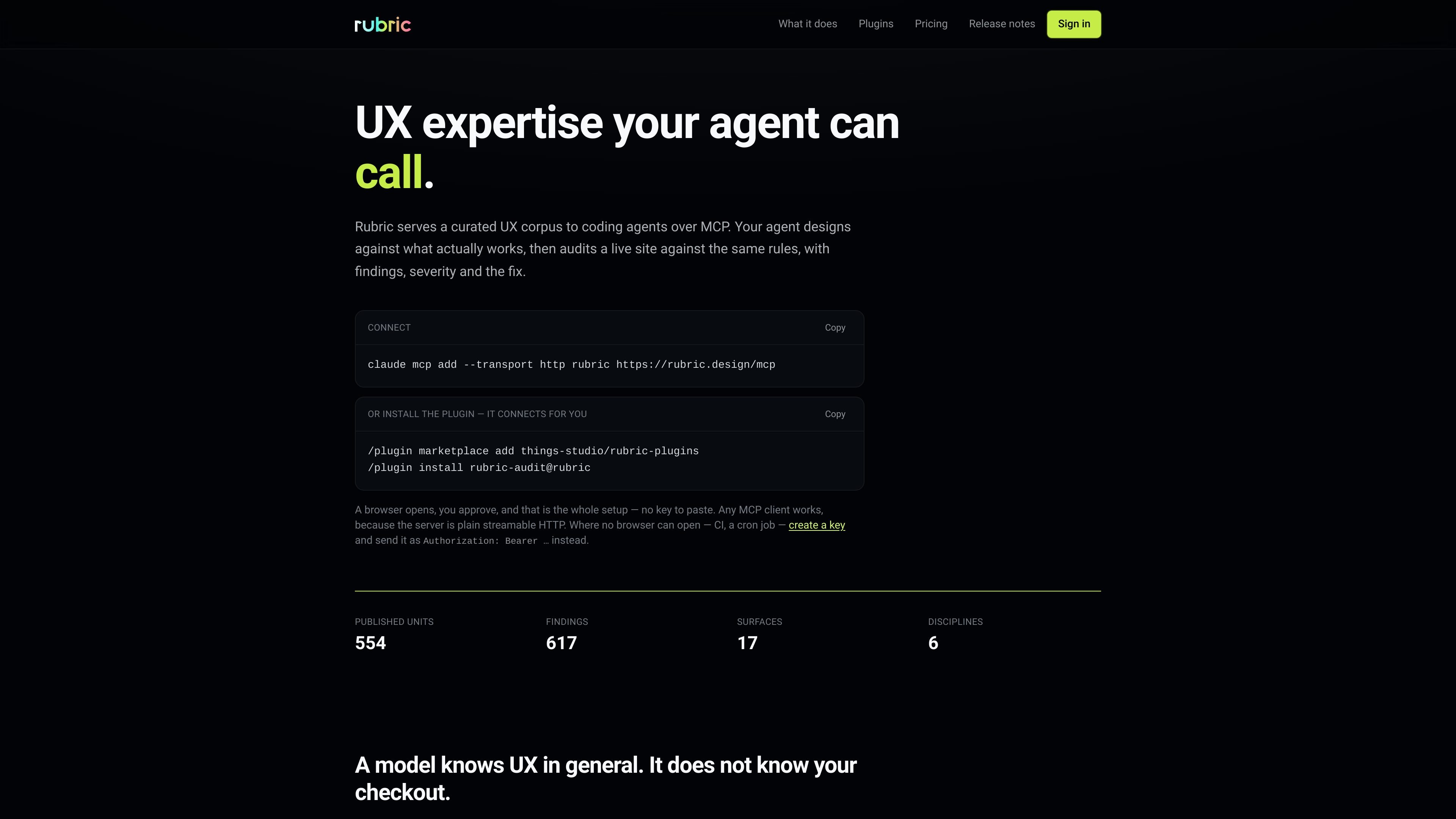
Rubric is a UX knowledge service for coding agents. It serves a curated corpus over MCP so agents can ask for design guidance before they build and run audits against a live site after the fact.
The product is aimed at workflows where the same rules should inform both creation and review. Rubric turns UX guidance into structured units with severity, evidence, and recommended actions, so an agent can work from specific checks rather than broad advice.
The server provides a curated UX corpus rather than generic design advice. Each unit is framed as a rule with severity, how to find it, what it costs, and what to do next.
Agents can use the same knowledge before implementation and after launch. The site describes a design-time flow for pulling guidelines and an audit flow for judging a real page against the checklist.
Audits return findings with issue, severity, impact, actions, and references. The report is intended to be handed to whoever fixes the problem, not just to flag that something is wrong.
Rubric works as a standard MCP server over streamable HTTP, so any client that speaks MCP can connect. The page names Claude Code, Codex, Cursor, Windsurf, Zed, Cline, Goose, and Manus as compatible clients.
The server can connect through a plugin that installs the MCP connection for the user. The source says the browser-based flow asks for approval and needs no key paste for normal setup.
For environments where no browser can open, such as CI or a cron job, the service supports key-based access through an Authorization header.
A coding agent can ask Rubric for prescriptive UX guidance before code is written, so the implementation follows specific rules rather than generic best practices.
After a site ships, Rubric can walk the live page, compare it to the checklist, and return findings ranked by severity with evidence and a fix.
Teams can use the same corpus in automated jobs when no browser is available, such as CI pipelines or cron jobs, by authenticating with a bearer token.
Developers using supported MCP clients can connect Rubric directly or through the plugin flow, letting the agent consult UX rules inside its normal environment.
Product teams can hand the report to the person who will implement the fix, since each finding is broken into issue, severity, impact, actions, and references.
Rubric is an MCP server that serves a curated UX corpus to coding agents. It is used both before code is written, to pull UX guidance, and after something is live, to audit a real page against the same rules.
The source shows a browser-based setup flow through a plugin, plus direct MCP connection support over streamable HTTP. A browser opens for approval during plugin setup, and if no browser is available you can create a key and send it in an Authorization header.
Rubric’s audit output includes a finding broken into separate parts: issue, severity, impact, actions, and references. The page also notes that issue and severity are free on every call, while the rest of the finding is paid.
Rubric is presented as usage-based pricing with a free tier, a pay-as-you-go plan, and an Enterprise option. The free tier includes the full checklist, each finding’s issue and severity, and a daily call limit; paid usage adds impact, actions, and references on findings.
The available pages show Rubric as a tool for design-time guidance and live-site auditing. They do not document all setup details, all supported MCP clients by feature set, or every limitation of the corpus.

ByteAsk is a terminal-first AI coding agent for C and C++ that edits repositories and verifies changes with the real compiler, debugger, sanitizers, and tests before showing a diff. It offers a free tier plus paid plans, with editor connectors and zero-retention handling described in the source.

Manta AI is an autonomous web app testing tool for teams that want to map application behavior, catch regressions, and generate tests without writing scripts or maintaining selectors. It works from a URL and supports plain-English test flows, run results with screenshots, and scheduled or deployment-triggered checks.

Goldfish is an AI memory app for macOS that helps you reply, write, summarize, and continue using the context already on your Mac. It stores memory locally and writes in your tone.

Lasso is an ecommerce product data platform for enriching catalog records, processing supplier files, generating product content, and monitoring competitors. It combines a web app with a REST API, SDK, and MCP server for teams and developers.

MeetStream is a meeting bot API for Zoom, Google Meet, Microsoft Teams, and Webex. It helps developers record, stream, and analyze meetings programmatically, with usage-based pricing and a $5 free credit to start.

CreateOS Sandbox is an isolated compute environment for running code and agent workloads inside Firecracker micro-VMs. It is designed for workflows that need machine-level isolation, private networking between sandboxes, and programmatic control through SDK, CLI, or MCP.