
Pattern detection
Detects emails, phone numbers, card numbers and IDs as a page loads, without requiring manual selection for each match.

Smart Blur is a privacy-focused browser extension that locally blurs emails, phone numbers, card numbers, IDs and other selected content before web-based screen shares or screenshots. It helps individuals and teams protect sensitive information without an account or server upload.
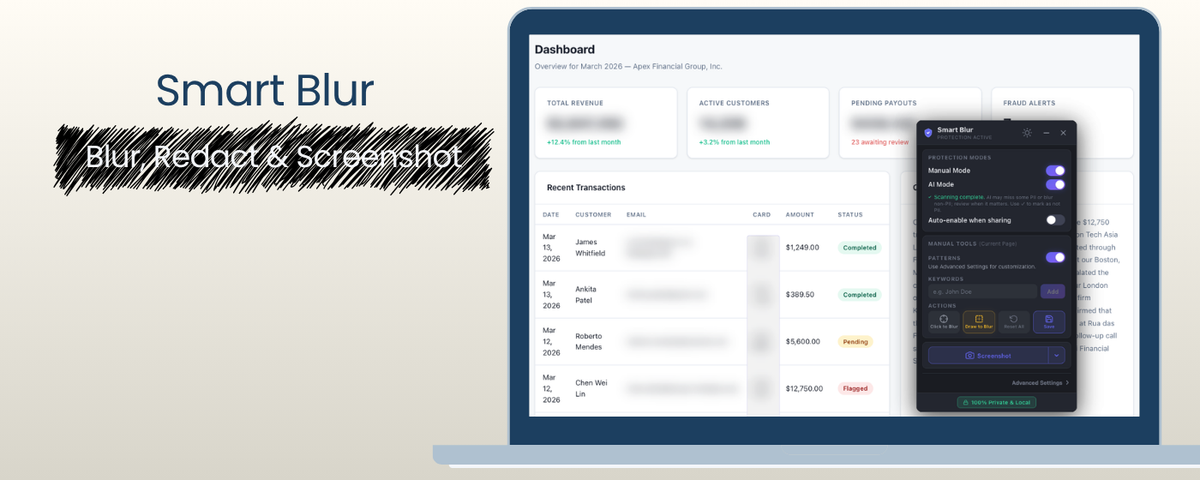
Smart Blur is a browser extension for hiding personal information on web pages before screen shares and screenshots. It automatically blurs emails, phone numbers, card numbers and IDs as a page loads, while manual controls cover content that pattern detection does not identify.
The extension processes data locally in the browser and does not require an account. The Free plan provides pattern detection, custom keywords and manual blur tools; Pro adds on-device AI for names and addresses, browser-share automation, protected screenshot capture, per-page blur persistence, and settings import and export.
Detects emails, phone numbers, card numbers and IDs as a page loads, without requiring manual selection for each match.
Add a word or name to hide every matching instance on the page, or define custom formats in plain language or regex for recurring IDs and other patterns.
Blur an individual HTML element with a click, select text, or draw a box over a larger region when automatic detection is not enough.
The Pro plan uses on-device WebGPU processing to identify names and street addresses written in ordinary sentences; the page states that the model runs locally after its one-time download.
With Pro, Share Shield activates protection when a browser tab starts being shared and turns it off when sharing ends. It applies to a tab, window or whole-screen browser share when the browser can detect the share.
With Pro, capture a page or region with the blur already applied, and save blurs per page so they return on a later visit. Settings can also be imported and exported.
Before presenting a customer record, support ticket or CRM page, let Smart Blur cover common contact and payment patterns and manually mask any remaining fields.
Use custom keywords or patterns for order numbers, policy numbers, patient IDs or other recurring identifiers when showing internal systems to colleagues or clients.
Prepare a browser-based Google Meet, Zoom or Microsoft Teams share with Share Shield so protection starts when the browser detects the share; use manual activation when sharing a desktop application.
Capture a page or selected region after blurring it so the copied or saved screenshot retains the protection instead of relying on later image editing.
Smart Blur is a browser extension that hides personal data on web pages before screen sharing or screenshot capture. It can blur detected patterns such as emails, phone numbers and card numbers, as well as content selected manually.
The Free plan can be used without an account or time limit. It includes automatic pattern detection for emails, phone numbers and IDs, custom keywords, click or draw-to-blur controls, and use on every site. Pro adds Local AI, Share Shield, baked-in screenshot capture, saved per-page blurs, and settings import and export. The site also lists yearly and one-time Pro options.
Install the extension in a supported browser, open its panel from the browser toolbar or the shield at the edge of a page, and choose an automatic or manual blur control. The practice page demonstrates switching pattern detection on, using Click, Draw or Text, adding a keyword, and hiding a tab name.
All processing takes place locally in the browser and the product states that data is not sent to a server. Local AI runs in the browser with WebGPU; it needs a one-time model download, after which it does not require an internet connection.
Share Shield can detect browser-based sharing and activate blurring when sharing starts, including web versions of Google Meet, Zoom and Microsoft Teams. Browser extensions cannot detect native desktop-application shares, so desktop-app sharing requires turning blur on yourself. The extension can still cover the browser content being captured.

MacSpoof cambia o randomizza l’indirizzo MAC Wi‑Fi su macOS: riconnettiti alle reti e limita la registrazione dell’identità su Wi‑Fi pubbliche.

DemoTV is an audience-ranked station for discovering and comparing independent product demos. Founders can submit videos, embed approved demos on their websites, collect viewer inquiries and optionally commission demo production or labelled promotion without buying ranking.

Ship It: Idle Dev Tycoon is an iPhone incremental simulation game about building apps, managing a software studio, and selling it for lasting progression benefits. It supports offline play, automated builds, adviser collection, and optional in-app purchases.

NomNak è un’app gratuita per iPhone per scoprire ristoranti grazie ai consigli degli amici, con spot salvati, food passport e ricerca città.
CAPTA is a mobile GPS waypoint app for quickly saving, organizing, and revisiting locations. It supports offline use, camera-based coordinate capture, optional cross-device synchronization, and GPX export for fishermen, explorers, and field professionals.

Ctrl+Shift+3 is a calm, text-first community platform with a chronological feed, profiles, RSS, and private groups called Clicks. It is built for reading, posting, and joining smaller communities without algorithmic ranking or vanity counts.