
Two-photo generation
Create the trend format from one photo of each person or pet, without using a separate app.

Zombie Hug is a browser-based AI video generator that turns two photos of people or pets into a 15-second vertical zombie-hug story with sound. It is for users who want a ready-to-share TikTok, Reels, or Shorts video without editing the clips themselves.
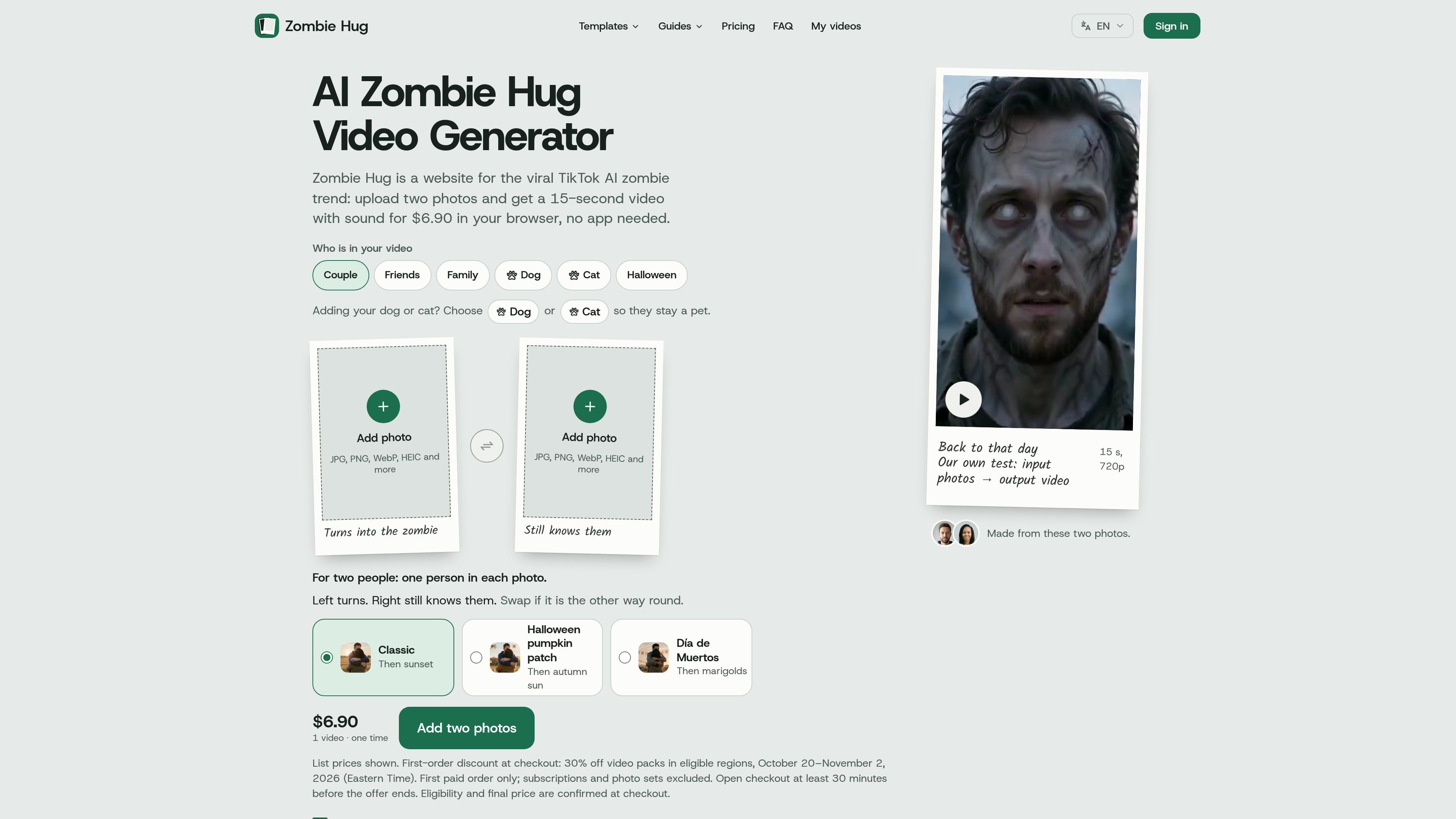
Zombie Hug is a browser-based AI video generator for the short-form zombie hug trend. It uses two uploaded photos—one for each person or pet—to create a 15-second vertical video in which one subject turns into a zombie, the other recognizes them, and the scene shifts to a warm memory.
The service is designed for users who want a finished social video without assembling clips themselves. Choose who turns and a scene, sign in with Google or an email code, and pay using a single-video purchase, pack, or optional monthly plan. The site estimates that most videos are ready in 5 to 10 minutes and emails a private download link.
Create the trend format from one photo of each person or pet, without using a separate app.
Choose a ruined street, pumpkin patch, or marigold-field setting for the story’s opening and memory transition.
Receive a 15-second 9:16 MP4 at 720p with sound and no watermark, suitable for TikTok, Reels, and Shorts.
The generated story includes recognition, a lowered prop rifle, an embrace, and a hard cut to a warm memory.
Sign in with Google or an email code to make a video. Single-video purchases and packs are available, alongside an optional monthly plan.
Use one free remake within seven days of delivery, with a stated refund process for unresolved face-mixing or missing-subject problems.
Create a couple-themed version of the zombie hug story from one photo of each partner, then share the finished vertical clip on short-form platforms.
Use separate photos of two friends to turn the trend into a friendship story, with the same recognition-and-embrace structure.
Make a family memory-style clip featuring two relatives, such as a parent and child, using the built-in transition to a warmer scene.
Choose Dog or Cat when adding a pet so the subject remains represented as a pet in the generated story.
Use the scene options to create a seasonal or themed post, including a pumpkin patch or Día de Muertos-inspired marigold setting.
Upload one photo of each person or pet, choose which subject turns into a zombie, and select a scene. Sign in with Google or an email code when you press Make and complete the purchase. The finished video link is sent by email.
Each video is a 15-second vertical 9:16 MP4 in 720p with sound and no watermark. It follows the zombie recognition, embrace, and warm-memory transition format.
Single-video purchases cost $6.90. One-time packs cost $12.90 for three videos and $34.90 for ten; an optional monthly plan is also available. A subscription is not required.
The site estimates that most videos are ready in 5 to 10 minutes. A private video link is emailed to you, and the video remains available for download for 30 days.
One free remake is available within seven days of delivery. If the remake still mixes up faces or leaves a person out, the video is refundable under the stated policy.

VIDEOAI.ME is an AI video generator for making spokesperson-style videos, ads, explainers, and social content from a script. It is aimed at founders, marketers, agencies, and creators who want to produce videos without filming.

Omni AI is a browser-based image and video generator for creating visuals from text prompts or reference photos. It supports text-to-image, image-to-image, text-to-video, and image-to-video workflows, with free sign-up credits and downloadable results.

I Love The Smiths AI turns two user-supplied photos into a 15-second, widescreen recreation of the viral elevator scene, with preset choreography, reference audio, and no watermark. It is intended for personal social clips featuring consenting adults or the user’s own pets, rather than general-purpose video editing.
艺映AI is a free AI video creation tool for generating video from text, images, or existing footage. It is positioned for short-form social content, promotional clips, and stylized AI video projects.

讯飞绘镜 (iFlytek Huijing) è una piattaforma di creazione video basata sull'IA che trasforma rapidamente ed efficientemente idee creative in sceneggiature, immagini storyboard e video dinamici.

Topview AI is a web-based AI video creation platform for social ads, ecommerce creatives, avatar videos, and short drama workflows. It combines channel-based templates, prompt-driven generation, reference uploads, and storyboard-based production tools.