
デュアルブレイン・アーキテクチャ
VENTUNO Qは、AIワークロード用のQualcomm Dragonwing IQ8プロセッサーと、決定論的制御用のSTM32H5マイクロコントローラーを組み合わせており、両者はRPCブリッジで通信します。

Arduino VENTUNO Qは、AI・ロボティクス向けのエッジAIコンピューターです。AI推論と決定論的制御を1枚に集約し、Arduino App Labに対応します。
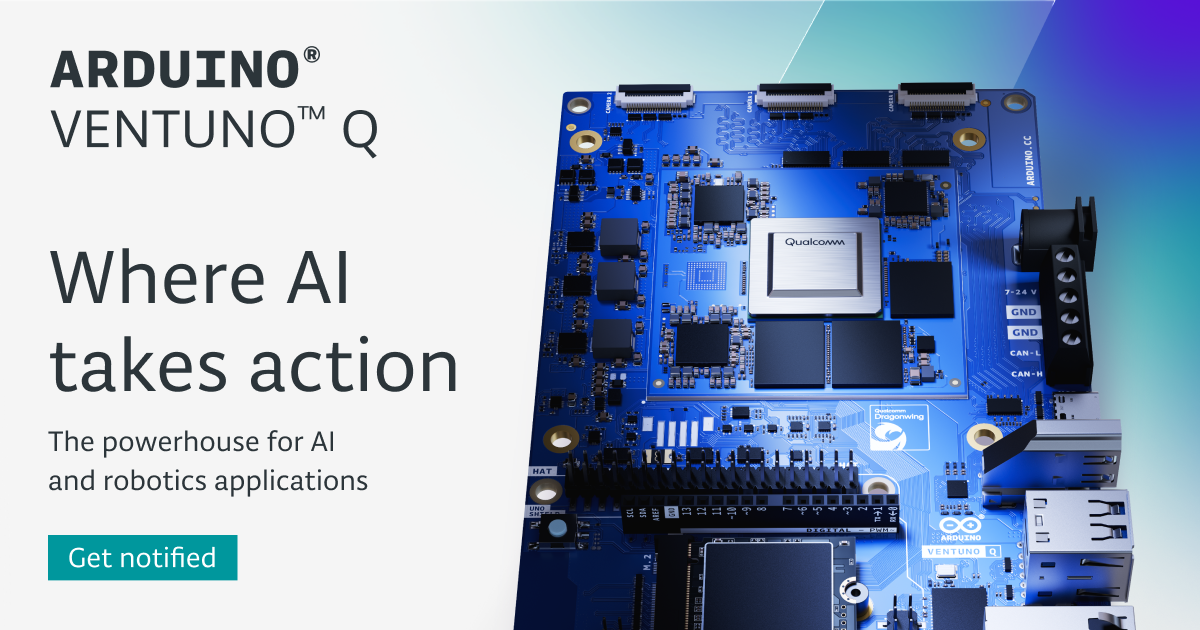
Arduino VENTUNO Qは、AI・ロボティクス向けに設計されたエッジAIコンピューターです。このページでは、知覚、意思決定、物理的な動作を1枚のボードにまとめ、複数デバイス構成の複雑さを軽減することを目的としていると説明されています。
このボードは、Qualcomm Dragonwing IQ8プロセッサーとSTM32H5マイクロコントローラーを組み合わせています。製品ページによると、Dragonwing側はビジョン、Large Language Model、マルチモーダルモデルなどのAI推論ワークロードを担当し、マイクロコントローラー側はロボティクス、モーションシステム、産業用インターフェースにおける高速で決定論的な制御に使用されます。
VENTUNO Qは、AIワークロード用のQualcomm Dragonwing IQ8プロセッサーと、決定論的制御用のSTM32H5マイクロコントローラーを組み合わせており、両者はRPCブリッジで通信します。
このボードは、エッジでのビジョンモデル、ローカルLLM、マルチモーダルAIを含むニューラルネットワーク推論向けに、NPU、CPU、GPUによる処理をサポートすると説明されています。
Arduino App Labは、Arduinoスケッチ、Pythonスクリプト、AIモデルを1つのワークフローで構築するための統合環境として紹介されています。
この製品は、シングルボードコンピューター構成またはUSB-Cやネットワーク経由のPCベース構成をサポートしており、デスクトップ型または接続型のワークフローで作業できます。
ハードウェアページには、16 GB RAM、64 GBの拡張可能なeMMCストレージ、NVMe Gen.4拡張用のM.2コネクターが記載されています。
このボードには、トリプルMIPI-CSIカメラ対応、HDMI、USB-C DisplayPort Alt Mode、Wi-Fi 6、Bluetooth 5.3、2.5 Gb Ethernet、USB-C、デュアルUSB-A 3.0、CAN-FD、PWM、決定論的GPIOが搭載されています。
別のコントローラーに依存せず、同じボード上でセンサー入力を解析し、推論を実行し、アクションを起動するシステムを構築します。
ROS 2やCAN-FDなどのハードウェアインターフェースを使用するプロジェクトを含め、ビジョン、モーション制御、決定論的な応答が必要なロボットを開発します。
LLM、VLM、TTS、ASRなどのモデルを使ってオフラインアシスタントやローカルAI体験を作成し、データ処理をデバイス上に保持します。
産業用途または対話型アプリケーション向けに、物体追跡、ジェスチャー認識、姿勢検出などの検査・追跡・知覚ワークフローを試作します。
組み込みコード、Python、AIモデルのための1つの環境が必要な教育、研究、実験でこのボードを使用します。
ソースでは、VENTUNO QはAI・ロボティクス向けに構築されたエッジAIコンピューターとして説明されています。Qualcomm Dragonwing IQ8プロセッサーとSTM32H5マイクロコントローラーを組み合わせており、Arduino App Labが主な開発環境として紹介されています。
はい。ページでは、VENTUNO Qは2つのセットアップモードをサポートしていると説明されています。1つはモニター、キーボード、マウスを使うシングルボードコンピューターとしての構成、もう1つはUSB-Cまたはネットワーク経由でノートPCやデスクトップに接続するPCベースの構成です。
Arduino App Labは、VENTUNO Q向けの統合開発環境として説明されています。ソフトウェアページでは、Arduinoスケッチ、Python、AIモデルをサポートし、Bricksと呼ばれる事前構築済みモジュールと連携するとされています。
製品ページでは、VENTUNO QがROS 2をサポートしているとされ、ハードウェア欄にはトリプルMIPI-CSIカメラ対応、HDMI、USB-C DisplayPort Alt Mode、Wi-Fi 6、Bluetooth 5.3、2.5 Gb Ethernet、USB-C、デュアルUSB-A 3.0ポート、CAN-FD、PWM、決定論的GPIOが記載されています。
ソースには、このボード自体の公開価格やプラン制限は示されていません。製品ページでは、ウェイティングリストに登録すると期間限定の10%ローンチ割引があると案内されています。

CreateOS Sandboxは、FirecrackerマイクロVM上でコードやエージェントのワークロードを実行できる分離型コンピュート環境です。SDK、CLI、MCPで制御可能。

AakarDev AIは、AIプロバイダーのアクセス管理、プロジェクト別設定、ログ、分析を1つのダッシュボードで管理できるチーム向けツールです。BYOKに対応し、OpenAI、Google Gemini、Anthropic、Groq、Mistral AI、Perplexity AIをサポートします。

Trigger.dev chat agentは、リフレッシュやクラッシュ、長時間の会話も維持できる、開発者向けの耐久性あるAIチャットバックエンドです。AI SDKのuseChatに対応し、ターンにタイムアウトがありません。

ByteAskは、C/C++向けのターミナル起点AIコーディングエージェント。リポジトリを編集し、コンパイラやデバッガ、サニタイザ、テストで変更を検証してから差分を表示。無料枠あり。

Codex Plugins は、再利用可能なスキル、アプリ連携、MCPサーバーを Codex app や Codex CLI で使えるワークフローにまとめます。接続サービスの作業や共有チームワークフローを拡張できます。

hobは、エージェントのセッション、ターミナル、履歴、後続作業を、既存のツールやプロバイダーに合わせて整理できる独立したコーディングエージェント向けワークスペース。ローカルでの制御を重視する開発者に最適。