Google Pics icon

Google Pics

Google Pics is an AI image generator and editor for Google Workspace that creates new visuals and supports precision edits to existing images. It is being tested now, with broader availability planned for eligible Workspace and Google AI subscribers.

Google Pics

Overview

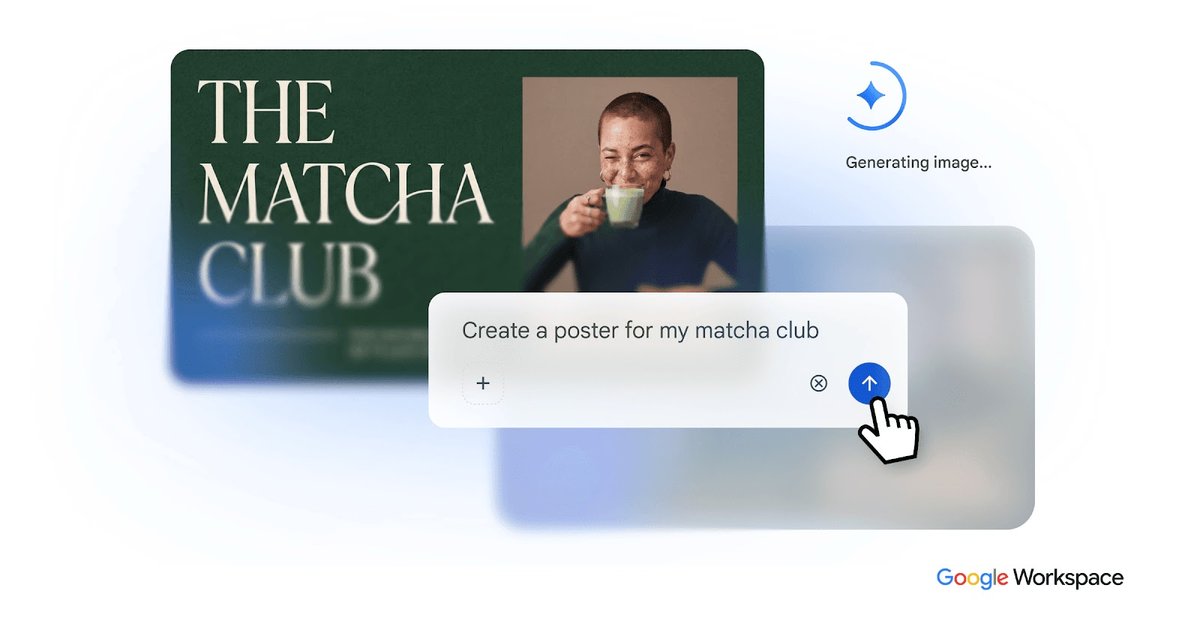
Google Pics is an AI image generator and editor for Google Workspace. It is designed to create new visuals and refine existing ones with Google's most advanced AI models, combining image generation and precision editing in a single workflow.

The product is positioned as a Workspace feature that works inside Google Slides and connects to Google Drive. Google says it is currently being tested with a small number of users, with broader availability planned in the coming months for eligible Workspace and Google AI subscribers.

Core capabilities

AI image generation

Generate expert-looking images from prompts using Google's most advanced AI imaging models, with the product positioned for creating visuals for different projects and styles.

Object-level editing

Adjust individual objects with controls to move, resize, and transform them rather than regenerating the whole image.

Targeted image changes

Modify and translate text inside an image, or update a specific area when only part of the composition needs changes.

Slides integration

Use the product inside Google Slides to add or edit images without leaving the presentation workflow.

Drive storage and sharing

Save creations to Google Drive for later access and sharing across Google Workspace.

Early access program

Join Workspace Experiments for early access and updates before broader rollout.

Practical ways to use Google Pics

  • Generate new visuals

    Create original images for presentations, documents, or campaigns when you need a starting visual from a text prompt.

  • Edit specific parts of an image

    Refine an existing image by moving objects, resizing elements, or changing a local area instead of recreating the entire asset.

  • Work inside Google Slides

    Add or update imagery while building slides so image creation stays inside the presentation workflow.

  • Save and share assets

    Store finished images in Google Drive so they can be found, reused, and shared with teammates.

  • Preview upcoming Workspace features

    Try the product early through Workspace Experiments if you want to track the feature before wider release.

Pros and Cons

Pros

  • Combines image generation and editing in one tool.
  • Supports precise edits to objects, text, and specific areas of an image.
  • Works inside Google Slides, which keeps image work in the presentation workflow.
  • Saves output to Google Drive for access and sharing.

Cons

  • It is not yet generally available, so access is limited during the testing phase.
  • The page does not publish a full feature specification or detailed file-format support.
  • A separate product-level price is not listed on the source page.

FAQ

Is Google Pics available now?

Google Pics is currently in testing with a small number of users. Google says it will expand to more users soon, and that interested users can sign up for Workspace Experiments to be notified when it becomes available.

Who will be able to use Google Pics when it launches more broadly?

Google says Google Pics will be generally available in the coming months for Workspace customers on Business Standard and higher plans, as well as Google AI Pro and Ultra subscribers.

How does Google Pics fit into Google Workspace?

The homepage says you can use Google Pics directly inside Google Slides to add and edit images, and save creations to Google Drive for access and sharing.

Does Google Pics have its own pricing?

The source does not list a separate Pics price. It points to broader Google Workspace pricing and availability, and notes that business users can test it by enabling Gemini Alpha features when it is available.

What are the main limitations shown on the site?

The source emphasizes image generation and precision editing, but does not provide a full technical limit list or detailed format support on the page.

Quick Facts

Category
AI image generator and editor
Brand
Google Workspace
Platform
Web, Google Slides, Google Drive
Availability
Testing now; broader rollout planned
Access
Workspace Experiments; eligible Workspace and Google AI subscribers

Google Picsの代替品

Kittl icon

Kittl

Kittl is a browser-based AI design platform for creating branding, product visuals, and digital or print graphics. It includes AI generation, an editor, templates, mockups, and collaboration tools, with a free plan available.

PXZ AI icon

PXZ AI

画像、動画、音声、ライティング、チャットのツールを統合したオールインワンAIプラットフォームで、創造性とコラボレーションを高めます。

Pixelcut icon

Pixelcut

Pixelcut is an AI photo editor for creating and editing product images, social content, and video assets. It offers free and paid plans, plus mobile app and browser access for individual users and teams.

Petalica Paint icon

Petalica Paint

Petalica Paint is a web service for automatically coloring line art and tracing line drawings from photographed images. The home page says it can be used under the stated terms for commercial and noncommercial work, but it is scheduled to end on 2025-07-31 at 16:00 JST.

Wearvue AI icon

Wearvue AI

Wearvue AI generates personalized outfit previews from a photo, lets users refine the style for an occasion, and surfaces similar real products to shop. It is aimed at people who want to preview outfit ideas before buying and compare them with shoppable alternatives.

Upscale.media icon

Upscale.media

Upscale.media is an AI image upscaling and enhancement tool from Pixelbin that enlarges low-resolution or pixelated images and improves clarity in the browser. It offers free individual image use, paid credit plans, and team-oriented workflows such as bulk processing and API integration.

Google Pics - AI Tool, Features, Use Cases & Alternatives | UStack


