

Coffee label capture
Photograph a coffee bag and let the app read the roaster, coffee name, roast date, origin, and flavour information. Review and edit the fields before saving.
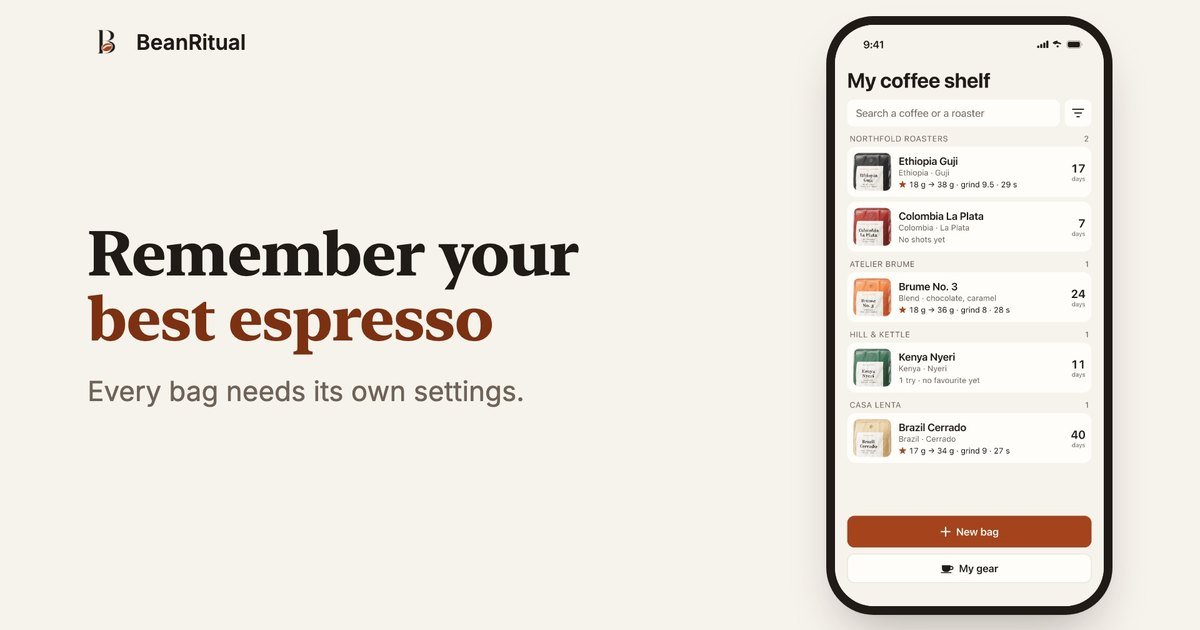
BeanRitual is an iPhone app for people who make espresso at home. It keeps coffee-specific shot records so a successful recipe does not have to be rediscovered when the same bag is opened or purchased again.
The workflow starts with a photograph of the coffee bag, followed by notes for dose, grind, time, yield, and taste. Users can retain every attempt, select the shot that worked, and later find that recipe alongside the machine and grinder used. The app is described as free and coming soon on the App Store; no account is required.
Coffee data, shot records, gear, notes, and label photos are stored in the app's database on the iPhone. Label photos are sent to a server for recognition, while the site says the server does not retain the photo; limited anonymous usage counts are sent to TelemetryDeck.
Photograph a coffee bag and let the app read the roaster, coffee name, roast date, origin, and flavour information. Review and edit the fields before saving.
Record dose, grind setting, shot time, and yield for each espresso attempt. Time and yield are optional, and the app includes controls for starting the timer and setting values.
Add a simple taste result to each shot, including options such as good, not yet, sour, bitter, or too fast. Both successful and unsuccessful attempts remain available for comparison.
Star the espresso that worked best for a particular bag. When you open that coffee again, its saved recipe is available on the coffee page.
Store the machine and grinder used with a recipe, while organizing coffees on a searchable shelf grouped by roaster. Each coffee also shows the days since its roast date.
After dialing in a new bag over several shots, keep the dose, grind, timing, yield, taste, and equipment together so the successful preparation can be repeated.
When returning to a coffee weeks later, open its entry and check the starred espresso instead of starting with an unrecorded guess about the grind or dose.
Keep failed and successful attempts in one history to see how changes to the grind, dose, or extraction time affected the result.
Use the coffee shelf to find coffees by roaster and check roast age while keeping label details and preparation records in one place.
Yes. The homepage describes BeanRitual as a free app. The pricing page currently returns a 404, so no paid plans or limits are documented.
No account is required. You can open the app, photograph a bag, and begin recording coffee without providing an email address, name, or password.
BeanRitual is an iPhone app designed for portrait use. The homepage says it is coming soon on the App Store; current public availability is not confirmed.
The app can read labels in any language, but you review the extracted fields and can correct them. If the reading fails or there is no network, you can enter the fields yourself.
Any machine and grinder can be recorded. You name your equipment, and each saved recipe keeps the machine and grinder used for that shot.

Flunkey is a voice-first productivity layer for Windows that converts speech into text, AI-assisted outputs, and remembered context. It is built for users who want to capture ideas and actions without leaving the app they are working in.

Contextbergは、画面・入力・ブラウザ・AIエージェントの利用履歴をローカルで記録し、MCP経由でClaude CodeやCursorなどに作業コンテキストを渡すデスクトップアプリです。中断した作業の再開、過去ログの検索、日次レビューに利用できます。

Yattayo: Slider To-Do Board is a productivity app that turns tasks into a physical-style slider board with sticky notes, widgets, reminders, and iCloud sync. It helps people who want a more tactile way to manage to-dos and, in Premium, recurring habits.

recall is an AI flashcard app that turns reading and notes into study cards through Claude, ChatGPT, or another MCP client. It uses one-time lifetime access pricing and spaced repetition review.

at8pm is an iPhone journaling app that locks each day’s entry after a chosen time so it can’t be edited later. It supports text, voice, photos, locations, and quick video notes, with private iCloud syncing and optional Face ID lock.

Notewarp is an AI note-taking tool that turns voice notes, uploads, or pasted text into cleaner notes, transcripts, summaries, and action items. It helps people capture rough ideas quickly and then edit, export, or share the result.