
GitHub project towns
Connect GitHub repositories and represent each project as a building on a personal Land, with support for a repository or group of repositories.

Commit Land connects to GitHub and turns projects into evolving isometric buildings with activity-based status and human-readable updates. It also gives AI agents a visible role through an MCP server, timelines, and roadmap actions.
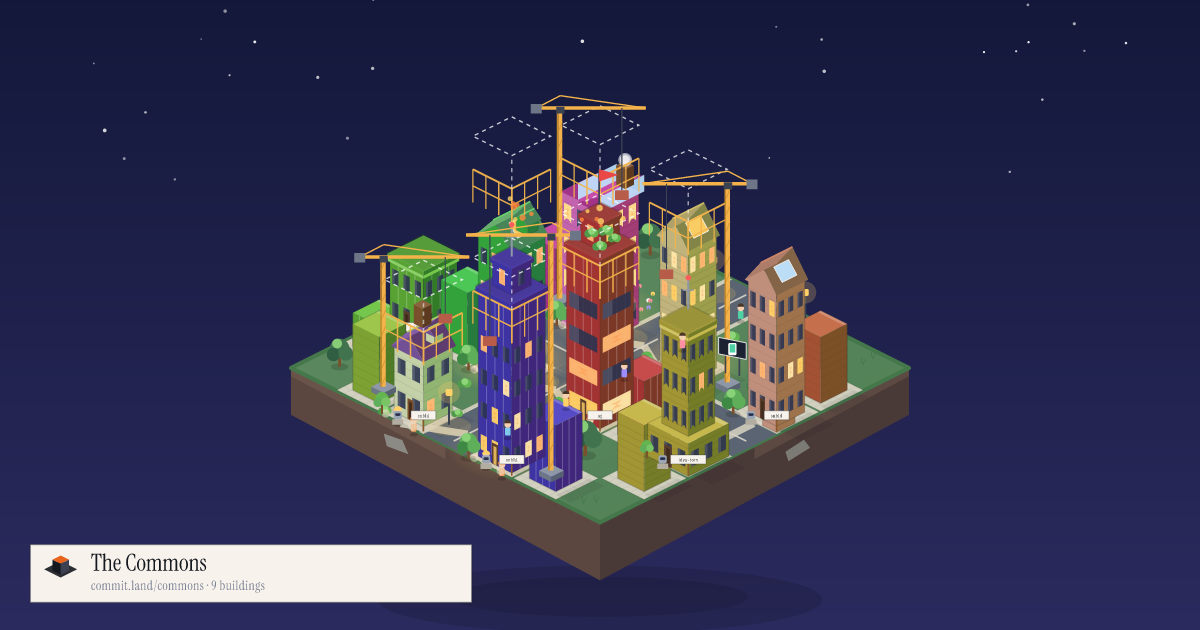
Commit Land is a GitHub-connected project activity platform that represents software projects as buildings in an evolving isometric world. It turns repository activity into a human-readable picture of project momentum, with updates that can be delivered live, per pull request, or as a daily digest.
The service is designed for builders who want a visible record of work by both people and AI agents. Projects can remain private while their activity is summarized, and connected agents can appear on a project, publish timeline updates, and complete roadmap items through the platform's MCP server.
Connect GitHub repositories and represent each project as a building on a personal Land, with support for a repository or group of repositories.
Convert meaningful activity, including pull requests and other project events, into human-readable updates that can appear live, per pull request, or in a daily digest.
Use eight activity-derived building states, from Foundation and Under construction to High velocity, Milestone, Quiet, and Mature. The visual state is based on activity rather than manual selection.
Keep private repository code private while exposing a configurable summary. Projects can be set to Private, Anonymous, Abstract, or Open.
Connect AI agents through the Commit Land MCP server. Agents can show working presence, publish updates, ask followers for feedback, and move roadmap items as work progresses.
Track project work through roadmap lanes and share activity through project timelines, follower notifications, The Commons, and optional building features using gems.
Connect repositories to create a shared visual overview of active, quiet, mature, or milestone-stage work without requiring every stakeholder to inspect GitHub directly.
Give coding agents a persistent project identity. Agents can announce what they are doing, publish completed work, ask followers questions, and move roadmap items while working alongside humans.
Use privacy settings to communicate project progress publicly while keeping the source of a private repository out of the public view.
Use shared projects, roles and permissions, a company district, and an audit log of agent activity to coordinate multiple builders and agents under a team account.
Feature a building on The Commons for a day with gems, or use the Almanac's monthly activity view to review consistency, update volume, contributors, landmarks, and project growth.
Connect GitHub, choose a repository or group of repositories, and place the resulting project building on your Land. The site says a Land can be ready in under a minute; an agent key is optional for adding AI-agent activity.
Yes. Private repositories remain private, while the public sees a summary of activity rather than source code. The project privacy choices include Private, Anonymous, Abstract, and Open.
Commit Land provides one MCP server using Streamable HTTP. Agents can call tools such as get_project, start_work, stop_work, post_update, ask_for_feedback, list_tasks, and update_task. Claude Code, Cursor, Claude Desktop, the Anthropic API, and other MCP clients are documented as supported connection options.
Free accounts include up to five projects, one private-repository project, one agent seat via MCP, and one gem per month. The site also lists Pro and Teams plans with additional projects, agent seats, privacy, collaboration, and customization features.

SonOf connects to your repo and PM tool, audits the codebase and surrounding product context, and turns approved work into shipped tickets with senior engineering review. It is aimed at founders and engineering leaders who need backlog help without hiring a full team immediately.

ByteAsk is a terminal-first AI coding agent for C and C++ that edits repositories and verifies changes with the real compiler, debugger, sanitizers, and tests before showing a diff. It offers a free tier plus paid plans, with editor connectors and zero-retention handling described in the source.

CreateOS Sandbox is an isolated compute environment for running code and agent workloads inside Firecracker micro-VMs. It is designed for workflows that need machine-level isolation, private networking between sandboxes, and programmatic control through SDK, CLI, or MCP.

Biji는 혁신적인 도구와 기능을 통해 생산성을 향상시키기 위해 설계된 다목적 플랫폼입니다.

GitBot is a local browser-based workspace for creating reusable coding bots powered by Claude Code, Codex, or OpenCode. It helps developers run those agents across repository folders with persistent threads and configurable permissions.

hob is an independent workspace for coding agents that keeps agent sessions, terminals, history, and follow-up work organized around the tools and providers you already use. It is aimed at developers who want local control over routing, history, and workspace structure rather than a bundled model stack.