

Application mapping
Heal scans a codebase and maps product features and entry points, including UI, API, CLI, SDK, webhooks, and scheduled jobs, to understand what it needs to exercise.
Heal is an AI-assisted runtime testing and product verification tool for software teams. Instead of limiting analysis to the changed lines in a pull request, it builds a production-like sandbox around an application and drives its user and machine-facing entry points to look for behavior, security, and performance issues.
The product combines codebase mapping, controlled dependency handling, candidate generation, and runtime validation. Findings are intended to be actionable: each reported defect includes reproduction steps and a failing test that demonstrates the issue, while code review remains useful for concerns that do not depend on running the product.
Heal scans a codebase and maps product features and entry points, including UI, API, CLI, SDK, webhooks, and scheduled jobs, to understand what it needs to exercise.
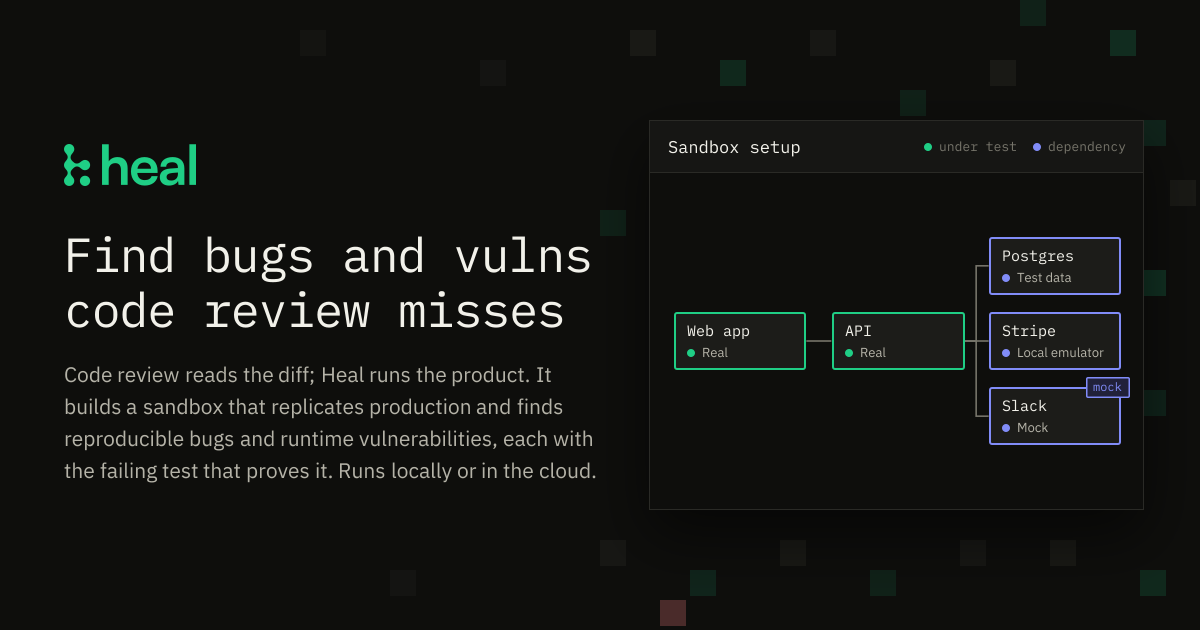
It builds a controlled application sandbox around the product, using real application components and seeded storage where possible, while mocking, stubbing, or emulating dependencies that cannot run.
The agent drives product flows as users and machines do, observing screens, responses, exit codes, logs, stored data, and interactions with third parties.
Heal combines code analysis, runtime security tools, UI checks, and manual QA patterns to generate candidates, then validates them against the sandbox before filing them.
Reported defects include reproduction steps and a failing test that demonstrates the behavior. Heal says it re-runs each defect and does not file issues it cannot reproduce.
For security checks, Heal runs exploits against the sandbox and can test scenarios with different signed-in users, reporting findings that are reproduced at runtime.
Run the product across its features before a release or on a recurring schedule to find defects that span unchanged code, configuration, data, and service interactions.
Exercise flows that depend on payments, email, or other third-party services by substituting controlled mocks or emulators, then verify how the application behaves when those services fail, respond slowly, or return unexpected data.
Validate security issues in the context of a running application, including exploit scenarios involving different signed-in users, rather than filing findings solely because a code pattern looks suspicious.
Investigate edge cases that standard end-to-end tests may not stage, such as missing fields, failed requests, broken assets, or disabled integrations, using a sandbox where failure conditions can be controlled.
Use the generated failing test and reproduction details as a handoff to an engineer or coding agent; the site shows a workflow where a defect is fixed and the test is run again.
Heal takes a codebase, maps its product entry points, and builds a production-like application sandbox. It can use real application components and seeded data while mocking, stubbing, or emulating external dependencies that cannot run in the sandbox. It then drives the application and re-runs candidate defects to verify them.
A reported defect includes reproduction steps and a failing test. Heal states that candidates are filed only when the behavior can be reached and reproduced; a test should turn green after the defect is fixed.
Heal is intended to complement code review rather than replace it. Code review evaluates diffs, style, consistency, and other code-level concerns, while Heal focuses on behavior, security, and performance issues encountered while running the product.
The site says Heal can run locally or in the cloud. The benchmark describes entry points including UI, API, CLI, SDK, webhooks, and scheduled jobs, but the site does not provide a complete list of supported runtimes or deployment requirements.
The available pricing page does not contain plan or price information. The homepage advertises a free trial with no credit card required, but detailed trial terms are not provided.

ByteAsk is a terminal-first AI coding agent for C and C++ that edits repositories and verifies changes with the real compiler, debugger, sanitizers, and tests before showing a diff. It offers a free tier plus paid plans, with editor connectors and zero-retention handling described in the source.

Manta AI is an autonomous web app testing tool for teams that want to map application behavior, catch regressions, and generate tests without writing scripts or maintaining selectors. It works from a URL and supports plain-English test flows, run results with screenshots, and scheduled or deployment-triggered checks.

EAS Observe is a production performance monitoring tool for Expo and React Native apps. It shows startup metrics, session timelines, release markers, and errors inside the Expo dashboard.

Traccia is an agent observability and governance platform that adds OpenTelemetry-native tracing, policy enforcement, prompt evaluation, and compliance evidence for AI workflows. It supports frameworks including LangChain, CrewAI, OpenAI Agents SDK, AutoGen, and LlamaIndex.

Hoplite is a cloud coding agent platform for teams that want to run software tasks in isolated sandboxes with repository context and imported local setup. It offers published Pro, Scale, and Enterprise plans.

Latitude Agent Score evaluates AI agent performance using production traces across outcome, reliability, cost, speed, and safety. It helps engineering teams investigate the sessions behind a score, turn recurring failures into evaluations, and verify fixes after release.