

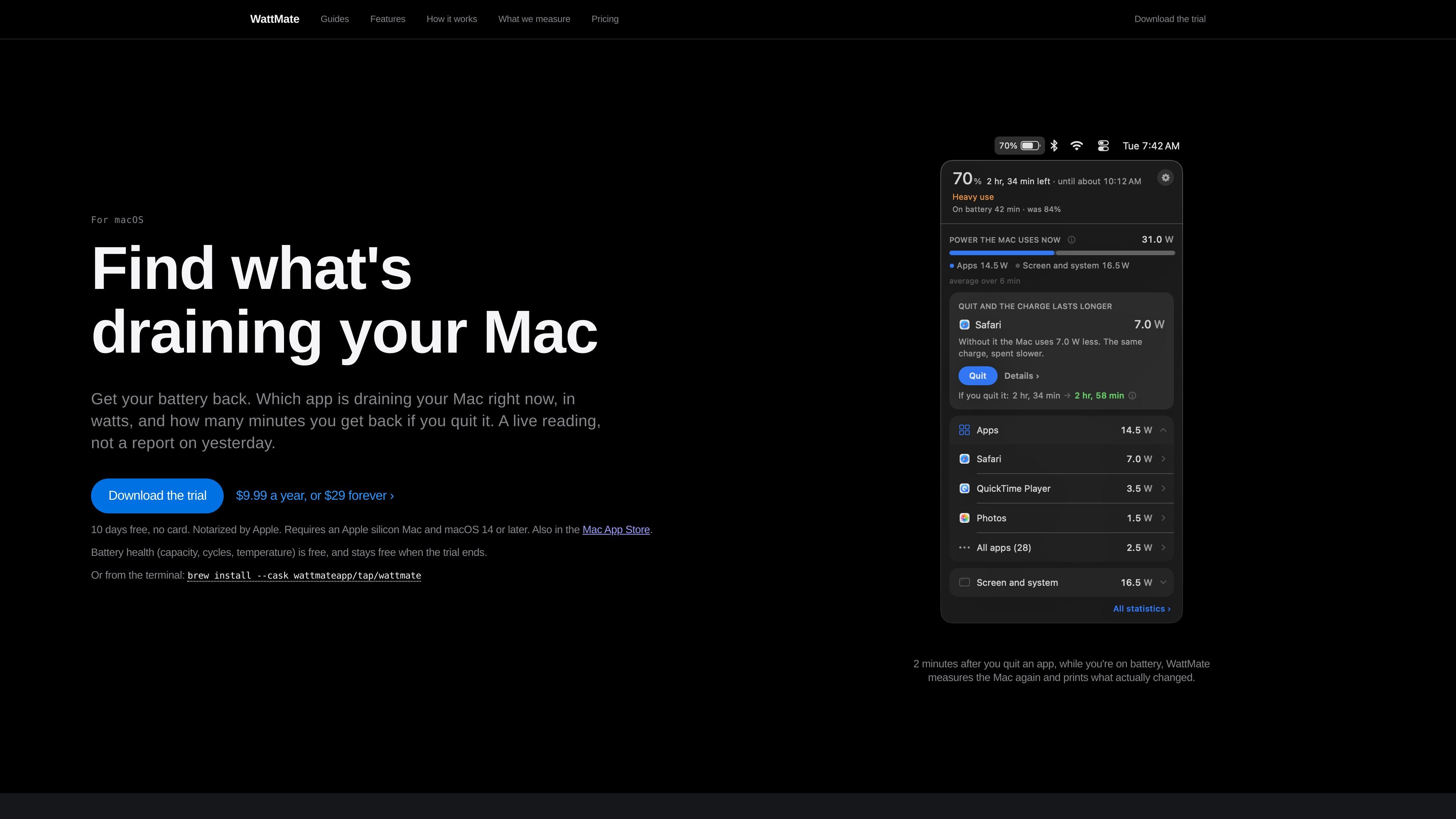
Per-app watt readings
Shows app-level power use in watts, grouping helper processes with the app that started them instead of presenting macOS's unitless Energy Impact score.
WattMate is a local macOS battery diagnostics app for Apple silicon Macs. It identifies which apps are using measurable processor energy, reports their estimated contribution in watts, and translates the current load into a projected number of battery minutes that could be recovered by quitting an app.
The app also compares its projection with a real post-quit measurement: while the Mac is on battery, it measures again about two minutes after an app is closed and prints what changed. WattMate includes battery health readings, charging diagnostics, overnight wake records, and session summaries, while explicitly separating app-attributed work from screen, system, graphics, and other energy it cannot assign to a single app.
Shows app-level power use in watts, grouping helper processes with the app that started them instead of presenting macOS's unitless Energy Impact score.
Estimates how many minutes of battery time could return if you quit an app, based on the Mac's current remaining time and measured app load.
About two minutes after an app is quit while the Mac is on battery, measures the Mac again and reports what actually changed, including when the effect cannot be isolated.
Displays battery capacity, cycle count, and temperature, and can also show delivered, consumed, stored, and spare power when connected to an adapter.
Lets users star an app, place its icon and watt reading in the menu bar, review a last-hour verdict, and receive a one-time notification when a configured power threshold is exceeded.
Keeps detailed charge data for two days and retains compact session summaries until the user erases them, allowing recent battery sessions and overnight wake activity to be reviewed.
When the battery is dropping quickly, inspect the live app list to find the largest measurable contributor and see the projected minutes associated with quitting it.
Before closing a browser, editor, call app, or other demanding workload, use the projection as a decision aid, then check the quit receipt to see whether the expected improvement appeared.
Star an app that should normally run quietly, keep its watt reading in the menu bar, and use the last-hour verdict or threshold notification to catch background activity.
When a Mac remains on battery while plugged in, inspect adapter delivery, total demand, shortfall, and the apps associated with measurable load.
Review overnight wake names and durations or consult session summaries to understand what consumed charge during sleep and how recent battery sessions were spent.
WattMate requires macOS 14 or later and an Apple silicon Mac. It reads counters exposed by macOS and does not require a password prompt or helper installation.
The app list appears within seconds. Battery-time estimates require measurement windows; the site says the first figure arrives within about three minutes half the time, and sometimes takes longer. The app does not show a countdown.
The app measures battery or board and adapter power locally, then works out app attribution and projected time savings. Per-app measurements are not sent off the Mac. Anonymous usage statistics and crash reports are enabled by default but can be disabled in Settings.
The ten-day trial includes the full app and starts the first time you open it, with no card or account required. After the trial, the app continues to show the app list, watts, battery health readings, the last run, and the most recent night; battery-time estimates and deeper historical features require a paid key.
WattMate identifies measured graphics energy as a total rather than assigning it exactly to individual apps. Neural Engine energy is not attributed to an app, and some power belongs to the screen, system, or background work. Estimates are shown conservatively and a quit receipt is provided when the result can be checked.

MacSpoof로 macOS Wi‑Fi MAC 주소를 변경하거나 랜덤화하세요. 네트워크 재접속 및 공용 Wi‑Fi에서 기기 식별 기록을 줄이는 데 도움.

DemoTV is an audience-ranked station for discovering and comparing independent product demos. Founders can submit videos, embed approved demos on their websites, collect viewer inquiries and optionally commission demo production or labelled promotion without buying ranking.

Ship It: Idle Dev Tycoon is an iPhone incremental simulation game about building apps, managing a software studio, and selling it for lasting progression benefits. It supports offline play, automated builds, adviser collection, and optional in-app purchases.

NomNak은 친구 추천으로 맛집을 찾는 iPhone 무료 앱입니다. 저장한 장소, 푸드 패스포트, 도시 검색으로 친구들의 식당 지도를 확인하세요.

CAPTA is a mobile GPS waypoint app for quickly saving, organizing, and revisiting locations. It supports offline use, camera-based coordinate capture, optional cross-device synchronization, and GPX export for fishermen, explorers, and field professionals.

Ctrl+Shift+3 is a calm, text-first community platform with a chronological feed, profiles, RSS, and private groups called Clicks. It is built for reading, posting, and joining smaller communities without algorithmic ranking or vanity counts.