

Audo Studio
Audo Studio is a browser-based AI audio cleaning tool for YouTubers and podcasters—one-click noise removal and auto volume adjustment.
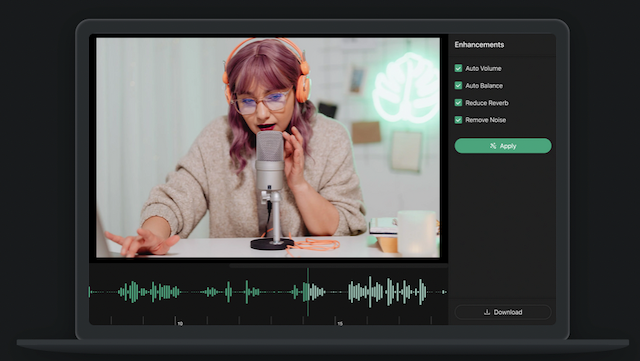
What is Audo Studio?
Audo Studio is a browser-based audio cleaning tool designed for YouTubers and podcasters. It uses AI to process recorded audio so you can automatically remove background noise and improve speech clarity.
The core purpose of Audo Studio is to help creators clean up audio quickly—reporting results “in seconds”—so you spend less time manually preparing recordings for publishing.
Key Features
- One-click noise removal: Automatically removes background noise to make voices easier to understand without needing a quiet recording environment.
- Speech enhancement: Enhances speech as part of the same AI-driven processing workflow.
- Echo reduction (coming soon): An upcoming feature intended to reduce room echoes (reverb) in recordings.
- Auto volume adjustment: Automatically adjusts volume level to produce a more consistent listening experience.
- Browser-based use: Runs in the web browser, so it can be used across operating systems without installing desktop software.
How to Use Audo Studio
- Sign up for an account to access the service.
- Use the live demo or the main studio interface to start processing an audio clip.
- Upload or submit your audio through the browser workflow.
- Click the processing button to apply the available cleaning steps (noise removal and auto volume are listed as current features).
- Review the output and export the cleaned audio for use in your podcast episode or YouTube upload.
Use Cases
- Podcast episode cleanup: Improve intelligibility of muffled or noise-filled voice recordings so listeners can follow the discussion.
- YouTube creator audio fixes: Reduce distracting background sounds and bring volume levels into a more consistent range before publishing.
- Content repurposing from imperfect takes: Salvage recordings made outside a sound-treated space by removing steady background noise and adjusting overall loudness.
- Room-echo mitigation (early interest): For creators anticipating additional processing options, monitor the “echo reduction (coming soon)” capability for reverb and room-sound control.
- Workflow acceleration vs manual editing: Use the one-click approach to speed up routine audio cleanup tasks that might otherwise take longer in editor-based workflows.
FAQ
How does Audo Studio work? Audo Studio uses recent research in artificial intelligence to process audio.
Will it work on Mac, Windows, or Linux? Yes. The tool is browser-based, so it should work on any operating system that supports the browser.
What cleaning features are available right now? The page lists advanced noise removal and auto volume as available, with echo reduction (coming soon).
Is there a live demo? Yes. The page includes a “Go To Live Demo” option so you can try the workflow before signing up.
Alternatives
- Dedicated audio editors (general-purpose): Desktop audio editing tools can offer more manual control over noise reduction and leveling, but typically require more steps than a one-click workflow.
- Other browser-based audio cleanup tools: Web tools aimed at quick enhancement can be similar in workflow, focusing on upload-and-process rather than extensive manual editing.
- Podcast/video post-production software: Full-featured editing suites support deeper audio restoration and mastering, which may be better when you need extensive control beyond noise removal and basic level adjustment.
Alternatives

Audo Studio
One click audio cleaning for YouTubers and Podcasters.

CAMB.AI
Turn a single live stream into a multilingual broadcast with real-time AI audio dubbing for YouTube, Twitch, X and more.

LALAL.AI
LALAL.AI is a next-generation vocal remover and music source separation service that allows users to quickly and accurately extract vocal and instrumental tracks from audio and video files.

LALAL.AI
LALAL.AI is an AI vocal remover and music source separation service that splits uploaded audio/video into isolated stems for fast downloads.

optimo
optimo is a free, open-source CLI that optimizes and converts images and videos for the web using ImageMagick and FFmpeg compression workflows.

Kits AI
Kits streamlines and improves producer workflows with AI audio tools built for music, allowing users to create custom voices and sing in any style.