

Brew Finder
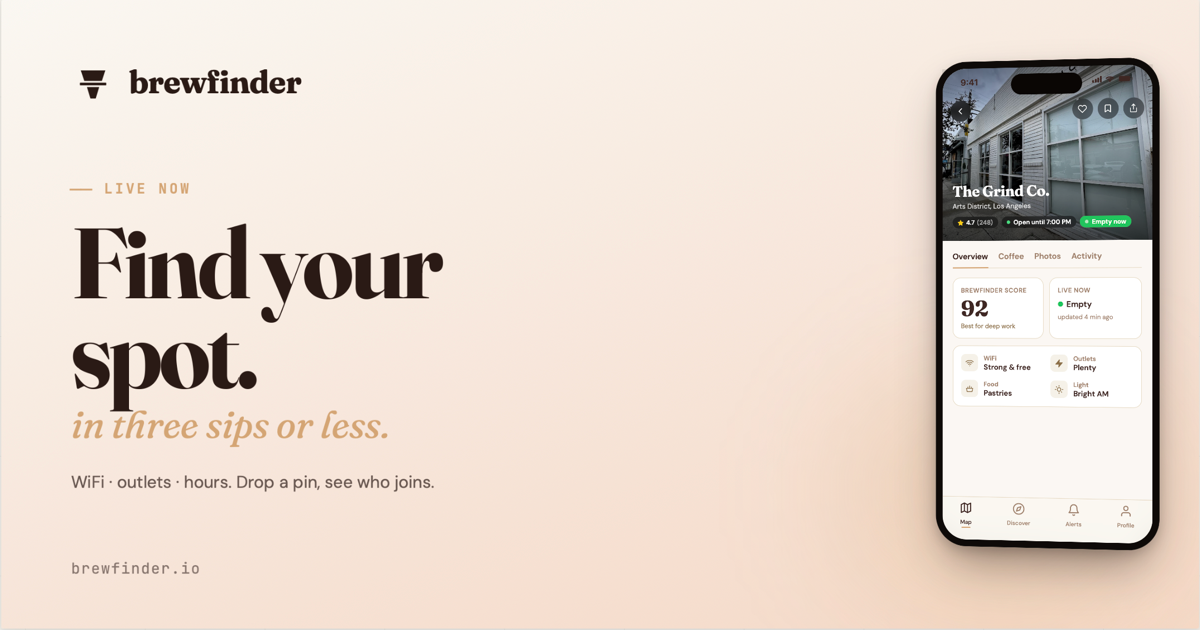
Find nearby coffee shops with Brew Finder—real-time crowd levels, WiFi quality, and power availability to help you choose fast.
What is Brew Finder?
Brew Finder is a location-based coffee shop discovery tool that helps people find coffee shops nearby. Before it can show nearby options, it asks for location access to determine where you are.
Based on the site description, Brew Finder focuses on practical shop details such as real-time crowd levels and whether WiFi quality and power are available, so you can choose a place that fits what you need at the moment.
Key Features
- Nearby coffee shop discovery using your location, so results are tailored to where you are.
- Real-time crowd level information, helping you assess how busy a shop currently is.
- WiFi quality information, to support browsing or working while you’re there.
- Power availability details, useful if you plan to use a laptop or charge devices.
- Launching in Los Angeles and expanding as it grows, indicating the app’s coverage is tied to city rollout.
How to Use Brew Finder
- Open Brew Finder and allow location access when prompted.
- Use the nearby results to view coffee shops around you.
- Check crowd level, WiFi quality, and power availability for each option to decide where to go.
- Start with Los Angeles if that is the current supported area, since the site states the product is launching there and expanding over time.
Use Cases
- Choosing a quieter place to work: Use crowd level plus power and WiFi information to pick a shop that supports focused time.
- Finding a stop for laptop use while traveling: Filter decisions using power availability and WiFi quality rather than relying only on reviews.
- Meeting a friend at a busy time: Compare crowd level across nearby shops to find an option that matches your preference for busyness.
- Planning a caffeine break while out and about: Rely on location-based nearby results when you need options close to your current area.
- Assessing “work-ready” cafes for a group: Use the same practical attributes (WiFi and power) to align on where everyone can settle.
FAQ
Why does Brew Finder ask for location access?
To show nearby coffee shops, Brew Finder requests your location so it can match results to where you are.
What information does Brew Finder show about each coffee shop?
According to the site description, it includes real-time crowd levels, WiFi quality, and whether power is available.
Where is Brew Finder available?
The site states it is launching in Los Angeles and expanding as it grows.
Does Brew Finder work without location permissions?
The site indicates location access is required to display nearby coffee shops, so using it without permission may limit or prevent local results.
Alternatives
- Map-based coffee shop directories: General business listings in map apps can show locations and basic amenities, but may not present real-time crowd levels, WiFi quality, or power availability in the same way.
- Crowd and amenity aggregators: Services focused on reviews or foot-traffic trends can help estimate busyness, but may not surface WiFi and power details as directly or in real time.
- Productivity-first café discovery apps: Other local tools oriented around finding “work-friendly” spaces may emphasize WiFi/power, but may not include real-time crowd-level data.
- Traditional review sites with filters: Platforms that rely primarily on user reviews can help you select a café, though the workflow may be slower and less aligned with live conditions like current crowd levels.
Alternatives

Draper
Draper is an AI-powered marketing intelligence tool to answer market demand, competitor insights, growth strategy, social sentiment, and content ideas.

OfferFlowAI
OfferFlowAI detects recruiter emails in Gmail, summarizes job offers, and drafts professional replies to help you respond faster.

Anthum AI
Anthum AI runs crowdsourced AI video ad contests: brands post creative briefs with prize pools, creators submit entries, winners are selected, creators get paid.

Slay At Work
Slay At Work helps you find local businesses worth pitching by searching Google Maps, auditing websites and social, scoring, and sharing outreach insights.

Parchment
Parchment is a simple SaaS to create and organize standalone pages and collections with block-based editing—plus an API to manage them.

VulWall
VulWall delivers automated external security scanning, a clear security score with plain-English fixes, and a shareable Security Certificate.