

Copilot Cowork
Copilot Cowork turns intent into action across Microsoft 365—delegating tasks, coordinating workflows, and grounding work in emails, meetings, and files.
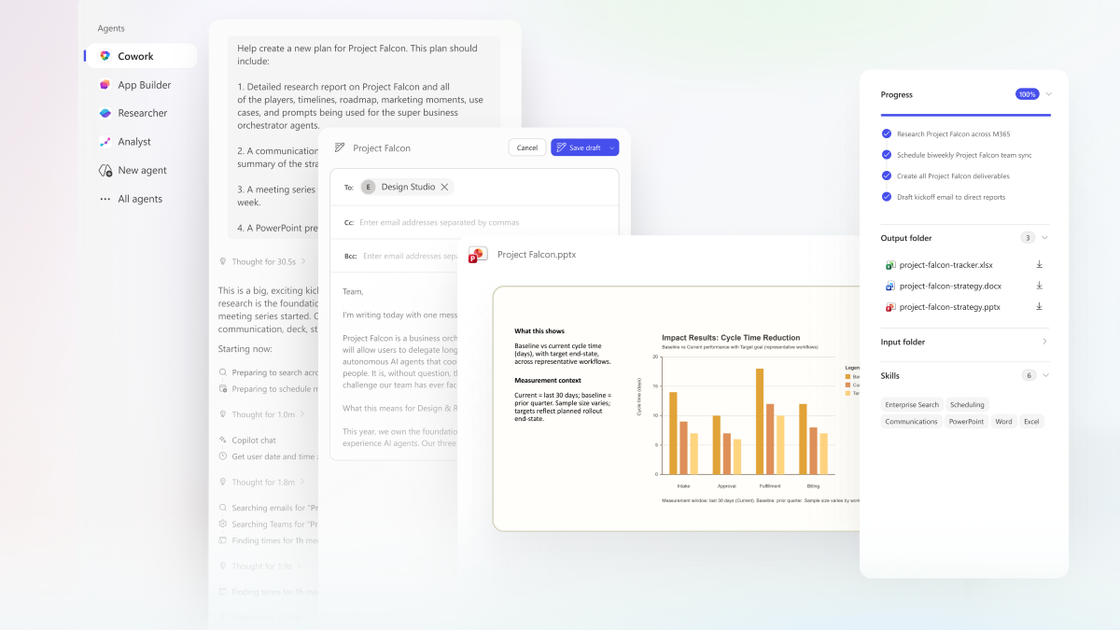
What is Copilot Cowork?
Copilot Cowork is an action-focused experience built for Microsoft 365 that helps turn your intent into concrete work. Instead of only generating content or answering in chat, Cowork delegates tasks and runs workflows on your behalf across Microsoft 365.
The core purpose is to coordinate work using context from your Microsoft 365 data. Powered by Work IQ, Cowork draws on signals across Outlook, Teams, Excel, and other Microsoft 365 apps so it can understand the task you want done, then translate your request into a plan with checkpoints you can monitor.
Key Features
- Delegation by outcome: You describe the outcome you want, and Cowork converts the request into a plan rather than stopping at a response.
- Work grounded in Microsoft 365 content: Cowork automatically grounds its actions in your emails, meetings, messages, files, and data.
- Plan-to-action loop with checkpoints: A plan continues in the background with clear checkpoints so you can confirm progress, make changes, or pause execution.
- Clarification and user approval: If Cowork needs more information, it checks in; it also surfaces recommended actions for you to approve before they are applied.
- Calendar, documents, research, and workflow coordination: Examples in the announcement include rescheduling meetings and focus blocks, assembling meeting packets (documents and decks), compiling research with citations, and generating launch materials and structured next steps.
How to Use Copilot Cowork
- Start with a task request: Describe what you want to accomplish (for example, cleaning up your schedule, preparing a meeting packet, compiling company research, or building a launch plan).
- Review the plan and checkpoints: Let Cowork create the plan, then check in as it progresses through checkpoints.
- Approve actions before they’re applied: When Cowork recommends specific actions (such as accepting/declining/rescheduling meetings), review and approve changes.
- Iterate when needed: If clarification is required or you want to adjust direction, you can change the plan or pause execution at any point.
Use Cases
- Reschedule meetings to protect focus time: Cowork reviews your Outlook schedule, identifies conflicts and low-value meetings, proposes rescheduling options, and can apply changes with your approval (including adding focus blocks). It can also generate a meeting prep document.
- Generate a connected meeting packet: For a customer meeting, Cowork pulls relevant inputs from email, meetings, and files, schedules prep time on your calendar, and produces deliverables such as a briefing document, supporting analysis, a client-ready deck, and a draft follow-up/status email with attached latest files.
- Compile company research quickly with citations: Cowork can gather and organize sources such as earnings reports, SEC filings, analyst commentary, and relevant news, emphasizing primary financial data, then format outputs like an email-ready executive summary, a structured research memo, and an Excel workbook with labeled tabs.
- Coordinate a cross-functional launch workflow: Cowork can produce launch planning assets and coordinate next steps, including competitive comparison tables in Excel, a value proposition document, a customer pitch deck, plus a milestones/owners/next-steps outline.
FAQ
Is Copilot Cowork the same as using Copilot Chat? No. The announcement describes Copilot Cowork as built to take action—delegating tasks and running workflows—rather than only providing chat-based help or drafting content.
What does “grounded in Microsoft 365” mean in this context? The post states that Cowork grounds its work in your emails, meetings, messages, files, and data, using Work IQ signals across Microsoft 365 apps to act with the same understanding you bring to your work.
Can I control what Cowork does? Yes. The workflow includes checkpoints, clarification when needed, and recommended actions that you review and approve before they are applied, with the option to pause execution.
What kinds of outputs can Cowork produce? The post provides examples including calendar changes (reschedules and focus blocks), meeting deliverables (briefing documents, supporting analysis, decks, and draft status emails), research outputs (summaries, research memos, and Excel workbooks with labeled tabs), and launch assets (competitive comparisons, value proposition documents, and pitch decks).
Alternatives
- AI chat assistants for Microsoft 365-style drafting: If you mainly need content generation (e.g., email drafts or outlines) without delegated execution and checkpointed task running, a chat-focused workflow can be a closer fit.
- Manual coordination in Outlook and Teams: For calendar and meeting preparation, teams can perform scheduling, document assembly, and follow-up drafting directly in Outlook/Teams/Office files without relying on an agent to propose and apply changes.
- General-purpose workflow automation tools: For organizations that already automate processes with rules and connectors, these tools can coordinate steps, though they may not be as tightly grounded in the same Microsoft 365 context as described for Copilot Cowork.
- Enterprise research and knowledge management tools: For gathering and organizing sources with citations, research platforms can support compilation workflows, especially when automation beyond content generation is not required.
Alternatives

Lasso
Lasso is an AI-first PIM for ecommerce teams that enriches product attributes and descriptions, processes supplier data, and monitors competitors via app or API.

Biji
Biji is a versatile platform designed to enhance productivity through innovative tools and features.

Gemma AI
Gemma AI is a smart application that calls you directly with personalized, intelligent voice reminders to ensure you never miss important tasks, appointments, or deadlines.

Tavus
Tavus builds AI systems for real-time, face-to-face interactions that can see, hear, and respond, with APIs for video agents, twins & companions.

HiringPartner.ai
HiringPartner.ai is an autonomous recruiting platform with AI agents that source, screen, call, and interview candidates 24/7, reducing time-to-hire from weeks to as little as 48 hours.

Spotit
Spotit is a macOS app that reads your screen and highlights exactly where to click, using voice questions and on-screen guidance.