

Cursor 3
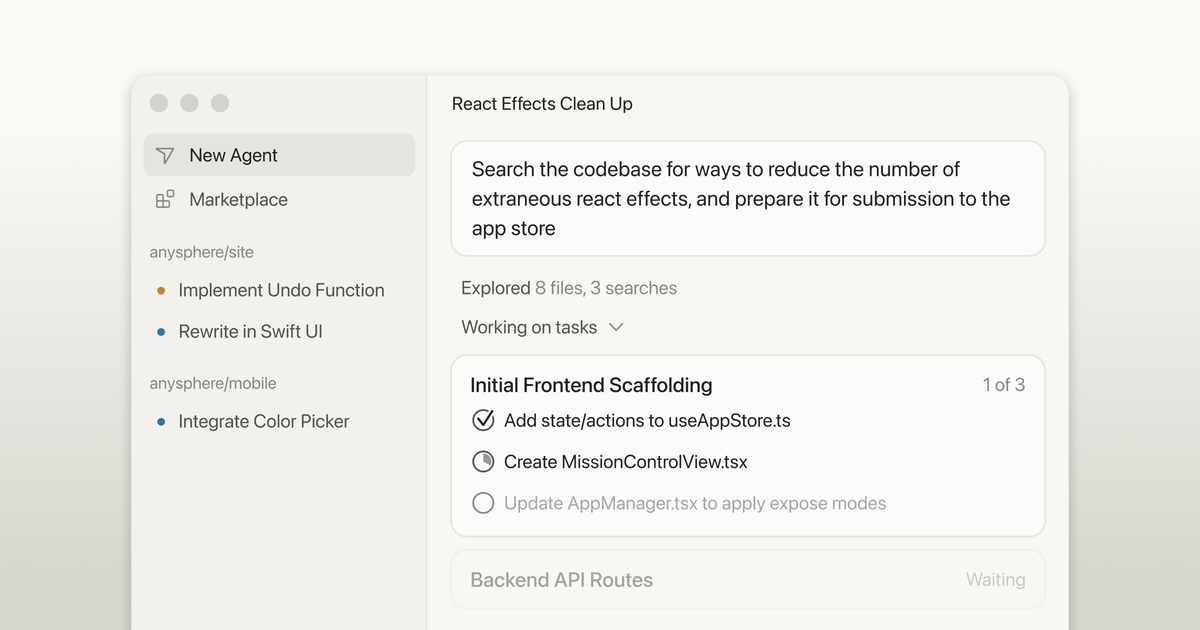
Cursor 3 is a unified desktop workspace for building software with agents—local & cloud sessions, diffs and PR workflow, and IDE navigation.
What is Cursor 3?
Cursor 3 is a unified desktop workspace for building software with agents. It is designed to manage agent-driven work more clearly than workflows that require micromanaging individual conversations across many files, terminals, and windows.
The interface is centered on agents and aims to provide a higher-level abstraction for reviewing and understanding what agents produce, while still allowing you to dig into details like files and definitions when you need to.
Key Features
- Unified agent workspace across multiple repositories: The interface is inherently multi-workspace, supporting work across different repos in one place.
- Local and cloud agents shown together in the sidebar: You can view and manage both local and cloud agent sessions, including sessions started from mobile, web, desktop, Slack, GitHub, and Linear.
- Cloud agent outputs for verification: Cloud agents can generate demos and screenshots so you can verify their work.
- Fast handoff between cloud and local: You can move an agent session from cloud to local to make edits and test on your own desktop, or move it from local to cloud to keep it running while you’re offline.
- “Go from commit to merged PR” diffs and PR workflow: A new diffs view supports editing and review with a simpler UI, with staging, committing, and PR management.
- IDE-oriented navigation and code understanding: You can view files for understanding code and use full LSPs to go to definition.
- Integrated browser for local websites: Cursor can use a built-in browser to open, navigate, and prompt against local websites.
- Plugin marketplace for agent extensions: Browse plugins that extend agents with MCPs, skills, subagents, and more, installable with one click (including support for private/team marketplaces of private plugins).
How to Use Cursor 3
- Upgrade to Cursor 3 and open the Agents Window (Cmd+Shift+P → Agents Window).
- Start or view agent sessions from the sidebar. Local and cloud agents appear together, so you can keep track of what’s running.
- Use the diffs view to review and edit changes produced by agents, then stage and commit when ready.
- Manage pull requests from within Cursor, using the PR workflow to move from changes to merged updates.
- If you need deeper context, use file navigation and go-to-definition via full LSP support, and use the built-in browser for local website prompts when relevant.
Use Cases
- Managing parallel agent work across repositories: Keep multiple agent sessions organized in the unified interface while agents work across different codebases.
- Verifying cloud agent changes with demos and screenshots: Review cloud agent outputs to confirm behavior before you pull the work into your local environment.
- Continuing long-running tasks while away from your laptop: Move a session from local to cloud so it can keep running when you close or step away, then review results later.
- Switching to local editing and testing when iteration is needed: Move a session from cloud to local to apply code changes and run your own tests on your desktop.
- Reviewing and merging agent-produced changes: Use the diffs view to edit and review, then stage, commit, and manage pull requests without leaving the Cursor workflow.
FAQ
What does “unified workspace” mean in Cursor 3? It refers to an interface that brings humans and agents into one place, including a multi-repo layout and a sidebar that shows both local and cloud agent sessions.
Can I move an agent session between cloud and local? Yes. Cursor 3 supports moving an agent session from cloud to local for edits and testing, and moving it from local to cloud to keep it running while you’re offline.
How do I review what cloud agents did? Cloud agents can produce demos and screenshots, which you can use to verify their work.
Does Cursor 3 include standard code navigation features? Cursor 3 includes file viewing for understanding code and “go to definition” using full LSPs.
Are there ways to extend agents beyond the default setup? Yes. Cursor 3 supports plugins from the Cursor Marketplace, including extensions that add MCPs, skills, subagents, and related capabilities.
Alternatives
- Agent-capable code assistants in an IDE environment: Alternative tooling may also support agent-driven code changes, but Cursor 3 specifically emphasizes a unified multi-workspace agents interface and session handoff between local and cloud.
- IDE-based workflows with separate AI chat tools: Some teams may rely on an IDE plus standalone agent/chat applications, which can require more manual switching between conversations and tools than Cursor 3’s integrated workspace.
- CI/CD and review automation tools: For teams focused on automation after code is produced (testing, deployment, review checks), these tools complement rather than replace an agent-first development interface like Cursor 3.
Alternatives

Lasso
Lasso is an AI-first PIM for ecommerce teams that enriches product attributes and descriptions, processes supplier data, and monitors competitors via app or API.

Biji
Biji is a versatile platform designed to enhance productivity through innovative tools and features.

Ably Chat
Ably Chat is a chat API and SDKs for building custom realtime chat apps, with reactions, presence, and message edit/delete.

Tavus
Tavus builds AI systems for real-time, face-to-face interactions that can see, hear, and respond, with APIs for video agents, twins & companions.

HiringPartner.ai
HiringPartner.ai is an autonomous recruiting platform with AI agents that source, screen, call, and interview candidates 24/7, reducing time-to-hire from weeks to as little as 48 hours.

AakarDev AI
AakarDev AI is a powerful platform that simplifies the development of AI applications with seamless vector database integration, enabling rapid deployment and scalability.