

Daydreamer
Daydreamer for Mac is a break reminder app with full-screen rest scenes, ambient music, inspirational quotes, and Focus Mode to reduce distractions.
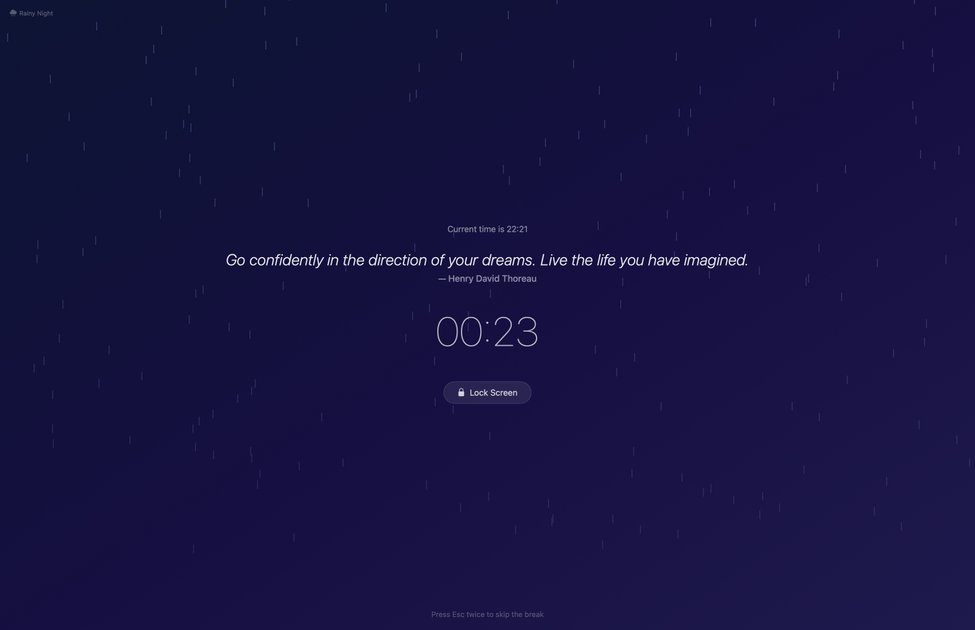
What is Daydreamer?
Daydreamer is a macOS break reminder app designed to help you rest your eyes and refresh your mind with full-screen break scenes, ambient music, and motivational quotes. Instead of showing a simple interruption, it presents each break as a short, calming experience.
It also includes Focus Mode to reduce on-screen distractions by dimming everything except your active window, and it can automatically pause break reminders when you’re in activities where interruptions aren’t desired.
Key Features
- Full-screen break scenes (including Rainy Night, Sunset Beach, Forest Morning, and Starry Night) with animated particles and ambient gradients to make breaks feel like a mini escape.
- Custom break backgrounds, including using your desktop wallpaper or a custom image as the break scene background.
- Focus Mode that dims everything except your active window, with adjustable dimming intensity, animation speed, and color.
- Smart Pause that automatically pauses break reminders during meetings, video playback, fullscreen apps, and gaming/presenting-style contexts, then resumes when you’re done.
- Inspirational quotes on each break, cycling through a curated collection of 150+ motivational and healing quotes (the collection updates automatically over time).
- Ambient music with smooth fade in/out during breaks, using either the built-in track or a chosen audio file.
- Smart break scheduling with preset intervals or fully custom timing (configure break frequency, duration, and longer breaks at regular intervals).
- Skip controls with three levels: Easy (skip freely), Normal (wait before skipping), and Strict (no skipping allowed).
- Lock screen option for one-click locking during breaks.
- Fully customizable break messages, timing, music, backgrounds, and skip behavior.
- Global keyboard shortcuts for starting breaks, toggling the timer, and activating Focus Mode.
How to Use Daydreamer
- Download Daydreamer and start the 7-day free trial (full access is mentioned, with no credit card required).
- Open the app and choose a break scene background (one of the built-in immersive scenes, your desktop wallpaper, or a custom image).
- Set your break schedule—either a preset interval (from 10 minutes up to 1 hour) or a fully custom H:M:S timing.
- Configure break duration, long-break intervals, and skip difficulty (Easy/Normal/Strict) to match your preference.
- Optionally enable Focus Mode settings and Smart Pause so breaks won’t appear during meetings, video playback, gaming, or fullscreen apps.
- Use keyboard shortcuts to start breaks, toggle the timer, or activate Focus Mode when you want to concentrate.
Use Cases
- Eye-rest breaks during focused work: take scheduled full-screen breaks with animated scenes, quotes, and ambient music designed to encourage eye relaxation.
- Concentration sessions with Focus Mode: dim other windows while you work on a single active window, adjusting dimming intensity, animation speed, and color as needed.
- Presentations and meetings without interruptions: rely on Smart Pause to stop break reminders when meetings or video playback are detected, then resume afterward.
- Personalizing your break environment: use your own image or desktop wallpaper as the background to create a consistent visual atmosphere for breaks.
- Flexible break planning: set custom break timing (including longer breaks every 3rd, 4th, or 5th break) and choose whether skipping is unrestricted, delayed, or disabled.
FAQ
Does Daydreamer pause break reminders automatically?
Yes. Smart Pause is described as auto-pausing during meetings (including mic/camera activity), video playback, gaming, and fullscreen apps, then resuming when the activity ends.
What is Focus Mode in Daydreamer?
Focus Mode dims everything on screen except your active window. You can adjust dimming intensity, animation speed, and color, and it works independently across multiple monitors.
Can I customize the break schedule?
Yes. You can choose preset break intervals (10 minutes to 1 hour) or set fully custom timing using H:M:S. You can also configure break duration and set up long breaks at regular intervals.
How many quotes are available?
The app includes a curated collection of 150+ quotes, with a different quote shown each break. The quotes update automatically over time.
Can I try Daydreamer before buying?
Yes. The page states there is a 7-day free trial with full access and no credit card required.
Alternatives
- Dedicated focus/website blocker apps: these focus on restricting distractions rather than showing full-screen break scenes and quotes; they typically don’t provide scheduled ambient break experiences.
- Screen dimming or Do Not Disturb workflows (macOS-native or third-party): these can reduce distractions or hide notifications, but they won’t include the break scenes, inspirational quote rotation, or ambient music described here.
- Meditation or mindfulness timer apps: these may provide guided sessions or timed pauses, but they typically don’t include Smart Pause for meetings/video/fullscreen detection or Focus Mode dimming of other windows.
- General time management and reminder apps: these can prompt you to take breaks, but they generally don’t bundle animated break backgrounds, ambient music fade behavior, and quote-driven full-screen experiences.
Alternatives

Biji
Biji is a versatile platform designed to enhance productivity through innovative tools and features.

Decision Jar
Create virtual jars of options with Decision Jar—shake your phone to pick instantly, use AI suggestions, and view decision logs over time.

Planndu: Daily Task Planner
Planndu is an intuitive productivity application designed to help users organize tasks, manage projects, build routines, and enhance focus using tools like AI generation and a built-in Pomodoro timer.
MealTime
MealTime is your personal, offline-first recipe companion designed to help you save, organize, plan meals, and generate smart grocery lists, all while keeping your data private.

Clawcard
Clawcard: AI agents get a real inbox, phone number & virtual credit card for OpenClaw. Secure, autonomous agent operations.

Scite
Scite is an AI-powered research tool that helps researchers understand research debates, ensure reliable citations, and improve their writing.