

Enough Cream
Enough Cream helps you match your preferred coffee color by using advanced color analysis and real-time camera comparison while adding cream.
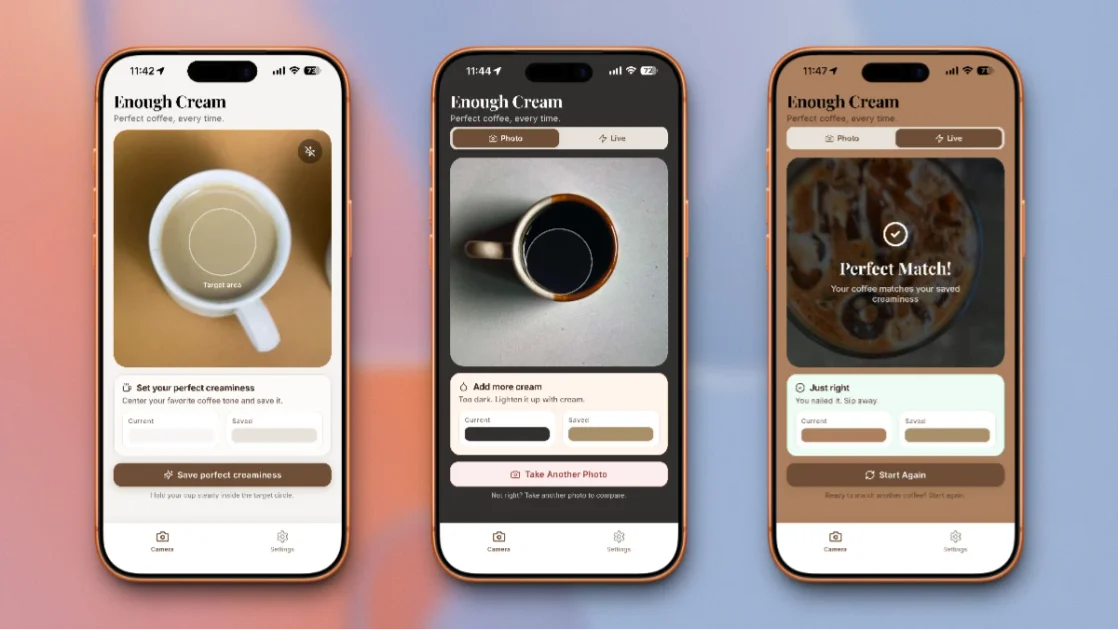
What is Enough Cream?
Enough Cream is a mobile app that helps people achieve a consistent coffee pour by using advanced color analysis. Its core purpose is to reduce guessing when adding cream by comparing the color of the coffee in real time to a target color profile that represents a user’s preferred “perfect cup.”
The app analyzes the hexadecimal color value of the coffee as cream is added, and it can account for differences in ambient lighting. Instead of relying only on taste or timing, it provides a visual match against a target profile and alerts when the coffee reaches that target shade.
Key Features
- Computer-vision color analysis of coffee: Uses camera-based analysis to measure the coffee’s specific hexadecimal color value as you pour, aiming for repeatable results.
- Target profile setup via a reference photo: Lets you snap a photo of your preferred cup once; the app analyzes light reflection and color depth to create a personal target profile.
- Real-time color comparison while pouring: Continuously compares the current coffee shade against your target profile and updates feedback as you add cream.
- Color model beyond “light vs. dark”: Analyzes saturation, hue, and brightness to distinguish between states like “milky” vs. “creamy,” not just overall darkness.
- Ambient light correction: Includes adjustments for ambient lighting so that kitchen lighting conditions (e.g., warm indoor lights vs. cooler daylight) don’t prevent consistent matching.
How to Use Enough Cream
- Set your target once: Use the app’s setup flow to snap a photo of your perfect cup. This creates your unique target color profile.
- Use the live comparison during future pours: Open the app with the camera active while you pour and add cream.
- Follow the alert: The app alerts when the coffee’s color matches your target. Stop pouring and enjoy the result.
Use Cases
- Dialing in a personal cream preference: If you regularly drink coffee with cream, create a target using a cup you already consider ideal, then reproduce that same look without repeated guessing.
- Making consistent cups across different mornings: Use the real-time comparison to reduce variation caused by how long you pour, how quickly you add cream, or how you visually judge changes in the mug.
- Handling lighting changes in the kitchen: When morning light conditions differ (for example, warm indoor lighting versus cooler daylight), use the app’s ambient light correction to keep the matching process consistent.
- Supporting multiple drinkers in the household: Each person can set their own target profile, allowing partners to make different ideal cups with the same workflow.
- Switching between “milky” and “creamy” preferences: If you’re sensitive to how the mixture looks (e.g., avoiding a more milky appearance), the app’s saturation/hue/brightness analysis is designed to distinguish those states.
FAQ
-
How does Enough Cream know what I consider “perfect”?
You set it by snapping a photo of your preferred cup once. The app analyzes the light reflection and color depth to build a target profile. -
What does the app compare during pouring?
It compares the live coffee color against your target profile using camera-based color analysis (including hexadecimal color values) as you add cream. -
Will kitchen lighting affect the result?
Enough Cream includes ambient light correction that adjusts for differences such as warm indoor lights or cooler daylight. -
Does it only judge coffee by whether it’s light or dark?
No. It analyzes multiple color dimensions—saturation, hue, and brightness—to help differentiate between similar-looking outcomes. -
What happens when the coffee reaches the target?
The app provides feedback and alerts you at the moment the coffee matches the target color, so you can stop pouring.
Alternatives
- Manual visual matching (no app): Using experience to judge cream amount by appearance and taste. This can work but relies heavily on the person’s perception each time.
- Using fixed ratios (measure-by-volume): Using a set cream-to-coffee ratio each morning. This can improve consistency but doesn’t directly account for differences in lighting or how color develops during pouring.
- Coffee brewing timers and temperature tools: Apps or devices that track brew time/temperature. They may improve repeatability for brew extraction, but they don’t specifically measure the coffee’s color response when adding cream.
- Other camera-based color/vision apps: Apps that analyze colors from photos can offer similar measurement workflows, though they may not be tailored to cream-in-coffee matching and the specific “target profile + live alert” pouring workflow described for Enough Cream.
Alternatives
MealTime
MealTime is your personal, offline-first recipe companion designed to help you save, organize, plan meals, and generate smart grocery lists, all while keeping your data private.

MealJar
MealJar helps you plan meals quickly, keep family recipes in one searchable library, and generate organized grocery lists to reduce food waste.

SkipTheMid
SkipTheMid is a food encyclopedia for curious eaters, helping you discover hyper-regional dishes worldwide with place-based context and community ratings.

MealJar
MealJar is a collaborative meal planning application designed to help families organize recipes, generate automated shopping lists, and reduce food waste by planning meals in seconds.

Morsel: cook, share, eat
Morsel: cook, share, eat is an iPhone app to record and share what you cook—recipe posts, photo uploads, and engagement notifications.

Cal AI
Cal AI is an AI-powered app that simplifies calorie tracking by allowing users to snap a photo, scan a barcode, or describe their meal for instant nutritional information.