

Focus Flow
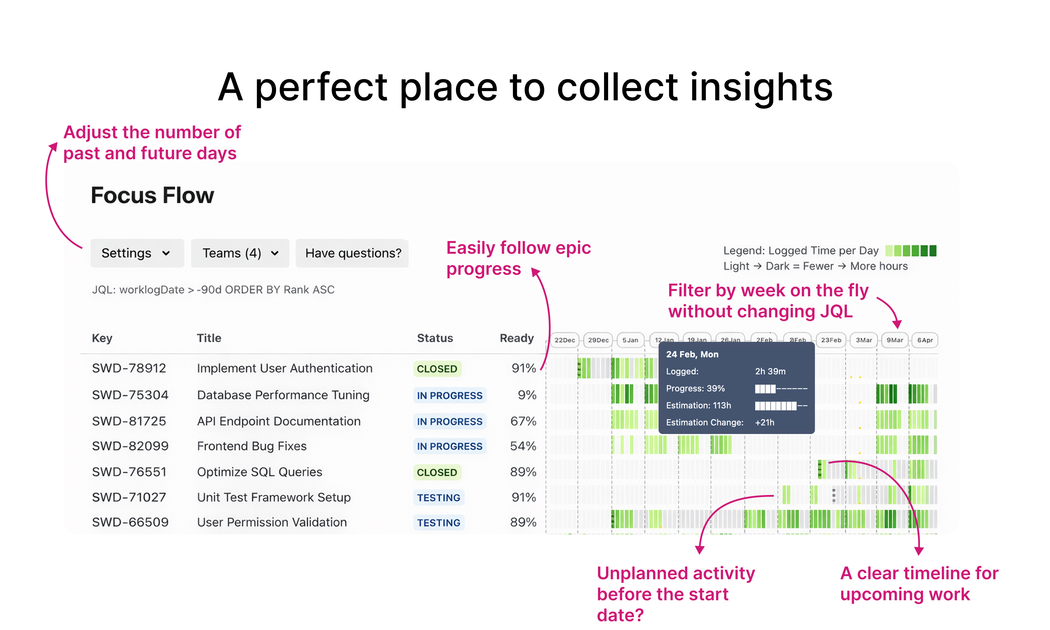
Focus Flow is a Jira Cloud app that builds a weekly epic execution timeline from worklogs, showing plan vs reality and drift with issue drill-down.
What is Focus Flow?
Focus Flow is a Jira Cloud app that builds a weekly epic execution timeline from worklogs, showing plan vs reality and drift visibility with drill-down into Jira issues.
Rather than requiring users to switch between multiple Jira views during delivery reviews, Focus Flow provides a single timeline-based screen that organizes the relevant epics for a selected week and supports drill-down into the underlying Jira issues.
Key Features
- Weekly epic execution timeline from Jira worklogs: Build an epic-level timeline based on what was logged, so you can see what actually moved.
- Plan vs reality comparison: Contrast planned activity with actual execution to understand progress and where it diverges.
- Weekly focus filtering for delivery reviews: Filter to the selected week to review active and planned epics in one meeting-ready view.
- Pattern drill-down from the timeline: Hover a day to inspect logged time, progress, and estimation changes, then open the exact Jira issues behind the pattern.
- Drift and scope shift visibility with evidence: Use the timeline’s logged and estimation change data to explain drift and scope shifts without relying on guesses.
- Cross-team review via Teams filter (v6.7): Filter the project heatmap to one or more teams derived from child issue “Team” values, including “No Team” when missing; heatmap intensity/legend/tooltips and drill-down reflect only the selected teams while epic status and weekly focus remain tied to full epic context.
How to Use Focus Flow
- Install Focus Flow for Jira Cloud and open it inside Jira.
- Use the app’s Weekly Focus view to select the week you want to review.
- Review active and planned epics on the timeline and compare plan vs reality on the same screen.
- Hover specific days to inspect logged time, progress, and estimation changes.
- Drill down to the underlying Jira issues to understand what drove the pattern and to support status discussions with evidence.
Use Cases
- Weekly delivery review for epic execution: A PM or delivery lead can isolate active and planned epics for a specific week and compare spent vs estimate without context switching.
- Investigating drift across epics: When progress appears off-track, users can use day-level inspection of logged time and estimation changes and then open the relevant Jira issues to explain why.
- Scope change analysis during status meetings: Teams can look for estimation changes and timeline patterns to ground scope shift conversations in logged Jira evidence.
- Cross-team execution heatmap review: For organizations managing work through epics across multiple teams, the Teams filter helps narrow the heatmap and drill-down to the teams relevant to a particular discussion.
- Estimation and progress reconciliation: When stakeholders expect a certain trajectory, teams can compare planned dates and progress markers against what actually moved according to worklogs.
FAQ
-
Does Focus Flow work with Jira Cloud? Yes. The listing specifies “Jira Cloud.”
-
What inputs does Focus Flow use to build its timeline? Focus Flow turns Jira worklogs, epic links, and planned dates into an epic-level execution timeline.
-
Can I review only a specific week? Yes. The app includes a “Weekly Focus” filter to isolate active and planned epics for the selected week.
-
How do I investigate details behind a timeline pattern? Hover any day to inspect logged time, progress, and estimation changes, then open the exact Jira issues behind the pattern.
-
Is cross-team filtering available? Yes. In Focus Flow v6.7, a Teams filter was added for the project heatmap, derived from child issue “Team” values in the current dataset.
Alternatives
- Jira-native reporting (without a timeline app): Use Jira dashboards, filters, and reports to review epics, but you may need to switch between views to compare plan vs reality and to investigate logged execution.
- Worklog-based analytics tools for Jira: Apps that provide worklog reporting or dashboards can help surface progress trends, typically with less focus on an epic-level weekly execution timeline and day-level drill-down.
- Agile planning and roadmap apps: Tools that emphasize roadmap or release planning can support plan-focused discussions, but may not provide the same worklog-to-epic execution timeline and drift visibility described here.
Alternatives

PromptScout
PromptScout tracks how your brand is mentioned, which competitors are recommended, and what sources are cited in AI answers—plus website audits.

Biji
Biji is a versatile platform designed to enhance productivity through innovative tools and features.

Sleek Analytics
Lightweight, privacy-friendly analytics with real-time visitor tracking—see where visitors come from, what they view, and how long they stay.

MacSpoof
MacSpoof is a macOS MAC address changer that lets you change or randomize your Wi‑Fi MAC to reconnect and limit device logging on public Wi‑Fi.

ClawTick
ClawTick is a CLI-first AI agent automation platform for scheduling webhook tasks on cron with monitoring, alerts, retries, and execution logs.

OpenFlags
OpenFlags is an open source, self-hosted feature flag system with a control plane and typed SDKs for progressive delivery and safe rollouts.