Knock
Knock is customer engagement infrastructure for product, marketing, and transactional messaging teams—activate your data and ship cross-channel workflows with developer tooling.
What is Knock?
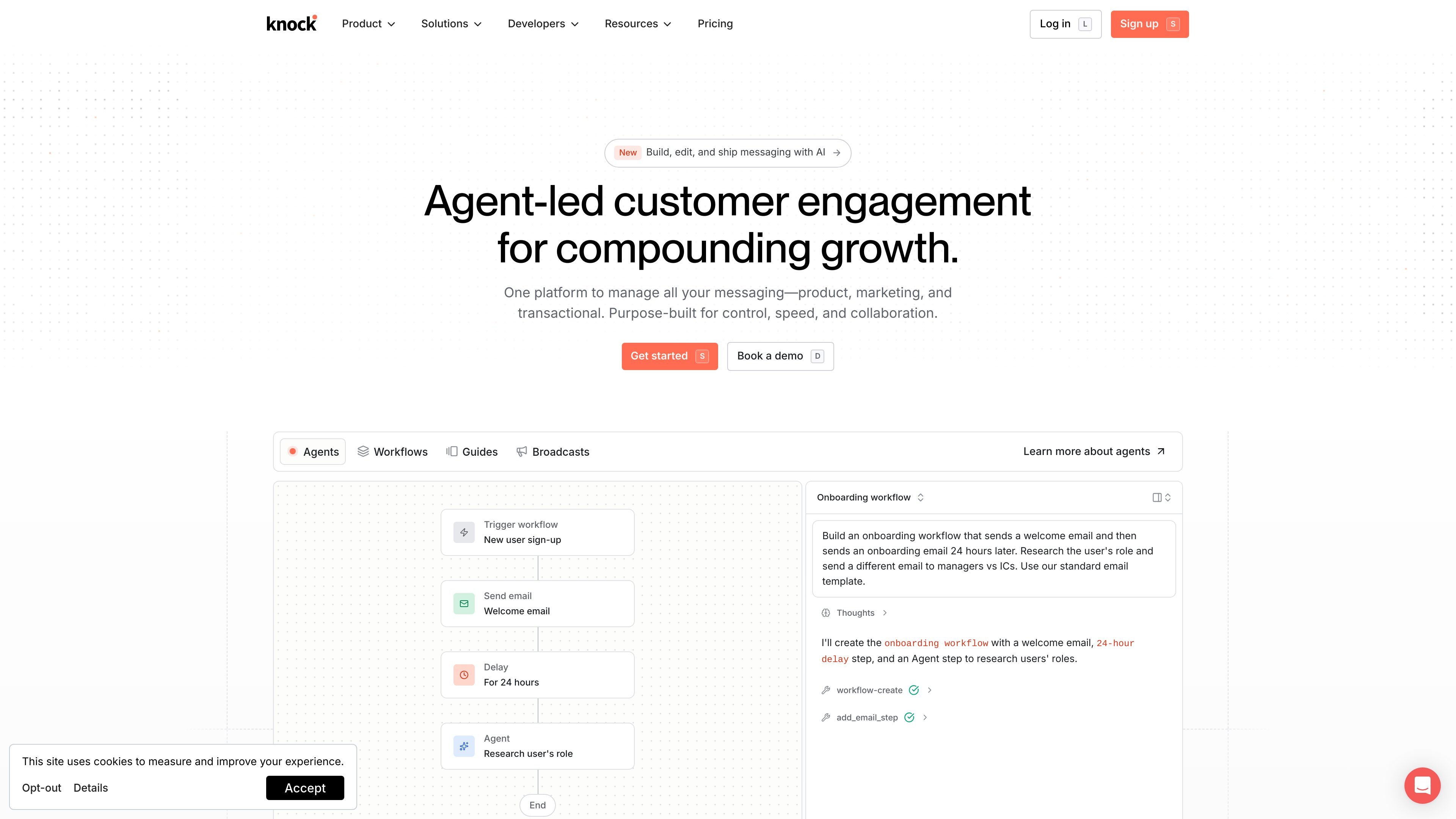
Knock is customer engagement infrastructure for product, marketing, and transactional messaging teams. It’s designed to help you activate your data and build cross-channel messaging experiences that respond to user attributes, events, and actions.
Knock focuses on messaging workflows that can be edited and shipped from a dashboard, while also supporting developer workflows through SDKs and a CLI for building and managing messaging from code.
Key Features
- Build and ship messaging from an AI-native platform: Create messaging experiences in Knock’s dashboard and send them from there without moving work across multiple tools.
- AI-assisted copy and logic for message experiences: Generate messaging content and supporting logic using prompts (including qualification and onboarding examples).
- Cross-channel messaging delivery: Send messages across email, SMS, push, chat, and in-app.
- Workflows for event-driven orchestration: Trigger workflows based on changes such as API calls, usage events, or segment changes.
- Data ingestion and unified activation: Ingest real-time data from your product, tools, and data warehouse/CDP sources (including warehouse, CDP, reverse ETL, and webhooks) to drive targeting and segmentation.
- Dynamic segments and custom objects: Build segments using attributes, events, and relations, and sync custom objects for audiences and personalized templates.
- User-first controls for sending: Use preference centers and send windows to manage how and when users receive messages.
- Developer tooling and agent-friendly usage: Work with Knock via SDKs in multiple languages and tools including Cursor/Claude Code environments, version control, and the Knock CLI with CI/CD integration and built-in observability (logging and notifications) for debugging changes.
How to Use Knock
- Get started by onboarding to Knock and preparing your workspace for messaging.
- Activate your data by connecting real-time sources (e.g., product events and warehouse/CDP sources) so Knock can build segments based on attributes, events, and relations.
- Create a messaging experience in the Knock dashboard—such as personalized onboarding—using AI-assisted prompts and your targeting logic.
- Define orchestration using workflows or audience/segment triggers (for example, trigger when a user signs up, becomes qualified, or changes segment membership).
- Edit, validate, and ship: update copy and targeting in the dashboard, then deliver messages across the configured channels with user controls like preference centers and send windows.
Use Cases
- Personalized onboarding for new sign-ups: Qualify a new user (e.g., via an agent prompt) and route them to personalized onboarding email sequences when qualified versus a standard onboarding path when not qualified.
- Qualification-based follow-ups for B2B SaaS: Run an ICP qualification step using a structured input (recipient JSON), score whether the lead matches qualification criteria, and tailor onboarding or outreach based on the result.
- Cross-channel lifecycle messaging: Send onboarding and subsequent engagement messages across email and other channels (SMS, push, chat, in-app) when the user reaches specific events or segment states.
- Event-driven workflows from product activity: Trigger workflows through API calls, usage events, or segment changes to initiate messaging at the right moment in the customer journey.
- Developer-managed messaging deployments: Use the Knock SDKs, environments, version control, Knock CLI, and CI/CD integration to manage messaging changes as part of a development workflow, with observability tools to debug notifications and stream logs.
FAQ
What types of messaging can Knock send?
Knock supports sending messages across email, SMS, push, chat, and in-app, based on the messaging experiences and workflows you define.
How does Knock decide who receives a message?
Knock can ingest and activate data so you can build dynamic segments using user attributes, events, and relations. Workflows can then trigger based on actions like API calls, usage events, or segment changes.
Can non-engineers edit messaging content?
The page states you can build, edit, and ship messaging with AI from anywhere in the Knock dashboard, and that the platform enables non-engineers to edit copy and targeting in Knock.
Does Knock support developer workflows?
Yes. The page describes SDKs in multiple languages and tooling including Knock CLI + your AI IDE, environments, version control, CI/CD integration, and built-in observability for debugging and logs.
Does Knock include user sending controls?
Knock includes preference centers and send windows to respect user preferences and manage when messages are delivered.
Alternatives
- General-purpose marketing automation platforms: These focus on campaign automation and segmentation; compared with Knock, they may require more tooling to unify product/transactional messaging workflows across channels.
- Customer data platform (CDP) + separate engagement tooling: A CDP can unify data, while a different engagement system handles messaging. The difference is that Knock emphasizes engagement infrastructure that ties data activation directly to cross-channel messaging and workflows.
- In-product messaging tools: Tools focused mainly on in-app dialogs, nudges, and paywalls can complement Knock’s in-app component approach, but may not cover broader cross-channel messaging and the described data-driven workflow orchestration.
- Custom-built messaging pipelines: Engineering teams can build their own event ingestion, segmentation, and channel sending. Compared with Knock, this shifts workflow and orchestration responsibilities entirely to your team and requires building the messaging and observability layers yourself.
Alternatives
DailyPlay.ai
Turn passive visitors into loyal customers with DailyPlay.ai—create personalized, data-driven mini games built for your brand’s engagement goals.
Podium
Podium is an AI-powered lead generation and management platform designed to help businesses convert more leads and increase revenue.
AakarDev AI
AakarDev AI is a powerful platform that simplifies the development of AI applications with seamless vector database integration, enabling rapid deployment and scalability.
DeepMotion
DeepMotion is an AI motion capture and body-tracking platform to generate 3D animations from video (and text) in your web browser, via Animate 3D API.
Arduino VENTUNO Q
Arduino VENTUNO Q is an edge AI computer for robotics, combining AI inference hardware and a microcontroller for deterministic control. Arduino App Lab-ready.
Devin
Devin is an AI coding agent that helps software teams complete code migrations and large refactoring by running subtasks in parallel.

