

Rainfrog
Rainfrog generates campaign-level visuals from your directions, automatically crafting prompts so brands and creatives can create production-ready images fast.
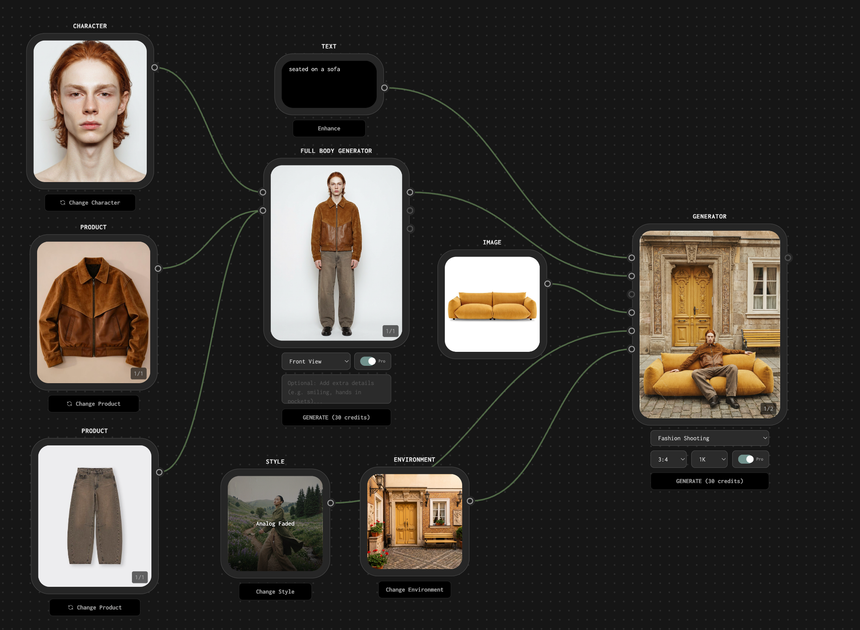
What is Rainfrog?
Rainfrog generates campaign-level visuals from your directions, automatically crafting prompts so brands and creatives can create production-ready images fast.
The core purpose of Rainfrog is to help brands and creatives rapidly create production-oriented visual content by mixing and matching products, characters, styles, and environments.
Key Features
- Automatic prompt crafting for campaign-level images: Rainfrog converts user direction into a prompt designed to generate campaign-ready visuals quickly.
- Mix-and-match inputs (products, characters, styles, environments): Build multiple visual variations by combining assets and creative dimensions in one workflow.
- Drag-and-drop ready workflows: Start from uploaded products and then select a style or character to begin generating visuals.
- Reusable ecosystem for brand and creative workflows: Keep the workflow consistent so users can generate and iterate visual sets without rebuilding the process each time.
How to Use Rainfrog
- Try Rainfrog for free to access the workflow.
- Upload your products.
- Pick a style or character as your starting direction.
- Generate visuals using the campaign-oriented prompt that Rainfrog crafts based on your selections.
- Iterate by mixing and matching products, characters, styles, and environments to expand your set of visuals.
Use Cases
- Fashion shooting workflow: Use uploaded fashion products, select characters and styles, then generate multiple campaign visuals for a fashion shoot workflow.
- Campaign concept variation: Create a range of visual options by swapping environments and styles while keeping the product set constant.
- Character-led creative exploration: Choose different characters to drive visual tone changes without changing the underlying product direction.
- Style exploration for a product line: Test many style combinations for the same product, producing variations that can be used as campaign inputs.
- Rapid content ideation for brand teams: Generate a broad set of campaign-level image concepts inside a single reusable workflow.
FAQ
-
Do I need to write prompts? Rainfrog is positioned as removing the need for prompt-writing by automatically crafting a prompt from the direction you provide.
-
What can I combine to generate visuals? The workflow supports mixing and matching products, characters, styles, and environments.
-
How do I start generating images? Upload your products, choose a style or character, and generate visuals from there.
-
Is the output meant for campaigns? The product page specifically describes generating “campaign-level” visuals.
-
What does “reusable ecosystem” mean in this context? It refers to a workflow built to generate visuals in a consistent way for brands and creatives, so you can reuse the same process across visual sets.
Alternatives
- Other AI image generators with manual prompting: These may require more direct prompt writing and iteration, while Rainfrog focuses on automating prompt construction for campaign-level outputs.
- Digital asset management plus templated creative tools: Tools that organize product assets and help generate consistent layouts can be useful for teams, but they may not generate campaign-level images from combined creative inputs the same way.
- Design workflow tools for creating visual variations: Some platforms support variation generation through predefined templates; compared to Rainfrog, the workflow may rely more on template selection than on automatic prompt engineering.
Alternatives

PXZ AI
An All-In-One AI Platform that combines tools for image, video, voice, writing, and chat to enhance creativity and collaboration.

Pic Copilot
Transform your eCommerce store with AI Fashion Models, AI Product Images, and UGC videos—all in one tool. No studio or design skills needed.

exactly.ai
exactly.ai is an AI image generator and creative studio for teams to replicate brand visuals with signature images—on-brand variations, private style.

GPTIMG2 AI
GPTIMG2 AI is an image-first AI generator for product shots, posters, and marketing visuals—refine with prompts to preserve subject, layout, and readable text.

TapNow
TapNow is an AI-native visual creation engine for businesses and creators—generate professional-grade visuals for e-commerce ads to cinematic art.

Hotpot.ai
Hotpot.ai is an AI platform for generating images and AI headshots, editing photos with upscaling and background removal, plus AI writing templates.