

SongDNA
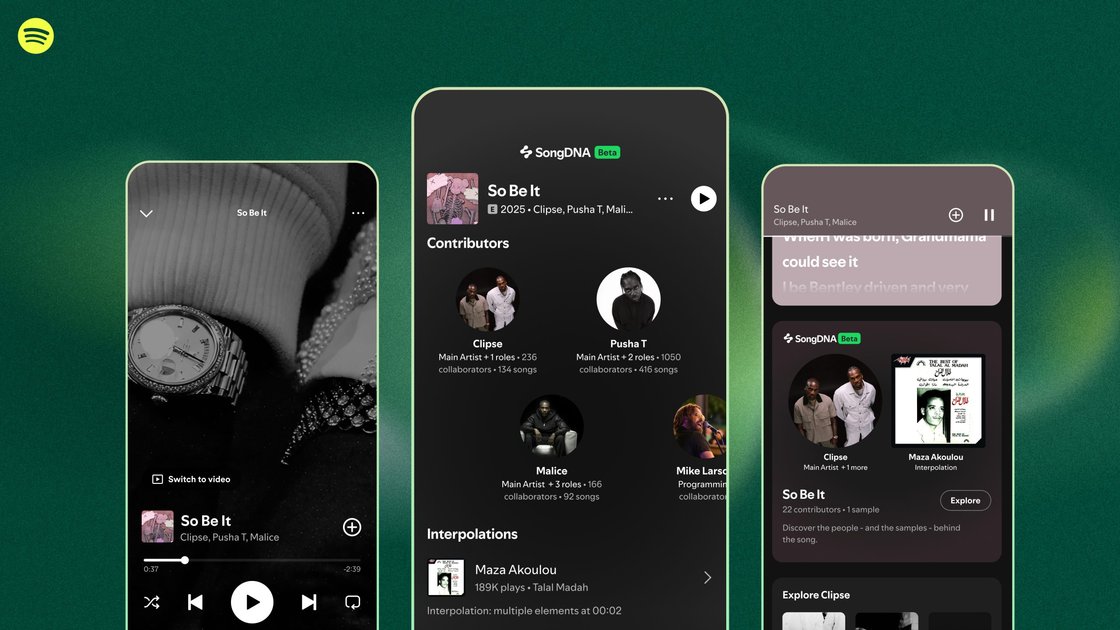
SongDNA is a Spotify Premium beta feature in Now Playing that reveals creative connections behind songs—collaborators, samples/interpolations, and covers.
What is SongDNA?
SongDNA is a Spotify beta feature that reveals the creative connections behind songs directly inside the Spotify mobile app’s Now Playing view. When available on a track, it lets listeners explore who helped create the music—such as writers, producers, and collaborators—and how other works shaped it through samples and interpolations.
The feature is also designed to make it easier to follow relationships across music. By tapping creators shown in SongDNA, listeners can navigate to other artists those creators have worked with, and then continue exploring through additional collaborators, covers, and related connections.
Key Features
- SongDNA card in the Now Playing view (mobile): While listening to a song in the Spotify mobile app, users can scroll to and tap the SongDNA card for supported tracks to open the connection experience.
- Collaboration details for a track: SongDNA surfaces people involved in the song’s creation, including writers, producers, and collaborators.
- Samples and interpolations: The feature highlights samples and interpolations that helped shape a song’s sound.
- Covers it inspired: Users can browse covers connected to the track, extending discovery beyond the original recording.
- Link-out exploration through creators: Tapping creators in SongDNA leads to additional discovery of other artists they’ve worked with, creating a chain of related tracks and people.
- Creator data managed via Spotify for Artists (beta): Eligible artist and label teams can review and manage SongDNA components in Spotify for Artists to influence how their musical story is presented.
How to Use SongDNA
- Open the Spotify mobile app and start playing a song.
- Go to the Now Playing view and scroll down to find the SongDNA card (on supported tracks).
- Tap the SongDNA card to view collaborators, samples and interpolations, and covers tied to the track.
- Tap any creator shown in the card to continue exploring related artists and connections.
Use Cases
- Learning the people behind a track: As a listener, you can use SongDNA to see writers, producers, and collaborators associated with a specific song and understand how those contributors relate to its sound.
- Exploring how a song draws from other works: If you’re curious about influences, SongDNA surfaces samples and interpolations, helping you trace which earlier recordings or compositions contributed elements to the track.
- Discovering related music through covers: Instead of searching separately, you can browse covers connected to a song and follow those links as part of the same discovery flow.
- Following an artist’s broader network: By tapping creators within SongDNA, you can navigate to other artists they’ve worked with, then follow collaborators to see how connections span eras and genres.
- Artist or label team review in beta: Eligible artist and label teams can use Spotify for Artists to review and manage SongDNA components, helping ensure the creative lineage presented to listeners reflects their input.
FAQ
- Who can use SongDNA? The feature is rolling out in beta for Premium users globally.
- On which devices is SongDNA available? SongDNA is available on iOS and Android mobile devices.
- Where do I find SongDNA while listening? In the Spotify mobile app, open the Now Playing view and scroll down to the SongDNA card on supported tracks.
- Will SongDNA show for every track? The announcement notes SongDNA is available on supported tracks, but it does not specify how support is determined.
- Can creators influence what appears in SongDNA? The announcement states that eligible artist and label teams can review and manage SongDNA components in Spotify for Artists during the beta.
Alternatives
- Spotify “About the Song” (context per track): While SongDNA focuses on interactive connections (collaborators, samples/interpolations, covers), About the Song is positioned as a way to understand the story behind a specific track.
- Music metadata and credits databases: Catalog-style sources that list song credits and releases can help identify writers/performers, but they typically don’t provide the same in-player, tap-through relationship map.
- Artist discography and collaboration pages: Following an artist through official discographies and credits can reveal related work, though the workflow is usually separate from the current track’s listening context.
- Label/press release archives: For some music narratives, press materials may explain influences and production context, but they won’t offer the same structured, linkable network experience within a player.
Alternatives

AI Song Maker
Create royalty-free songs effortlessly with our AI Song Maker and Music Generator.

LALAL.AI
LALAL.AI is a next-generation vocal remover and music source separation service that allows users to quickly and accurately extract vocal and instrumental tracks from audio and video files.

LALAL.AI
LALAL.AI is an AI vocal remover and music source separation service that splits uploaded audio/video into isolated stems for fast downloads.

Hedra
Hedra is a visual creation platform that enables users to quickly turn their ideas into AI-generated video, audio, and imagery content.
MusiKey Authentication
MusiKey is a cross-platform desktop application that replaces traditional passwords with encrypted musical compositions for secure authentication.

TME Studio
TME Studio is an online music creation assistant launched by Tencent Music Entertainment, providing various creative tools for music enthusiasts.