

Turn It Gen Z
Turn It Gen Z turns your text into Gen Z slang with selectable vibes, intensity and output length—then copy or share to X.
What is Turn It Gen Z?
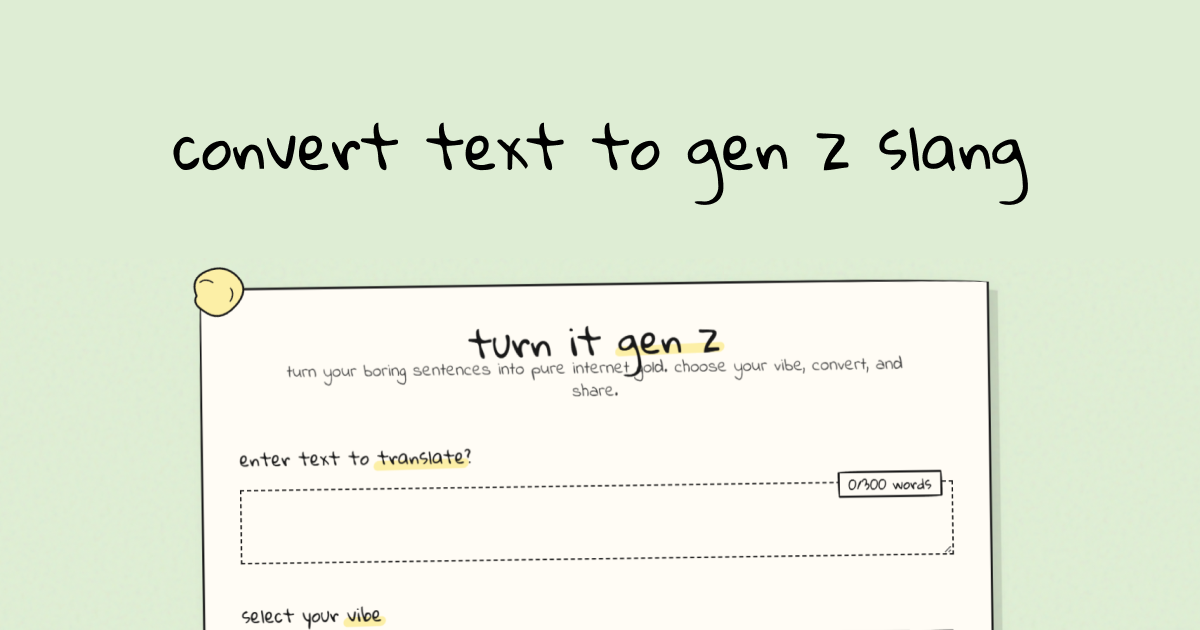
Turn It Gen Z is a web tool that converts written text into Gen Z slang. It’s designed for quick, playful rewrites where you can select a “vibe” (such as brainrot, NPC, e-girl, or other listed styles) and generate slang output.
The workflow centers on entering text, choosing a vibe and translation intensity, optionally setting the desired output length, and then producing an output that you can copy or share.
Key Features
- Vibe selection for stylistic output (e.g., brainrot, NPC, e-girl, and other vibe options) so your slang matches a chosen tone.
- Translation intensity control (shown as an intensity percentage) to adjust how strongly the input is translated into slang.
- Output length options (short, medium, long) to control how much rewritten text you receive.
- Emoji support via an “use emojies” toggle to include emojis in the slang output.
- Option to “invent slang” to allow the generator to create slang phrasing beyond direct rewrites.
- Copy and sharing actions, including sharing to X and regenerating the output for another variation.
How to Use Turn It Gen Z
- Open Turn It Gen Z and enter your text in the input area (there is a visible limit of 0/300 words).
- Choose your vibe from the available options.
- Adjust settings such as translation intensity and output length (short/medium/long) as needed.
- Turn “use emojies” on or off, and enable “invent slang” if you want more created phrasing.
- Click translate to generate output, then use copy or share-to-X; if you want a different result, use regenerate.
Use Cases
- Social post captioning: Rewrite a caption or draft text into a specific Gen Z slang vibe for posting on social platforms.
- Reply drafts: Convert short messages into an NPC, brainrot, or e-girl tone while keeping the meaning of your original text.
- Meme or trend text: Create variations of a phrase by regenerating output and switching intensity to match different meme formats.
- Different audience lengths: Generate short vs. long versions of the same message depending on whether it’s for a quick reply or a longer post.
- Emoji-enhanced slang: Use the emoji toggle when you want the output to feel more expressive for comments or stories.
FAQ
How do I choose the vibe?
Select the vibe from the provided “select your vibe” options before translating.
What does translation intensity do?
Translation intensity adjusts how strongly your input is converted into Gen Z slang; it’s shown as a percentage in the translation settings.
Can I control how long the output is?
Yes. The page provides output length options: short, medium, and long.
Is there a word limit for input?
The interface shows a limit indicator of 0/300 words for the text input.
Can I regenerate different versions?
Yes. After generating output, you can use the regenerate option to produce another variation.
Alternatives
- General-purpose text rewriting tools: Tools that rephrase text without slang-specific “vibe” controls; they may require more manual editing to reach a Gen Z tone.
- Social caption generators: Caption-focused generators for platforms like Instagram/X that produce short posts, but may not offer the same intensity/length/vibe controls shown here.
- AI chat assistants with style prompts: Prompt-based writing in a chat interface can produce slang and different tones, though it typically requires more setup and iterative prompting than a dedicated slang translator.
- Emoji/theme text tools: Tools that add emojis or themed formatting; these can help with presentation but may not translate text into slang as directly.
Alternatives

Supermeme.ai
Supermeme.ai is an AI meme generator that turns your text into shareable memes with template matching, multilingual outputs, and social-friendly exports.

Terraforge: Alchemy Craft Game
Tier-based puzzle game: drag and mix elements to discover new creations, saved in an in-app grimoire. Optional Master Forger hints; offline + iCloud sync.

PXZ AI
An All-In-One AI Platform that combines tools for image, video, voice, writing, and chat to enhance creativity and collaboration.

Slidesgo
Discover free Google Slides themes and PowerPoint templates on Slidesgo. Download and customize online to create presentations.

Grok AI Assistant
Grok is a free AI assistant developed by xAI, engineered to prioritize truth and objectivity while offering advanced capabilities like real-time information access and image generation.
Creativly
Creativly is a browser-based creative tool that helps you create without writing prompts—generate creative outputs fast with a simple workflow.