

VVTerm
VVTerm is an SSH terminal app for iOS and macOS to connect via SSH, Mosh, Tailscale SSH, or Cloudflare Tunnel SSH—sync via iCloud.
What is VVTerm?
VVTerm is an SSH terminal app for iOS and macOS designed to let you connect to remote servers and manage connection details across Apple devices. It’s built for everyday remote work on Apple hardware, with a workflow that includes a server list, organization tools, and iCloud sync.
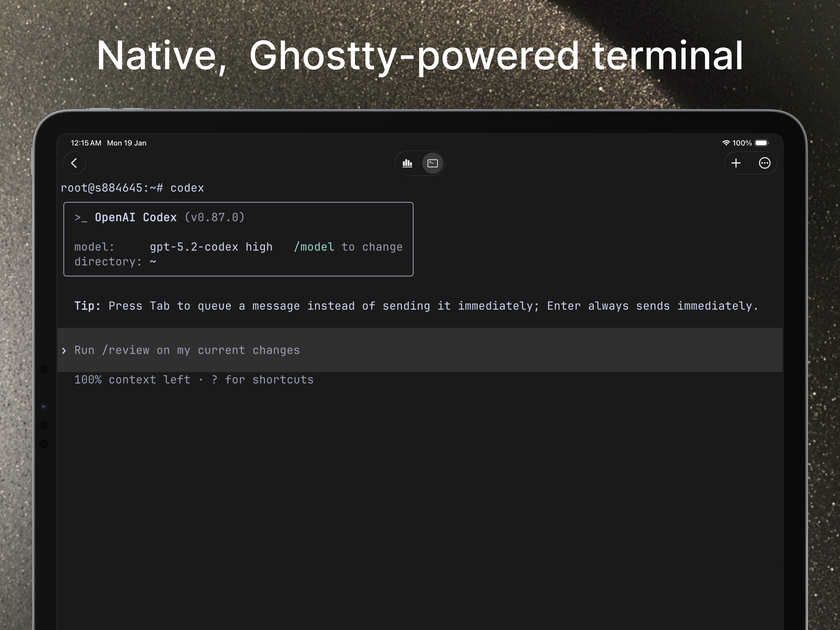
The app supports multiple connection methods—standard SSH and additional options for modern workflows—while storing credentials in Apple Keychain. VVTerm is powered by libghostty for terminal rendering, aiming to provide responsive terminal behavior during remote sessions.
Key Features
- Native iPhone, iPad, and macOS app: Designed specifically for Apple platforms so the interface is consistent across devices.
- Standard SSH plus modern transports: Connect via SSH, Mosh, Tailscale SSH, or Cloudflare Tunnel SSH.
- iCloud sync for server configuration: Server metadata syncs automatically across your iPhone, iPad, and Mac.
- Keychain-secured credentials: Passwords and SSH keys are stored in Apple Keychain; iCloud Keychain can sync them when enabled.
- Server organization with workspaces and tabs: Use workspaces, environments, and multiple connection tabs to keep solo infrastructure manageable.
- libghostty-powered terminal rendering: Uses libghostty (from Ghostty) for fast, accurate terminal emulation.
- iPad keyboard support and iOS keyboard toolbar: The iOS version includes a keyboard toolbar with Esc, Tab, Ctrl, and arrow keys.
- Cross-device connection flow: Start on one device and reconnect from another while keeping your server list in sync.
How to Use VVTerm
- Install VVTerm on an iPhone, iPad, and/or Mac that meets the system requirements.
- Open the app and add servers, selecting the connection method you need (standard SSH, Mosh, Tailscale SSH, or Cloudflare Tunnel SSH).
- Configure credentials as required; VVTerm uses Apple Keychain for password/key storage.
- Use workspaces, environments, and tabs to organize connections, then open a terminal session to connect.
- Sign in with the same Apple ID across devices so server configurations sync via iCloud and unlock status syncs through the App Store.
Use Cases
- Managing a small set of production or side-project servers: Keep connections organized by workspace and environment, then switch between services using multiple tabs.
- Remote administration while away from your desk: Start a session on your Mac and reconnect from your iPhone or iPad without rebuilding your server list.
- Homelab maintenance from Apple devices: Check containers, update machines, and jump between services using the terminal workflow already available on iOS/macOS.
- Using modern networking paths: Connect over standard SSH when that’s simplest, but switch to Mosh, Tailscale SSH, or Cloudflare Tunnel SSH when your network setup requires it.
- Working with remote AI and automation hosts: Connect to GPU boxes, inference hosts, and automation servers while you’re away from your workstation.
FAQ
What is VVTerm?
VVTerm is an SSH terminal app for iOS and macOS that lets you connect to remote servers and manage connection details with iCloud sync across Apple devices.
How does iCloud sync work?
Server configurations sync via iCloud to your devices. Passwords and SSH keys are stored in Apple Keychain and can sync via iCloud Keychain when enabled.
What connection methods does VVTerm support?
VVTerm supports standard SSH plus Mosh, Tailscale SSH, and Cloudflare Tunnel SSH.
Does VVTerm work on iPad?
Yes. VVTerm works on iPhone, iPad, and Mac, and the iOS version includes a keyboard toolbar with Esc, Tab, Ctrl, and arrow keys.
What terminal engine does VVTerm use?
VVTerm uses libghostty for terminal rendering and emulation.
Alternatives
- A generic SSH client for Apple: These apps may support SSH connections but might not include the same combination of server organization, iCloud sync, and native Apple-focused workflow.
- Terminal apps for iOS/macOS using iCloud or file-based sync: Alternatives in this category may sync configuration differently (e.g., manual exports/imports), which can change how consistently server lists stay in sync.
- Network-focused SSH tooling (separate apps/services): If you rely on vendor-specific tunnel or mesh tooling, you may end up juggling separate tools instead of selecting connection methods within one terminal app.
- Team-oriented remote management/control panels: These are designed for broader infrastructure management, whereas VVTerm focuses on opening and using terminal connections without a dedicated team control plane.
Alternatives

FounderStackHub
FounderStackHub uses an always-on AI agent to scan, verify, and match startup perks like cloud credits, AI-tool credits, and SaaS discounts to your stack.

Elvixs
Elvixs is an AI job outreach tool for freshers and students—find HR contacts, generate AI cold emails, send from Gmail, and track opens.

Gossipic
Gossipic tracks how often your brand is mentioned in AI answers, analyzes sentiment, benchmarks competitors, and creates daily action plans. Start 7-day free trial.

SnapSub: Subscriptions Hub
SnapSub: Subscriptions Hub centralizes recurring services so you can track what you pay, upcoming billing dates, and get reports to review spending.

Abakada
Abakada is the Philippines’ curated directory of free, open-source tools—1,000+ verified listings across 45+ categories for students & educators.

Been There Global
Been There Global shares real stories from real travellers to help you “know before you go” and plan trips with more confidence.