
Context gathering across work tools
Uses context from Jira, GitHub, Notion, and Slack so Claude Code can work with the task details already in hand instead of asking for the same information repeatedly.

CoolPlugz is an orchestration layer for Claude Code that helps developers finish tasks with less manual supervision by gathering context from tools like Jira, GitHub, Slack, and Notion. It is aimed at remote developers and teams that want fewer context switches and a more structured workflow.
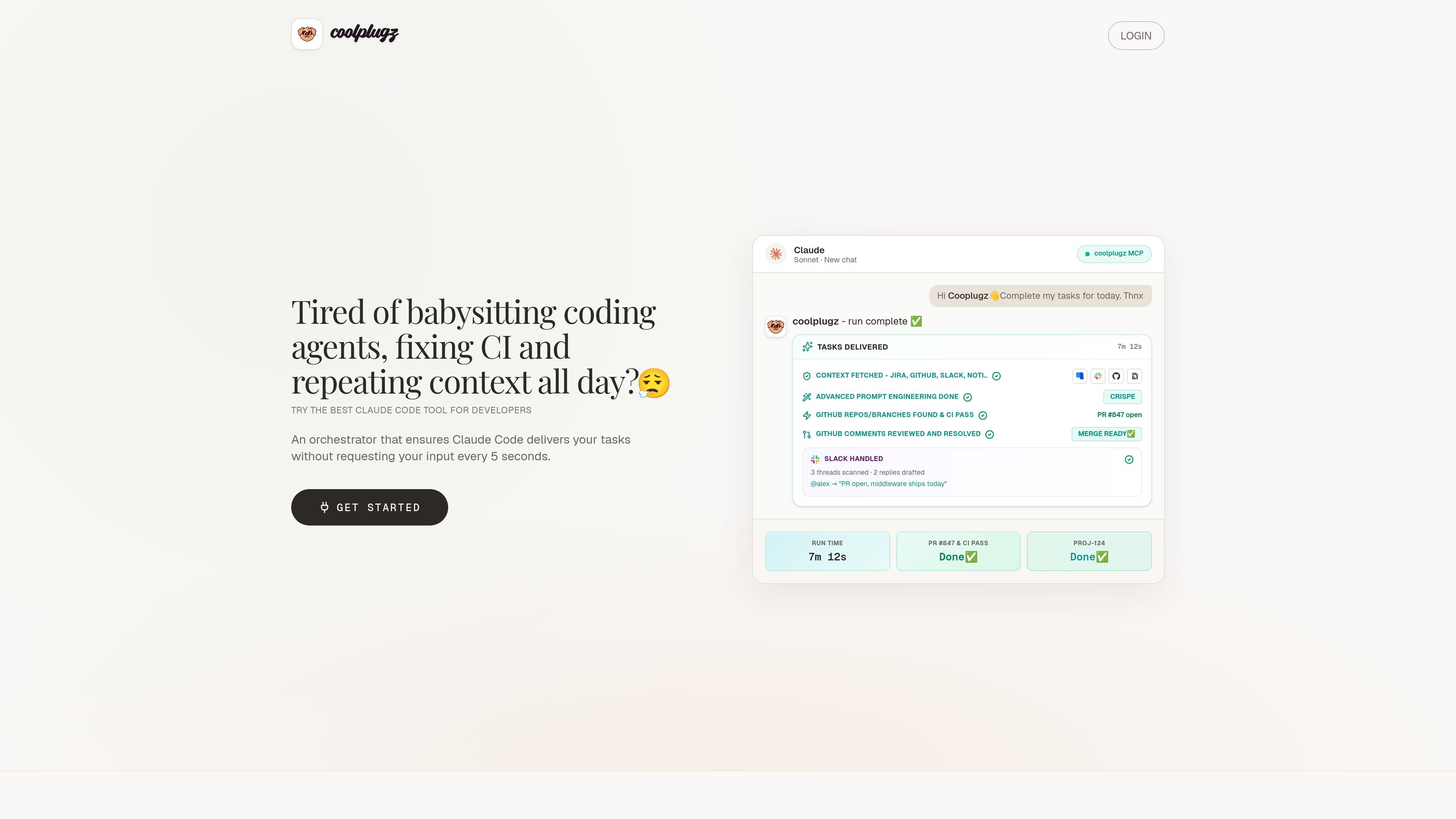
CoolPlugz is an orchestration layer for Claude Code that is built to help developers finish coding tasks with less manual supervision. The site positions it around reducing context switching, AI fatigue, and the back-and-forth that usually happens across Jira, GitHub, Slack, CI, and docs.
Rather than acting as a standalone coding model, CoolPlugz gathers work context, structures prompts, and guides Claude through a task until the output is ready for approval. The product pages describe this as a gather, act, verify, repeat workflow, with results such as structured deliverables, CI-checked changes, and drafted Slack replies that can be reviewed before submission.
The pricing page shows a 7-day free trial, a Pro subscription, and Enterprise plans for teams. The install page says CoolPlugz is an MCP server, so setup starts by pasting its MCP URL into Claude and connecting the tools you want to use.
The site also documents fallback paths for restricted environments, including GitHub PAT-based access and a browser-based Slack workflow when company policy blocks the Slack API.
Uses context from Jira, GitHub, Notion, and Slack so Claude Code can work with the task details already in hand instead of asking for the same information repeatedly.
Runs a structured task loop that the site describes as gather context, take action, verify work, and repeat until the output is ready for approval.
Includes a complete PR workflow, with branch finding, CI fixes, and review-comment handling listed on the pricing page.
Produces Slack drafts and thread replies from synced context, then leaves posting to an approval step.
Keeps orchestration persistent across tasks and projects on the Pro plan, so instructions and workflow structure carry forward.
Supports setup as an MCP server by pasting the CoolPlugz URL into Claude, with desktop or mobile use mentioned on the install page.
Use it when a coding task requires Jira tickets, repository context, Slack updates, and CI results, but you do not want to re-explain the same details in every tool.
Use it to keep a pull request moving when review comments and CI failures would normally force you into repeated copy-paste loops between chat, GitHub, and the pipeline logs.
Use it to draft responses for Slack threads from synced context, then review the text before it is posted, which is helpful when async communication is draining or repetitive.
Use it in a freelance or contract workflow where multiple client contexts need to be kept separate while still letting Claude automate routine delivery work.
Use it in environments with security or access restrictions, such as Slack API blocks or GitHub SSO gates, using the documented browser and PAT fallback paths.
CoolPlugz is set up as an MCP server for Claude. The install page says you paste your MCP URL into Claude, then connect the tools you want to use.
The pricing page says the Free Trial includes Jira, GitHub, Notion, and Slack integration, plus a complete PR workflow with branch finding, CI fixes, and review comments.
The source describes CoolPlugz as an orchestration layer for Claude Code that gathers context, guides the session with structured workflows and prompts, and runs tasks through to an approve-or-redo finish point.
The troubleshooting guide says it can still work when Slack API access is blocked by using Claude Cowork in Chrome alongside CoolPlugz, and it also supports GitHub PAT-based access when SSO or OAuth is not enough.
The pricing page offers a 7-day free trial, a Pro subscription, and an Enterprise option for teams that need multi-seat licensing, onboarding, and custom SLAs.

Biji - это универсальная платформа, разработанная для повышения продуктивности с помощью инновационных инструментов и функций.

hob is an independent workspace for coding agents that keeps agent sessions, terminals, history, and follow-up work organized around the tools and providers you already use. It is aimed at developers who want local control over routing, history, and workspace structure rather than a bundled model stack.

SonOf connects to your repo and PM tool, audits the codebase and surrounding product context, and turns approved work into shipped tickets with senior engineering review. It is aimed at founders and engineering leaders who need backlog help without hiring a full team immediately.

ByteAsk is a terminal-first AI coding agent for C and C++ that edits repositories and verifies changes with the real compiler, debugger, sanitizers, and tests before showing a diff. It offers a free tier plus paid plans, with editor connectors and zero-retention handling described in the source.

CreateOS Sandbox is an isolated compute environment for running code and agent workloads inside Firecracker micro-VMs. It is designed for workflows that need machine-level isolation, private networking between sandboxes, and programmatic control through SDK, CLI, or MCP.

Manta AI is an autonomous web app testing tool for teams that want to map application behavior, catch regressions, and generate tests without writing scripts or maintaining selectors. It works from a URL and supports plain-English test flows, run results with screenshots, and scheduled or deployment-triggered checks.