
Approve from the notch
Crew Tower blocks on a local socket and sends your choice back into the exact prompt the agent asked with. The answer is resolved in place, so you do not have to type into a terminal window you cannot see.

Crew Tower is a macOS menu bar app that lets you monitor and approve AI coding agents from the notch. It works locally with several agent CLIs and keeps prompts, transcripts, and approvals on your Mac.
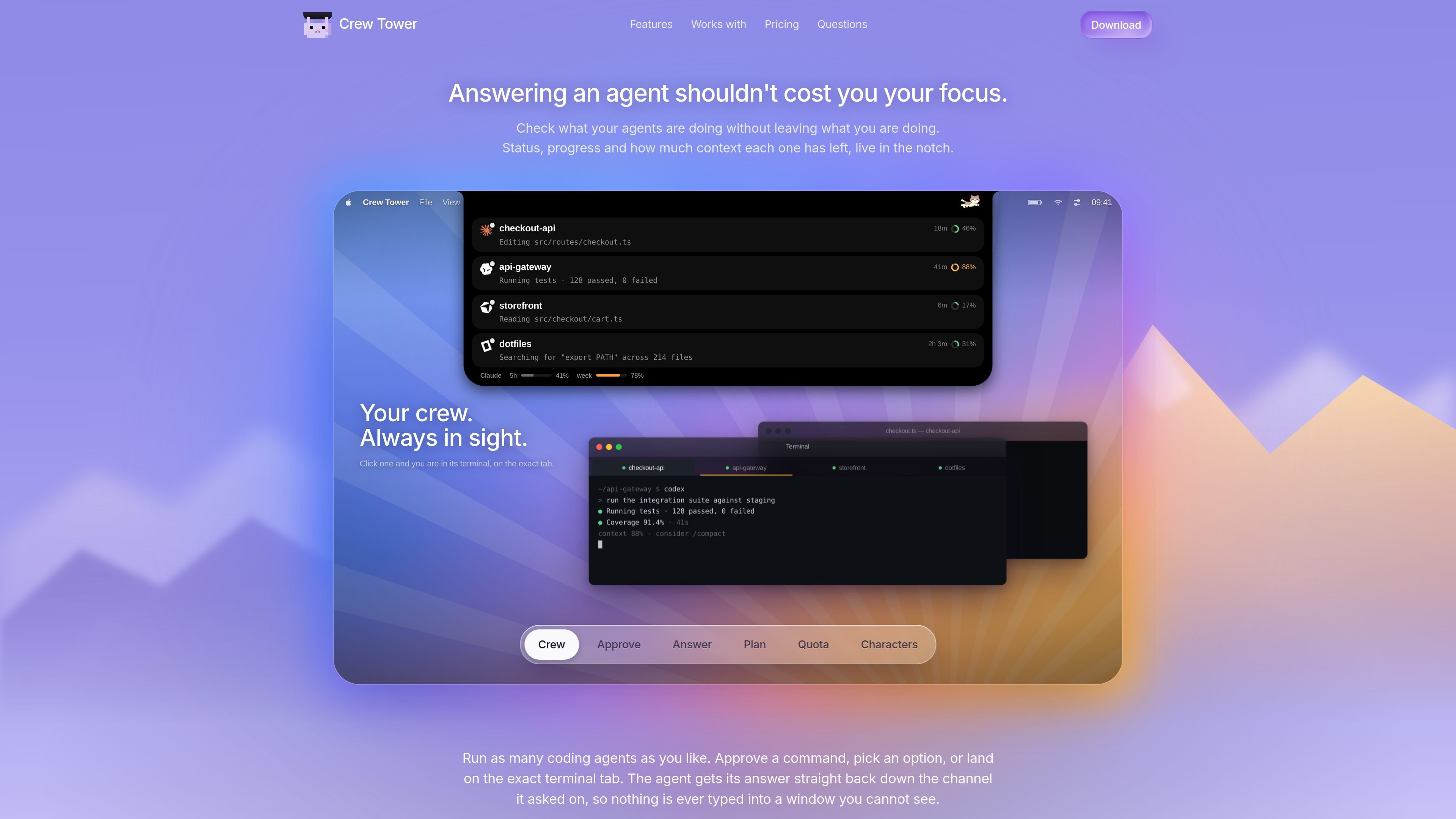
Crew Tower is a Mac menu bar app for watching and approving AI coding agents without leaving the work you are already doing. It keeps each agent’s status, progress, and remaining context visible in the notch, so you can see which session needs attention and act on it without switching into the terminal.
The product is built for local agent workflows. It reads session data from the files and hooks your agent already uses, lets you approve commands or answers from the notch, and returns the response straight back to the agent over a local socket. It supports multiple coding agents at once and aims to reduce the context loss that comes from checking each terminal manually.
Crew Tower blocks on a local socket and sends your choice back into the exact prompt the agent asked with. The answer is resolved in place, so you do not have to type into a terminal window you cannot see.
Dangerous shell commands are identified before you act. Destructive requests are called out on the card so you can make a deliberate allow or deny decision.
When an agent asks a question instead of a permission, the options appear as buttons and the selected answer is passed back in the form the agent expects.
You can allow once, allow for the rest of the session, or always allow. The always-allow option writes a durable rule into the project’s own settings when supported.
Each session card shows status, elapsed time, context usage, and the agent’s current request. The bar also surfaces subscription usage for Claude or Codex when enabled.
Clicking a session brings the correct terminal tab forward by matching the title the agent wrote for itself. The app also recognizes tmux panes and several terminal apps.
Use Crew Tower when you are running more than one coding agent and need a single place to see which one is blocked, which one has finished, and which one is still working through its context window.
If an agent asks for permission to run a command or make an edit, you can approve, deny, or answer the request from the notch without jumping into a terminal tab.
When an agent asks a structured question with multiple choices, the options appear as buttons and your response is routed back in the format the agent expects.
If you switch between several projects or terminal tabs, Crew Tower can jump to the exact session that needs attention, even when multiple tabs share a directory name.
For screen sharing or distraction-sensitive work, privacy mode keeps the panel shut and sound off while the crew continues running locally.
Crew Tower is set up on macOS and reads the session data your coding agents already write locally. It monitors agent activity, shows prompts and options in the notch, and sends approvals back over a local Unix socket.
Yes. The home page says it works with Claude Code, Codex, Cursor, Gemini CLI, Qwen Code and opencode, and it also detects other agent CLIs while they run. It can jump to the matching terminal tab or tmux pane where the session lives.
Crew Tower is built for Mac and the site says macOS 15 or later is required. It presents itself in the notch on built-in displays, or as a floating pill on external monitors, and it can be hidden when nothing needs you.
The privacy page says the app keeps code, prompts and transcripts on your Mac. Network requests are limited to optional Claude usage checks, license activation and update checks.
The site shows a download for Mac and early-bird pricing, but the pricing page itself is not available from the collected sources. The changelog and privacy pages confirm it is a paid app with license activation handled through Polar.

ByteAsk is a terminal-first AI coding agent for C and C++ that edits repositories and verifies changes with the real compiler, debugger, sanitizers, and tests before showing a diff. It offers a free tier plus paid plans, with editor connectors and zero-retention handling described in the source.

CreateOS Sandbox is an isolated compute environment for running code and agent workloads inside Firecracker micro-VMs. It is designed for workflows that need machine-level isolation, private networking between sandboxes, and programmatic control through SDK, CLI, or MCP.

hob is an independent workspace for coding agents that keeps agent sessions, terminals, history, and follow-up work organized around the tools and providers you already use. It is aimed at developers who want local control over routing, history, and workspace structure rather than a bundled model stack.

Manta AI is an autonomous web app testing tool for teams that want to map application behavior, catch regressions, and generate tests without writing scripts or maintaining selectors. It works from a URL and supports plain-English test flows, run results with screenshots, and scheduled or deployment-triggered checks.

Redline is a budgeting tool for Claude Code that paces sessions to stay within time, token, cost, or plan-percentage limits. It uses Claude Code’s native hooks and statusline to help sessions finish with a usable result instead of stopping abruptly.

SonOf connects to your repo and PM tool, audits the codebase and surrounding product context, and turns approved work into shipped tickets with senior engineering review. It is aimed at founders and engineering leaders who need backlog help without hiring a full team immediately.