
Search real production websites
Search for real websites by description, layout, font, color, screenshot, or domain, rather than relying on mockups or generic inspiration boards.

Fudge is a design reference search tool for finding, inspecting, saving, and reusing examples from real production websites. It helps designers, developers, and AI-assisted workflows work from captured typography, color, layout, and token data instead of guessing.
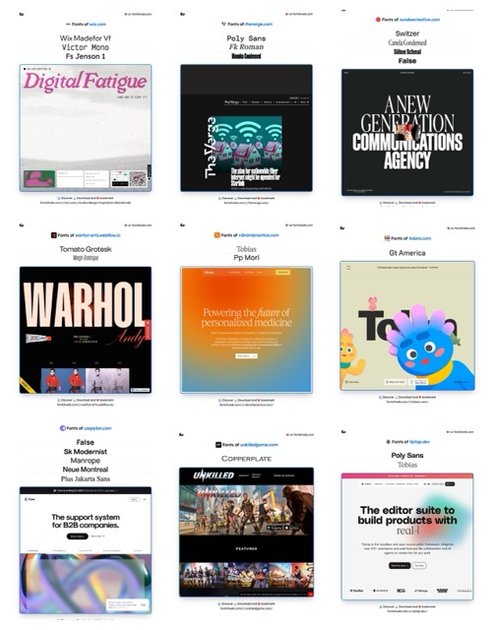
Fudge is a design reference search tool that helps people find, inspect, save, and reuse examples from real production websites. The site positions it as a way to query typography, color palettes, UI patterns, and layout details instead of starting from generic inspiration or mockups.
It combines a searchable library of websites with browser capture and export workflows. Users can search by style, see how a page is made, save examples from Chrome, and turn captured visual details into formats such as Tailwind, CSS variables, JSON, and design tokens for use in code or AI-assisted workflows.
Search for real websites by description, layout, font, color, screenshot, or domain, rather than relying on mockups or generic inspiration boards.
Inspect pages for typography, color values, spacing, borders, radii, shadows, gradients, layout hierarchy, media roles, and other structural details captured from the source site.
Save websites from Chrome and keep screenshots, fonts, colors, spacing, layout, and source context in a reusable library or collection.
Export observed styles as Tailwind, CSS variables, JSON, DTCG, and Figma tokens, with support for structured results and reconstruction-ready layout data.
Use Fudge inside MCP-compatible AI clients so an agent can query captured references and work with screenshots, palettes, typography, and source context.
A designer can search for a pricing page, dashboard, onboarding flow, or landing page with a specific look, then inspect the fonts, colors, and layout choices behind it.
An engineer can save an example site from Chrome and export its visual properties into Tailwind or CSS variables as a starting point for implementation.
An AI user can connect Fudge through an MCP-compatible client so the model can answer questions using captured screenshots, palettes, typography, and source context instead of guessing.
A team can build a personal library of saved websites and collections to revisit examples for future projects rather than searching from scratch each time.
Someone comparing typography choices can search for real websites that use a given font or close alternatives, then see how those fonts are paired in production.
Fudge is used to search saved production websites for design references such as layouts, typography, color palettes, spacing, and UI patterns. The pricing and MCP pages also show that it can be used inside AI tools through an MCP-compatible client.
The source pages show a Chrome extension for saving websites from the browser, and an MCP setup for connecting Fudge to AI tools. The site also says you can search, inspect, save, and reuse designs from real websites.
Yes. The pricing page says Fudge can export website typography, colors, spacing, and design tokens to Tailwind, CSS variables, JSON, and the tokens page also mentions export to Figma tokens and CSS.
The pricing page states the subscription is $15/month or $150/year, with yearly pricing shown as 17% off. It also says the plan is for your own design work and that commercial licensing requires contacting the company.
The source does not show a detailed public integration list. It does indicate a Chrome extension, a subscription product, and an MCP-compatible workflow for AI agents.

ByteAsk is a terminal-first AI coding agent for C and C++ that edits repositories and verifies changes with the real compiler, debugger, sanitizers, and tests before showing a diff. It offers a free tier plus paid plans, with editor connectors and zero-retention handling described in the source.

Epherem is a static security scanner for web apps built with AI coding tools such as Lovable, Bolt, v0, Replit, Cursor, and Claude Code. It checks source files and dependencies for common security mistakes, then provides categorized findings and suggested fixes without running the app.

CreateOS Sandbox is an isolated compute environment for running code and agent workloads inside Firecracker micro-VMs. It is designed for workflows that need machine-level isolation, private networking between sandboxes, and programmatic control through SDK, CLI, or MCP.

GitBot is a local browser-based workspace for creating reusable coding bots powered by Claude Code, Codex, or OpenCode. It helps developers run those agents across repository folders with persistent threads and configurable permissions.

hob is an independent workspace for coding agents that keeps agent sessions, terminals, history, and follow-up work organized around the tools and providers you already use. It is aimed at developers who want local control over routing, history, and workspace structure rather than a bundled model stack.

Ably Chat is a chat API platform for building custom realtime chat applications. It supports room-based messaging, typing indicators, presence, reactions, and message updates, with usage-based pricing options for different deployment stages.